Showing posts with label blog. Show all posts
Showing posts with label blog. Show all posts
Saturday, January 7, 2017
Program PPC BidVertiser membuat Blog kita menjadi ladang Uang
Program PPC BidVertiser membuat Blog kita menjadi ladang Uang
Program PPC BidVertiser membuat Blog kita menjadi ladang Uang - Program PPC (Paid Per Click) BidVertiser memang bisa dibilang sebagai program paling gampang sebagai alat untuk mencari uang di Blog/Website. Yang paling terkenal adalah Google Adsense. Namun program satu ini emang menggemaskan, karena tidak gampang untuk mendapatkan approve (atau istilahnya ijin) dari Google untuk menjadi salah satu Publisher.
Silahkan kunjungi dan gabung BidVertiser Klick baner ini Monetize your Website or Blog with BidVertiser
Serangkaian syarat harus dipenuhi. Sebagaimana kita pertama kali ngeblog, tujuan pertama pasti adalah menulis, mengeluarkan uneg-uneg, pemikiran, dan juga pengetahuan. Jangan sampai waktu kita habis dan justru ide kita banyak yang tidak kita keluarkan hanya karena mikirin gimana di-approved Google. Namun, memang tidak ada salahnya kita membuat blog/website kita menghasilkan uang selain sebagai tempat berbagi pengetahuan. Ya kan?!
Nah program yang mirip-mirip dengan Google Adsense ini sebenarnya banyak. Salah satunya yang tidak kalah dengan Google Adsense adalah BidVertiser. Situs layanan iklan ini menyediakan juga program yang sama bagi para publishernya, yaitu mereka yang mempunyai blog/website untuk menyediakan space iklan. Semua bentuk dan sistemnya pun hampir sama. Bedanya, BidVertiser tidak membatasi pada situs yang boleh gabung. BidVertiser juga tidak mewajibkan suatu situs publisher memiliki niche, jenis halaman, jenis domain, jenis konten tertentu serta segepok persyaratan tetek bengek lainnya. Soal bayaran, BidVertiser emang lebih rendah dari Adsense, tapi... jauh lebih tinggi dari PPC lokal manapun.
Pendaftaran di BidVertiser pun cukup mudah, setelah masuk di BidVertiser anda pilih tab publisher di bagian atas (disamping kiri advertiser), kemudian pilih join/signup dan masukkan data diri seperti email, username, password, alamat, dan seterusnya. Setelah itu anda tinggal memasukkan kode verifikasi yang anda dapat melalui email. Setelah itu anda sudah terdaftar sebagai publisher untuk BidVertiser. Anda ga perlu pake nunggu blog/website kita di survey atau diverifikasi dulu. Setelah itu anda kemudian dipandu untuk menyesuaikan iklan yang sesuai dengan isi blog/website anda dan mengatur template serta bentuk banner iklan sesuai dengan yang anda inginkan. Setelah itu anda akan mendapatkan script kode html banner yang sudah anda pilih untuk dipasang di website/blog anda.. Lalu......jrrrreeeeng! Anda telah menjadi Publisher! Cukup tunggu saja uang mengalir dari hasil klik pengunjung blog/website anda! Hasilnya lumayan loh, I have proven it already!
Kabar baiknya, Bidvertiser kini tidak hanya melakukan pembayaran melalui PayPal, Check, atau Wire Transfer saja, tapi juga melalui Western Union, seperti Google Adsense. Cara pembayaran ini menjadi pilihan banyak publisher Indonesia seperti saya, karena prosesnya yang sangat mudah. Sistem WU adalah real time, jadi ketika anda mendapatkan info pembayaran dari Bidvertiser atau Adsense telah dilakukan, maka saat itu juga anda bisa mencairkan uangnya melalui kantor cabang WU atau bank-bank terdekat yang melayani pencairan uang transfer WU. Potongannya pun tidak lebih dari 5 persen, beda jauh dengan cek yang bisa sampai 25 - 30 persen, belum lagi nunggu pencairannya yang hingga satu bulan! Sebagai publisher Adsense, telah 3 tahun ini saya menikmati proses pengambilan uang seperti ini. Sama juga ketika kini bidvertiser melakukan pembayaran melalui WU. Sangat jarang ada jaringan iklan manca yang menggunakan WU, jadi inilah kelebihannya.
Update bukti pembayaran:
Ini bukti notofikasi via email untuk payout Bidvertiser terbaru bulan Desember 2013 kemarin. Saya menggunakan metode pembayaran Western Union, minimum payment adalah 100 Dollar US. Payout setiap satu atau dua bulan sekali tergantung batas minimumnya. Kalo anda pake paypal lebih cepat lagi karena minimum adalah 10 Dollar US. Tapi saya gak suka paypal, haha.

klik untuk melihat dalam ukuran besar
Silahkan kunjungi dan gabung BidVertiser Klick baner ini Monetize your Website or Blog with BidVertiser
Serangkaian syarat harus dipenuhi. Sebagaimana kita pertama kali ngeblog, tujuan pertama pasti adalah menulis, mengeluarkan uneg-uneg, pemikiran, dan juga pengetahuan. Jangan sampai waktu kita habis dan justru ide kita banyak yang tidak kita keluarkan hanya karena mikirin gimana di-approved Google. Namun, memang tidak ada salahnya kita membuat blog/website kita menghasilkan uang selain sebagai tempat berbagi pengetahuan. Ya kan?!
Nah program yang mirip-mirip dengan Google Adsense ini sebenarnya banyak. Salah satunya yang tidak kalah dengan Google Adsense adalah BidVertiser. Situs layanan iklan ini menyediakan juga program yang sama bagi para publishernya, yaitu mereka yang mempunyai blog/website untuk menyediakan space iklan. Semua bentuk dan sistemnya pun hampir sama. Bedanya, BidVertiser tidak membatasi pada situs yang boleh gabung. BidVertiser juga tidak mewajibkan suatu situs publisher memiliki niche, jenis halaman, jenis domain, jenis konten tertentu serta segepok persyaratan tetek bengek lainnya. Soal bayaran, BidVertiser emang lebih rendah dari Adsense, tapi... jauh lebih tinggi dari PPC lokal manapun.
Pendaftaran di BidVertiser pun cukup mudah, setelah masuk di BidVertiser anda pilih tab publisher di bagian atas (disamping kiri advertiser), kemudian pilih join/signup dan masukkan data diri seperti email, username, password, alamat, dan seterusnya. Setelah itu anda tinggal memasukkan kode verifikasi yang anda dapat melalui email. Setelah itu anda sudah terdaftar sebagai publisher untuk BidVertiser. Anda ga perlu pake nunggu blog/website kita di survey atau diverifikasi dulu. Setelah itu anda kemudian dipandu untuk menyesuaikan iklan yang sesuai dengan isi blog/website anda dan mengatur template serta bentuk banner iklan sesuai dengan yang anda inginkan. Setelah itu anda akan mendapatkan script kode html banner yang sudah anda pilih untuk dipasang di website/blog anda.. Lalu......jrrrreeeeng! Anda telah menjadi Publisher! Cukup tunggu saja uang mengalir dari hasil klik pengunjung blog/website anda! Hasilnya lumayan loh, I have proven it already!
Kabar baiknya, Bidvertiser kini tidak hanya melakukan pembayaran melalui PayPal, Check, atau Wire Transfer saja, tapi juga melalui Western Union, seperti Google Adsense. Cara pembayaran ini menjadi pilihan banyak publisher Indonesia seperti saya, karena prosesnya yang sangat mudah. Sistem WU adalah real time, jadi ketika anda mendapatkan info pembayaran dari Bidvertiser atau Adsense telah dilakukan, maka saat itu juga anda bisa mencairkan uangnya melalui kantor cabang WU atau bank-bank terdekat yang melayani pencairan uang transfer WU. Potongannya pun tidak lebih dari 5 persen, beda jauh dengan cek yang bisa sampai 25 - 30 persen, belum lagi nunggu pencairannya yang hingga satu bulan! Sebagai publisher Adsense, telah 3 tahun ini saya menikmati proses pengambilan uang seperti ini. Sama juga ketika kini bidvertiser melakukan pembayaran melalui WU. Sangat jarang ada jaringan iklan manca yang menggunakan WU, jadi inilah kelebihannya.
Update bukti pembayaran:
Ini bukti notofikasi via email untuk payout Bidvertiser terbaru bulan Desember 2013 kemarin. Saya menggunakan metode pembayaran Western Union, minimum payment adalah 100 Dollar US. Payout setiap satu atau dua bulan sekali tergantung batas minimumnya. Kalo anda pake paypal lebih cepat lagi karena minimum adalah 10 Dollar US. Tapi saya gak suka paypal, haha.
klik untuk melihat dalam ukuran besar
Itulah Cara Program PPC BidVertiser membuat Blog kita menjadi ladang Uang
Tags: Program PPC,Cara mencari uang di Blog,iklan di Blog terpercaya,Bisnis Online terpercaya
Sumber:http://buka-rahasia.blogspot.com/2010/12/bidvertiser-cara-mudah-dapat-uang-dari.htmlAvailable link for download

Tuesday, November 1, 2016
How to Recover Deleted Blog Post in Blogger
How to Recover Deleted Blog Post in Blogger
Hi guys, Somehow deleted a blog post on blogger ? Dont worry I have a very simple method to recover those deleted blog posts. This tip can be and is a very useful one for those who unknowingly or by the influence of the mood, deleted a or a number of blog post from their blog.
This method is based on search engine caching, say Google. I found this as the easiest and the fastest method to recover deleted blog posts. Search engines always cache the blog posts you have posted and that was crawled by Googles search engine.


Have a great blog...
Thanks...
recover blog posts after deleting how to restore recover deleted blog posts recover blogger post after deleting how to recover deleted blogger post how to recover deleted blogger post using google
This method is based on search engine caching, say Google. I found this as the easiest and the fastest method to recover deleted blog posts. Search engines always cache the blog posts you have posted and that was crawled by Googles search engine.
How to easily recover deleted blog posts using Google ?
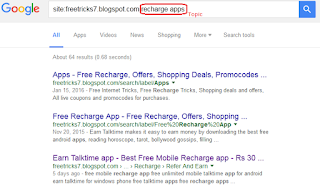
- STEP 1: Open Google.com and search as shown below
site:YOURBLOGSNAME topic (topic is not a must)
Eg: site:freetricks7.blogspot.com recharge apps
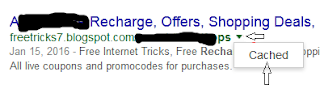
- STEP 2: Click on the down arrow at the end of the required posts link and then click on the " Cached".
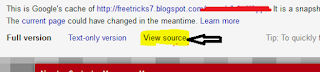
- STEP 3: Now, you will see an older version of your blog saved by Google. Click on "View source".
- STEP 4: Search for " PostID " in the browser (use Ctrl + F ). You will find something like the below one.
- STEP 5: Copy it and Open your Blogs dashboard and click on "edit" of any post.
- STEP 6: Replace the PostID in link to the one you have copied earlier.
- STEP 7: You now see the deleted post. Click on publish after making any changes if wishing.
Have a great blog...
Thanks...
recover blog posts after deleting how to restore recover deleted blog posts recover blogger post after deleting how to recover deleted blogger post how to recover deleted blogger post using google
Available link for download
Wednesday, October 26, 2016
Will Website Blog Name makes an impact on Google Search
Will Website Blog Name makes an impact on Google Search
Impact of Website/Blog name on Google Search
Recently I started a blog named varunonweb which is hosted on Google's blogger website. Initially I kept my blog name as TechnetSavy without searching whether there is any other name which resembles like this. I started writing articles on this blog but none of my articles are indexed and even they are not able to see in Google search. The content what I am writing is unique and it is of my own. Then I googled and find out that there is another website which resembles same like Technetsavy with a extra 'v'. Since this is the new website Google taught that the website which I created is of copy cat and so it is not showing in the Google search results.Available link for download
Monday, October 3, 2016
Steps to make Google crawl your blog
Steps to make Google crawl your blog
How to make Google crawl my website/blog ?
On the day I started my blog “ Varun on Web“ I decided to write an article every day in the blog. As per my opinion “writing a genuine interesting article every day with good Search Engine Optimization (SEO) practice will make “Google crawl your blog every day”. Writing an article with good content value is equally important as writing an article every day.
I started the blog “varunonweb” by keeping an aim in my mind. The first thing is to update my knowledge. The second thing is to earn few bucks from my blog. With the help of this blog I want to help the people who are facing problems like me while using computer or internet. I want to update my blog with the problems and solutions I faced while using Computer, Internet and Mobile. Apart from these I want to write few general articles which are not related to technology.
Available link for download
Subscribe to:
Posts (Atom)