Showing posts with label lost. Show all posts
Showing posts with label lost. Show all posts
Saturday, January 14, 2017
How to Recover Lost iPod Data after an iPod Reset or Restore
How to Recover Lost iPod Data after an iPod Reset or Restore
IPod devices are widely used as a pocket computers and portable media players. You can use them as external data storage devices to carry files. Using the Apples iTunes, you can transfer data to and from the iPod device using Apple Macintosh and Windows operating systems.
Using the iTunes restore option, you can erase all data structure on the iPod drive. If you have those deleted files in your iTunes then you can re-synchronize your device to iTunes and restore your files back.
But in case, you don’t have backup and wants to restore files that accidentally deleted even from the iTunes backup folder, then there is no direct way to restore back the deleted files. In such situation, you would require data recovery software for iPod.
Note: If you have lost your iPod data, stop performing any action with it. As it may overwrite the deleted data and thus reduces the chances of recovery. Don’t even connect it with iTunes or any other app.
How to restore iPod to factory settings using iTunes?
You can restore your iPod to factory settings using the iTunes restore option. It let you erase all data (songs, videos, photos, calendar and contacts etc.) from the device and setup the device as new. If you want to restore some deleted data, you can so it by synchronizing g your device with ITunes data library.
If you want to restore your device using the iTunes Restore option keep in mind the following things.
You must have the latest version of iTunes on your device. Backup your device data using the iTunes backup or copy the device data to another device/computer.
Now follow the given steps to restore your device:
- Connect the iPod to the computer system
- From the list of available devices, select your iPod.
- Then click Restore from the Summary panel
- In the prompt windows, click restore to confirm. It will remove all data from you device and restore it to factory settings.
- After completion of the restore procedure, restart your device.
- After restart, the welcome screen will come up. From there you can setup the device as new or restore it from a previous backup.
Suppose you have erased all your IPod data using the factory reset and you don’t have any backup. Then how would you get it back. In such case you have to recover the lost IPod data using Stellar Phoenix iPod Data Recovery software.
Features of iPod recovery software:
- Let you recover the lost data, documents, songs, video files, podcasts, e-books, and graphic files from your iPod on Windows system.
- It performs iPod recovery in cases of file loss due to accidental /intentional deletion, iPod formatting, virus attack etc.
- Supports data recovery from iPod classic and iPod Shuffle on Windows based OS (Windows 7, Vista, XP, and 2000)
- Let you create image of the IPod so that you can perform recovery later, if required.
- The original format of the data is kept intact preserved after recovery.
- The software offers three options: Quick Recovery, Deleted File Recovery and Advance Recovery
- The data not available under the Quick Recovery option could be scanned using the Advance Recovery option.
- It let you preview the list of recoverable items.From the scan results, you can search the desired data item using the Find option. The File Mask and File Filter options let you search better from the scan results.
- Using the tool, you can perform selective iPod recovery using the filters scan results according to file types and set criteria. The supported file types are MIDI, AIFF, M4A, OGG, RPS, M4P, AU, AVI, MOV, ASF, WMV, MP4, WMA, MP3, MPG, MPEG, GIF, WAV.
- From the scan results, you can select the desired items and save them at your desired location.
- Using the Create Image feature, you can create a .dat image of the iPod data and then perform recovery from the image.
- It let you save the scan results so that you can resume the recovery process at later times.
How to perform recovery using Stellar Phoenix iPod Recovery – Windows
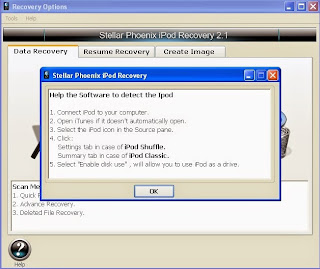
- Download and install the software. Connect the IPod to your system.
- Open the software. Click on the "Recovery" icon then click on Play button.
- Select your iPod from the dropdown list
- Click on Quick Recovery then click Play. You can also choose the Deleted File Recovery and Advance Recovery options according to needs.
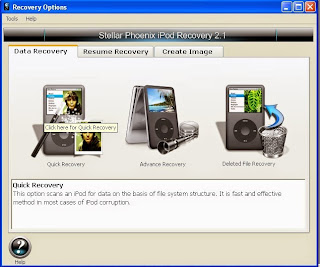
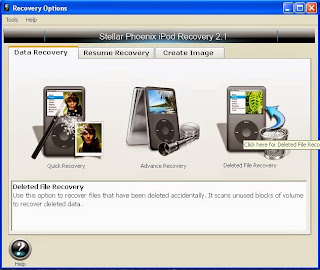
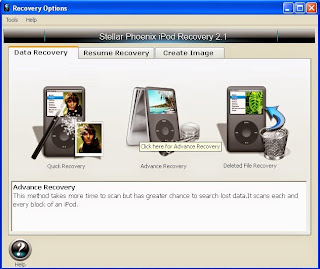
- This will begin the scan process.
From the scan result, select the folder that you want to recover and then click ‘Play’. Select the files to be recovered and save them at desired location.
Available link for download

Sunday, September 18, 2016
How to recover lost photos from Nikon digital camera
How to recover lost photos from Nikon digital camera
Digital cameras are most widely used for personal uses as well as for professional photography. It a common scenario that you may lose the clicked photos from the camera SD card in various situations such as while transferring photos from camera to computer system. There can be various other photo loss scenarios like: issues with the storage media/SD card , accidental deletion of photos, accidentally formatting the memory card, photo loss while data transfer from camera to system or vice versa and software failure etc.
How to recover lost photos from a digital camera?
In a digital camera, a flash memory is used to store the clicked photos known as SD or SDHC card. The type of memory card may vary such as SD card, SDHC card, SDXC card, CF card, xD Picture Card, multimedia card MMC, MicroSD card, xD card, MicroSDHC card, MicroSDXC card, SD mini or Memory Stick etc.
When you press ‘delete’ button to delete a photo from your camera, it deletes the item from memory. However it isn’t actually erased, only the space will be marked as free (reference to access it, gets deleted) and the allocated space is freed for further use. Same is the case for memory card formatting. Thus there are chances of photo recovery but if the deleted data has been overwritten by some other data then it cannot be recovered anyway.
As there is no built in trash/recycle bin in the camera from where you can restore the deleted photos back. So there is no direct method for performing photo recovery from a digital camera. You require using some professional photo recovery tool that can be run over some Windows based OS with the problem digital camera/SD card attached to it. These tools let you scan for the deleted items and let you preview the list of all recoverable items. Later on, you can save the recoverable items at your desired location.
How to perform photo recovery using photo recovery software?
- Download the software from: http://www.stellarinfo.com/digital-media-recovery.htm
- Install the software on your Windows based system.
- Attach the camera memory card to the system. Run the software.
- The main interface will be opened. Click the option to Recover Photo, Audio, & Video. From the listed media devices, select the one that is to be recovered.
- After selecting your problem media/memory card click ‘Scan now’. The scan process will begin; the recoverable files will be shown in the left pane of the window. Once the scan process is completed, you can select the all/desired item listed in the left pane and preview them.
Note: You can also choose the ‘Advance Scan’ option. This option lets you perform customized recovery on basis of file types. You can choose to scan the media according to the file list (i.e. ‘Photo’, ‘Audio’, or ‘Video’) or the data range from the storage media
- Finally you can select all or desired items from the recoverable items list and save them at your desired location.
Using the above software, you can recover lost photos, HD MOV files and other multimedia files from memory cards, digital cameras and internal & external drives. It supports recovery of different image, audio and video file formats.
It supports BMP, JPEG, GIF, TIFF, Mamiya (MOS, MEF), Paint Shop Pro Image File (PSP), and Picture File (PCT) etc. image file formats. The supported audio file formats are: RPS, MP3, AU, WAV, MIDI, OGG, AIFF, RM, WMA, RA, M4P and M4A.The supported video file formats are MP4, 3GP, AVI, MPEG, Matroska Video File (MKV), AVCHD Video File (MTS), Divx Encoded Movie File (DIVX), MOI Video File, Video Object File (VOB), OGG Media Player (OGM), 3G2, ASX.
The above given are some common features of “Stellar Phoenix Photo Recovery (Windows)” software. The software is laced with advanced and powerful photo recovery features.
Available link for download
Subscribe to:
Posts (Atom)