Showing posts with label lumia. Show all posts
Showing posts with label lumia. Show all posts
Saturday, March 11, 2017
Nokia LUMIA 1020 The Smartest Phones Ever
Nokia LUMIA 1020 The Smartest Phones Ever
It’s not just about smart phone, Nokia new flagship product has something to offer more: an eye catching display on the front and prominent big camera on the back. Lumia 1020 has already achieved a grand appearance on the web, though not available in the market yet. It’ll come with stunning inbuilt 41 Megapixel Camera and digital zooming capacity. We somehow, got the look over this phone and just feels something special about it, which you can find after reading the post.
The first smart phone ever to have crystal clear image capturing capacity that delivers still images in a typical shot with up to 3X zoom. Nokia Lumia will available online for pre orders from July 16 in U.S. and all around the world. You can also find it in stores on or after July 26 and it costs you around $300.
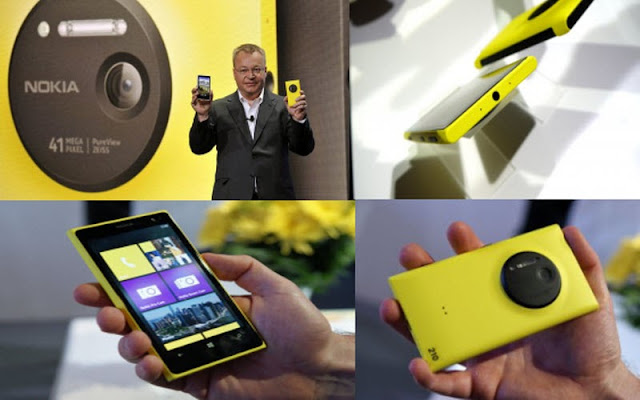
Huge internal storage capacity (32 GB and larger sizes to be available soon), redefined technologized RAM and much more advancements has been packed in this slim and lightweight Lumia Phone. There is still much more than you think and wonders Windows phone users about how so much technology is reduced to its lowest.
Everything you need to know about Camera
Nokia brings the smartest advancements to camera inbuilt into this Smartphone till date. 41 Mega Pixel camera is fitted in much less space (around 2 inches) at the back of Lumia 1020 with two types of flash quality: Xenon & LED. Optical Image Stabilization (OIS) technology is much awaited for Windows phones and this time Nokia has added it with great improvement that can helps you in capturing still images on the go.
So if you’re a photographer and wants to carry only a smartphone instead of Camera, you’d have no regrets as you can still able to capture crystal clear images with optical zoom facility up to 3x, autofocus (can able to use manual focus too) and outstanding dual flash technology. You’re not restricted to capture only high quality images, instead you can record 1080p High definition video with average 30 FPS recording rate.
A 1.2 Mega Pixel camera at the front just above the display will be available in ready to capture mode with HD video calling and recording facility.
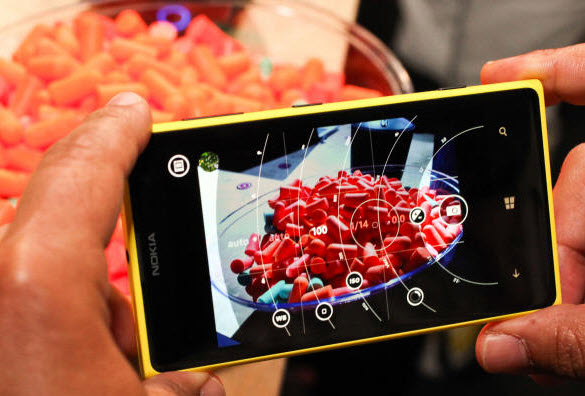
Nokia offers optimized settings for camera like manual exposure and long exposure times that helps you to take shots even in the night with little flash or at moving location. Inbuilt Camera app has tutorials to teach you better about taking the best photos around.
Display Size
However, Lumia carries the display size of 4.5 Inch or 768 x 1280 pixels which might forces you to loosen the digital camera experience in some ways. Though, still many users suppose it be the best smartphone in display sizes as it offers AMOLED body to prevent your phones against scratches, knocks and bumps. It offers PureMotion HD+ to have clear view even in the sunlight.
Whereas, many similar category smartphones offer the same functionality but the colorful polycarbonate body of this yellowish Lumia looks more stylish and usually have longer durability.
Isn’t it impressive to have so much power in this cool distinct Camera that compels you to ditch over other smartphone manufacturers. Lumia 1020 clearly shines when we talk about the Camera and no other popular manufactures like Samsung or Apple Inc. have powerful image editing applications to lets you feel the superb glimpse of any taken images. Picture editing options in Lumia 1020 are Cinema graph, panorama, Nokia Smart Cam and creative studio.
Designing and Specifications
Lumia 1020 will be available in three manifest colors: White, Yellow & Black and offers squad corners with rounded spines that makes easier for holding and carry anywhere. This phone certainly impresses you in many way as soon you get the chance to hold it on your hand and gives you premium feel while 3G calling, taking photos, playing games or whatever else you like.
1020 is slightly abbreviated than its predecessor 920, but without compromising its shining look or high capacitive large size camera at the back. It also has soft touch coating that provides less slippery feelings than the 920’s tight back surface.
Nokia pays special attention on the operating speed of Lumia 1020, comes with 1.5 GHz dual-core Qualcomm Snapdragon S4 processor and has non expandable 32 GB of internal storage capacity. Don’t worry about the memory as you’ll get supplemented 7 GB cloud storage SkyDrive space, free gift from Microsoft. No enhancements to expand storage capacity any further would be disappointing for users with lots of videos, music and games, but 32 of capacity could still fulfill the desire to a greater extent.
The Ending Words
Wow factor in this Lumia 1020 is absolutely its 41 Mega Pixel camera, though it would be hard to say about the long term joys that serious photographer wants to have. One thing is for sure, the asking price of $300 couldn’t be the big one for this dual benefits device that brings you more than you ever thought. Unlike other smartphones in Lumia family, the prices of Lumia 1020 can’t be supposed to go down before 5 or 6 months of its release.
Available link for download

Saturday, January 14, 2017
How To Connect Nokia Lumia Mobile Devices With PC Via USB Data Cable Connection
How To Connect Nokia Lumia Mobile Devices With PC Via USB Data Cable Connection
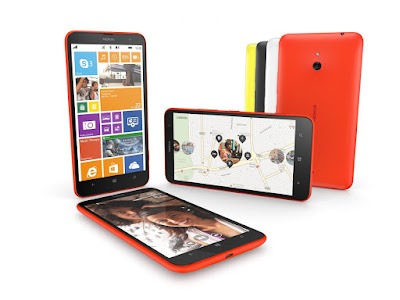
In this post, we trying to solve the most recent problem of Nokia Lumia mobiles connectivity with PC. If any one wants to connect their Nokia Lumia mobiles with their computers but they cant. So, this is your Nokia Lumia drivers problem. The driver is not installed on your PC windows operating system or it is in old version or it not working properly. So, the first problem is that the USB connectivity driver of Nokia Lumia devices is not installed in your windows operating system. You just download this USB driver of Nokia Lumia mobiles for your PC windows operating system and install it on your windows. Nokia Lumia USB driver is most important for connect lumia mobile devices with PC via USB cable connectivity. Download the latest version of Nokia Lumia devices USB driver and install it on your computer windows operating and then connect your Lumia mobile with a comfortable USB cable connection. I hope, now your Lumia devices would connect perfectly. To download the latest USB driver of Nokia Lumia devices. Just follow the provided download link is available below of this post.
Description: How To Connect Nokia Lumia Mobiles With PC
Nokia Lumia Mobiles USB Driver Download
Available link for download
Tuesday, December 27, 2016
How To Hard Reset Nokia Lumia 520
How To Hard Reset Nokia Lumia 520
Nokia Lumia 520 hard reset Windows Phone 7
1. Turn off your Windows phone 7 .2. Press and hold the Volume down and Camera keys.
3. Press and hold the Power key.
4. When you feel the phone vibrates, release the power key, but keep pressing the volume down and camera keys, until the phone reboots. All data will be lost!
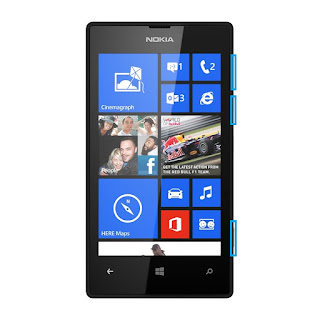
Nokia Lumia 520 hard reset Windows Phone 8
1. Turn the power Off.
2. Press and hold the Volume down and connect the charger or the USB cable with PC, for about 8 seconds, you will see anexclamation mark (!) on the screen. Note: If you do not press any of the following keys, then the phone wp8 will starts boot normally.
Then press the keys in this exact order:
1. Volume up
2. Volume down
3. Power
4. Volume down
The phone will reset and restart. Please note this may take a few minutes.
2. Press and hold the Volume down and connect the charger or the USB cable with PC, for about 8 seconds, you will see anexclamation mark (!) on the screen. Note: If you do not press any of the following keys, then the phone wp8 will starts boot normally.
Then press the keys in this exact order:
1. Volume up
2. Volume down
3. Power
4. Volume down
The phone will reset and restart. Please note this may take a few minutes.
All data will be lost!
Factory Reset Nokia Lumia 520 from the menu
On the start screen Scroll down to the bottom of the screen. Tap the arrow icon.
- On the Start screen, tap
 .
. - Tap Settings > about phone.
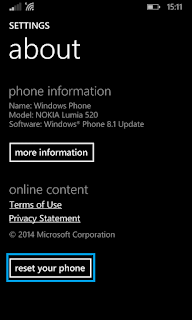
- Tap reset your phone, and then tap yes and again yes.
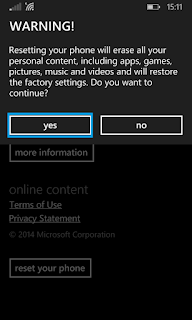
Available link for download
Saturday, December 24, 2016
Nokia Lumia 530 RM 1019 USB Driver Free Download
Nokia Lumia 530 RM 1019 USB Driver Free Download

Connect Nokia Lumia 530 without facing problems. Now, we are sharing the most perfect and best software to connect Nokia Lumia 530 with computers easily. Nokia Lumia 530 USB driver software is provided to download for free here. To connect Nokia Lumia 530 Via USB cable connection to the computers. First of all, you must download the USB driver of Nokia Lumia 530 from here. This USB driver of Nokia Lumia 530 is ready here to download for free. You mUst download this Nokia Lumia 530 and install it on your windows operating systems. Driver of Nokia Lumia 530 helps us to connect our Lumia 530 with our computer without suggestions. We have to download latest and updated USB driver of Nokia Lumia 530 for our computer windows operating systems. This USB driver of Nokia Lumia supported on windows XP, 7, 8 and other Vista (32-Bit or 64-Bit) versions. Just download this provided USB driver of Nokia Lumia 530 and install it on your PC, then connect your phone Via USB data cable connection and start exploring. USB driver is ready to download below.
Description: Nokia Lumia 530 USB Driver
Supporting OS: Windows XP, 7, 8 And Vista (32-Bit or 64-Bit)
Lumia 530 USB Driver
Lumia USB Driver Link 2
Available link for download
Wednesday, September 7, 2016
Cara downgrade OS pada Telepon Lumia Windows
Cara downgrade OS pada Telepon Lumia Windows
Cara downgrade OS pada Telepon Lumia Windows - mencoba memperbaiki sendiri dengan menggunakan Software Perangkat Nokia Pemulihan . Ini adalah aplikasi desktop yang ditujukan untuk mendapatkan Anda sakit Lumia kembali berdiri dan berjalan. Berikut adalah tutorial singkat tentang cara menggunakan perangkat lunak.
Apa yang Anda akan perlu
- A rusak (tapi tidak pernah turun untuk menghitung) Lumia
- Nokia Recovery Software Alat
Dimana saya dapat men-download Software Alat Nokia Recovery?
Di sini Anda pergi. Ikuti tautan di bawah untuk mengambil perangkat lunak Windows desktop:
- Nokia Recovery Tool Software (US)
- Nokia Recovery Tool Software (UK)
Apa saja persyaratan PC untuk menggunakan alat ini pemulihan?
- Microsoft Windows 7 atau yang lebih baru.
- Kabel USB untuk menyambungkan ponsel ke komputer.
- 2 GB ruang penyimpanan gratis Minimum.
- File yang didownload oleh Nokia Software Recovery Tool mungkin sebanyak 4GB, dan mungkin memakan waktu lama, tergantung pada koneksi internet Anda dan model telepon.
Apakah ini bekerja dengan Windows Phone saya dari HTC, Samsung atau pembuat telepon lain?
Tidak Perangkat lunak ini hanya untuk Lumia handset dari Nokia.
Apakah Anda siap untuk menyimpan Lumia Anda?
Ya. Mari kita lakukan ini.
Cara menyimpan Lumia Anda menggunakan Nokia Recovery Software Alat - langkah-langkah

- Download dan install Nokia Recovery Software Alat
- Buka Nokia Software Recovery Tool
- Hubungkan Lumia Anda ke PC dengan kabel USB
- Anda akan melihat perangkat lunak versi dapat anda instal pada Lumia Anda - Klik install di bawah
- Anda akan perlu untuk mengakui bahwa data dan konten di ponsel akan terhapus. Jika Anda masih dapat mengakses telepon, membuat cadangan dengan pergi ke pengaturan -> backup . Anda juga harus tahu bahwa foto, musik dan aplikasi akan dihapus selama proses reset ini. Klik bahwa Anda memahami dan kemudian klik lanjutkan.
- Anda sekarang akan mulai men-download perangkat lunak. Kecepatan jaringan bervariasi, tetapi download mungkin memakan waktu sekitar 15 menit.
- Perangkat lunak ini sekarang akan mulai menginstal ke telepon Anda. Jangan gunakan telepon atau melepaskan kabel selama langkah ini. Hanya pergi untuk berjalan cepat saat ponsel Anda dan PC melakukan hal mereka.
- Ta-da! Anda sudah selesai dan hanya disimpan ponsel Anda!
Available link for download
Subscribe to:
Posts (Atom)