Showing posts with label mini. Show all posts
Showing posts with label mini. Show all posts
Sunday, March 19, 2017
How to Flash Gionee Elife E7 Mini with Flash tool simple way here
How to Flash Gionee Elife E7 Mini with Flash tool simple way here
Gionee Elife E7 very awesome phone and this device for using easy comfortable some time use internet connect in device then many issue comes on display like unfortunately, when you starting device then automatically restart, hang on logo problem any problem of software related this procedure its easy to everyone who working in software related here some impotent of before use this tutorial first read all are content to carefully after step by step using here we are try to very easy solution but if any problem using this tutorial just leave your comment on below comment i will soon with good reply or before using this tutorial please mention on required which are giving below must working well all are requireds if any problem then you cant flash or error on displayed see also mention below content of about firmware
This flash file tested by me without any error working well, you can use this flash file when your device hang on logo problem, restarting problem, security lock problem, password lock problem, pattern lock problem etc software related problem and you can use this tutorial without any box and this is free for all who know about software in mobile, impotent for flashing first must check your micro usb cable if not good then you cant flash it so check micro usb cable second check your device battery that is impotent for flashing if your device battery low so stop your device between flash so this is impotent for flash, before you flash save your data like contact, photos, videos etc because this is factory flash file so you cant save after full flash so must remember all are impotent notes.
Download link
Gionee Elife E7 Mini Stock Rom Firmware Download here
Gionee Elife E7 Mini Flash tool Download here
Gionee Elife E7 Mini USB Driver Download here
Need for Flash:
1. Gionee Elife E7 Mini device with good battery charged
2. Gionee Elife E7 Mini tested Stock ROM
3. Gionee Elife E7 Mini Flash tool
4. Gionee Elife E7 Mini USB Driver (for flashing)
5. Micro usb cable
6. Computer or Laptop
2. Extract to desktop or as you like path (must be installed winrar software in your computer)
3. Open SP flash tool and choose flash_too.exe file and open it
4. Click on Scatter-loading button and choose MT6592_Android_scatter.txt file
5. Now click on Download button and Press and hold Volume Up button and insert usb cable
6. If driver not installed in your computer then update from above link driver
7. Wait until full install (do not disconnect when your device in flashing mode)
8. Congratulation you are done
2. Gionee Elife E7 Mini tested Stock ROM
3. Gionee Elife E7 Mini Flash tool
4. Gionee Elife E7 Mini USB Driver (for flashing)
5. Micro usb cable
6. Computer or Laptop
How to Flash Gionee E7 Mini with flash tool ?
1. Download tested firmware, Flash tool or usb driver from above link2. Extract to desktop or as you like path (must be installed winrar software in your computer)
3. Open SP flash tool and choose flash_too.exe file and open it
4. Click on Scatter-loading button and choose MT6592_Android_scatter.txt file
5. Now click on Download button and Press and hold Volume Up button and insert usb cable
6. If driver not installed in your computer then update from above link driver
7. Wait until full install (do not disconnect when your device in flashing mode)
8. Congratulation you are done
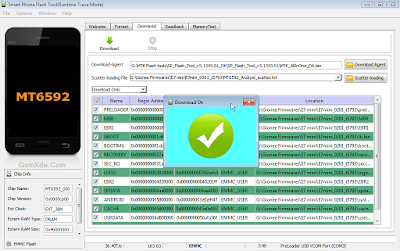
Flash done Screenshot:
Available link for download

Tuesday, January 10, 2017
Intex Aqua I5 mini Flash done with SP Flash tool tested
Intex Aqua I5 mini Flash done with SP Flash tool tested
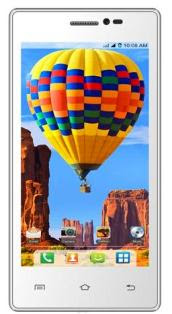
In this device problem of auto data connection start, wifi automatically start, hidden application automatically install, auto balance gone so try first of intex aqua i5 mini reset or hard reset but same issue not solve this problem then i decide to flash device when i flashed device with below link firmware or tool so result problem solved all type issue but not only use this tutorial above mention problem but any try software related issue in this device then you can use this tutorial but remember first carefully all read tutorial after step by step following.
This flash file tested by me without any error working well, you can use this flash file when your device hang on logo problem, restarting problem, security lock problem, password lock problem, pattern lock problem etc software related problem and you can use this tutorial without any box and this is free for all who know about software in mobile, impotent for flashing first must check your micro usb cable if not good then you cant flash it so check micro usb cable second check your device battery that is impotent for flashing if your device battery low so stop your device between flash so this is impotent for flash, before you flash save your data like contact, photos, videos etc because this is factory flash file so you cant save after full flash so must remember all are impotent notes.
Download Link
Intex Aqua I5 mini Firmware download here
SP_Flash_Tool_v5.1343.01 Flash tool download here
Whats needed for flash ?
- Intex Aqua I5 mini device with good battery charged
- Intex Aqau I5 mini tested firmware or flash tool (link are above)
- Micro usb cable (with good quality)
- Computer or Laptop
How to Flash ?
- Download tested firmware from above link (if link not working then just leave your comment on below comment box)
- Extract both winrar file to desktop or as you like path (must installed winrar software in your computer or laptop)
- Open SP_Flash_Tool_v5.1343.01 folder and choose flash_tool.exe file and open it
- Click on Scatter-loading button and choose MT6582_Android_scatter.txt file from firmware folder
- Now click on Download button
- Press and hold Volume Up button and insert usb cable (device key, device USB socket or micro USB cable must working well)
- Wait until driver install, if driver installed in your computer or laptop then downloading automatically start into device
- Wait until full install (do not disconnect device while device in flashing mode)
- Congratulation you are done from many software issue
Intex Aqua I5 mini Flash done with SP Flash tool screenshot:

Intex Aqua I5 mini Flash done with SP Flash tool video HERE
Available link for download
Monday, January 2, 2017
Download Laptop Driver HP Mini 110 35XX For WindowsXP And Windows7
Download Laptop Driver HP Mini 110 35XX For WindowsXP And Windows7
| Download Driver HP Mini 110-35XX For Windows XP | |
| Chipset | |
| Intel Chipset | Download |
| Graphic | |
| Intel (HD) Graphics | Download |
| Audio | |
| MS-UAA | Download |
| MS-UAA SP3 | Download |
| IDT High-Definition (HD) Audio | Download |
| Network | |
| Atheros Wireless | Download |
| Broadcom Wireless | Download |
| Ralink 2011 802.11 b/g/n WiFi | Download |
| Realtek RTL8102E | Download |
| Broadcom 2070 Bluetooth | Download |
| Mouse, Keyboard and Input Device | |
| Synaptics Touchpad | Download |
| Alcor Micro Card Reader | Download |
| Intel Rapid Storage Technology | Download |
| HP Wireless Assistant | Download |
| Download Driver HP Mini 110-35XX For Windows7 | |
| Chipset | |
| Intel Chipset | Download |
| Graphic | |
| Intel (HD) Graphics | Download |
| Audio | |
| IDT High-Definition (HD) Audio | Download |
| Network | |
| Atheros Wireless | Download |
| Broadcom Wireless | Download |
| Ralink 2011 802.11 b/g/n WiFi | Download |
| Realtek RTL8102E | Download |
| Broadcom 2070 Bluetooth | Download |
| Mouse, Keyboard and Input Device | |
| Synaptics Touchpad | Download |
| Alcor Micro Card Reader | Download |
| Intel Rapid Storage Technology | Download |
| HP Quick Launch Software | Download |
| HP Wireless Assistant | Download |
Available link for download
Subscribe to:
Posts (Atom)