Showing posts with label check. Show all posts

Monday, March 20, 2017

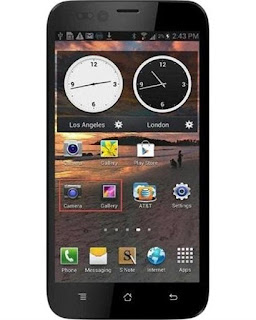
How to Flash Karbonn A20 Check here with simple method

How to Flash Karbonn A20 Check here with simple method


First back to all type data like photos, email, contacts, videos etc because this is factory firmware if dont take backup all then you will lost all type data of above mention.

This flash file tested by me without any error working well,  you can use this flash file when your device hang on logo problem, restarting problem, security lock problem, password lock problem, pattern lock problem etc software related problem and you can use this tutorial without any box and this is free for all who know about software in mobile, impotent for flashing first must check your micro usb cable if not good then you cant flash it so check micro usb cable second check your device battery that is impotent for flashing if your device battery low so stop your device between flash so this is impotent for flash, before you flash save your data like contact, photos, videos etc because this is factory flash file so you cant save after full flash so must remember all are impotent notes.

Download Link
Karbonn A20 Firmware Download here
SP_Flash_Tool_v5.1343.01 Download here

Required for flash:

1. Karbonn A20 device with good battery charged
2. Karbonn A20 tested firmware
3. SP Flash Tool
4. Micro usb cable
5. Computer or Laptop

Procedure:

1. Download tested firmware or flash tool from above link
2. Extract to both winrar file into desktop or as you like path (must installed winrar software in your computer or laptop)
3. Open SP_Flash_Tool_v5.1343.01 folder and choose flash_tool.exe file and open it
4. Click on Scatter-loading button and choose MT6572_Android_scatter.txt file
5. Click on Download button
6. Press and hold Volume Up button and insert usb cable (device key or micro usb cable must be working well)
7. Wait until driver install, if driver installed in your computer or laptop then downloading start automatically in your device
8. Wait until full install android os into device
9. You are done

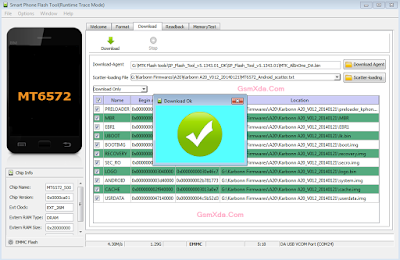
Karbonn A20 flash done with flash tool screenshot:

Karbonn A20 flash done with flash tool video:

Available link for download

Read more »

Friday, December 9, 2016

How to Flash Intex Aqua I 4 Plus with flash tool check here with simple method

How to Flash Intex Aqua I 4 Plus with flash tool check here with simple method


Must Read:
First back to all type data like photos, email, contacts, videos etc because this is factory firmware if dont take backup all then you will lost all type data of above mention.

This flash file tested by me without any error working well,  you can use this flash file when your device hang on logo problem, restarting problem, security lock problem, password lock problem, pattern lock problem etc software related problem and you can use this tutorial without any box and this is free for all who know about software in mobile, impotent for flashing first must check your micro usb cable if not good then you cant flash it so check micro usb cable second check your device battery that is impotent for flashing if your device battery low so stop your device between flash so this is impotent for flash, before you flash save your data like contact, photos, videos etc because this is factory flash file so you cant save after full flash so must remember all are impotent notes.

Download Link
Intex Aqua I-4 Plus firmware download here
SP_Flash_Tool_v3.1328.0.183 download here

Required for flash:

1. Intex Aqua I-4 Plus device with well battery charged
2. Tested firmware or flash tool
3. Micro usb cable
4. Computer or Laptop

Procedure:

1. Download tested firmware or flash tool from above link (if link not working just write down comment on below comment box)
2. Extract to desktop or as you like path (must be installed winrar software in your computer or laptop)
3. Open SP Flash tool folder and choose flash_tool.exe file and open it
4. Click on Scatter-loading button and choose MT6572_Android_scatter.txt file
5. Now click on Download button
6. Press and hold Volume Up and insert micro usb cable
7. Wait until driver install, if driver installed in your computer or laptop then downloading automatically start into device
8. Wait until full install android os
9. You are done

Intex Aqua I-4 Plus flash done with flash tool screenshot:

Intex Aqua I-4 Plus flash done with flash tool video:

Available link for download

Read more »

Saturday, December 3, 2016

How to check amount in New Pension Scheme

How to check amount in New Pension Scheme


Procedure to check the balance amount of Tier I and Tier II account in the New Pension Scheme (NPS) 


In my previous article I explained in detail about New Pension Scheme and its benefits and drawbacks. In this article I will explain the detailed procedure on how to check your balance in the New Pension Scheme. Follow the steps mentioned below to check your Tier-I and Tier-II account balance in a proper way.

Steps to be followed to check NPS Balance

1) First we have to visit " https://cra-nsdl.com/CRA/ "website which is the official website of Central Record Keeping Agency and of National Securities Depository Limited.

2)  In the first page of the website, one can find login options for "Subscribers and Nodal officers".


3) To get the details of the balance of NPS, one should login into the Subscribers section.


4) In Subscribers section you should type your user ID and Password.

5) User ID is your PRAN No (which is provided by NSDL to every NPS subscriber) and password is the password provided to you.

6) If you are logging in for the first time after entering the default password you will be requested to change your default password. Please change the default password.

7) After logging in, one can find 5 buttons on the top side. They are 

              1) Security
              2) Account Details
              3) Grievance
              4) Views
              5) User Maintenance

  • Security
  • Account Details
  • Grievance
  • Views
  • User Maintenance


8) To check your balance in Tier-I account (which is the mandatory for all Central Government employees), you have to click on "views under that Statement of Transaction".

9) A detailed list of monthly amount invested in various asset groups and fund managers by your organization and by the Government will be shown in the page.

10) At the end of the page one can check the total amount invested by Employee and Government. At the bottom of the page one check the total balance in his account.(Amount Invested by Employee+Amount Invested by Government+Gain what he got from the amount invested by NSDL in the market)

11) To check the balance in your Tier-II account, you have to click on Account details under that Statement of Transaction.

12) A transaction details of Tier-II page will be displayed. At the bottom of the page, one can check their total balance in the Tier-II account.

Note: Tier-II account is optional and it is not opened by default when you are joining the Central Government. One can open the Tier-II account by contacting their nearest POP centre or by visiting "CAMS" which is nearer to you. CAMS will be present almost in all cities.

Update: Please go through the following other articles on New Pension Scheme (NPS) or National Pension Scheme 

  1)    How much amount will I get after retirement
  2)    How to withdraw money from NPS Tier-II account


Available link for download

Read more »

Wednesday, September 14, 2016

What Should We Check While Buying Printer Cartridges Online Free Drivers Download

What Should We Check While Buying Printer Cartridges Online Free Drivers Download


------------------------------------------------------------------------------------
The internet and the numerous quality office stationery suppliers that can now be found online means that it is easier than ever before for businesses to find what they need for the office environment, ranging from printer cartridges right through to reams of printer paper, pens, computer parts, and many other accessories and items.
------------------------------------------------------------------------------------
However, buying online does not come without its risks. It is very easy to make mistakes when buying certain items that have to have certain specifications, and it is also hard to ascertain the quality of items before you buy. In addition to this, it is often difficult to know who is a reputable supplier before you actually place your order.
--------------------------------------------------------------------------------
With this in mind, it is important to keep a few things in mind when you buy certain stationery products. Some of the products that you should be careful about buying online are printer cartridges. The reason for this is that printer cartridges can be particularly costly, and certain aspects such as quality and price can have a significant impact on your business.
-------------------------------------------------------------------------------
Firstly, you will need to make sure that your cartridges are of the highest quality possible to meet your needs and stay within your budget. The quality of a new cartridge will depend on a number of things. It can refer to the colour and the appearance of ink as it is printed on a page, or it can indeed refer to its effect on your printer warranty.
------------------------------------------------------------------------------
Therefore, when you invest in this particular stationery item, it is important to make sure that the quality is good enough for you to spend your budget. There is a simple and easy way to do this, and that is by going straight to your printer manufacturer and asking for they advice on the best product available.
-----------------------------------------------------------------------------
In the majority of cases, a printer company will advise you to buy their own brand name products. Indeed, this is often the way to get high quality and prevent the voiding of any warranty that you may have on your printer. With that said, these can be expensive, and it may be worth finding a viable and cost-effective alternative that is also of quality.
-----------------------------------------------------------------------------
In this case, it is necessary to find an office stationery supplier that is able to advise you on the best products to buy. To do this, look for a retailer that specialises in delivering high quality stationery products for a business and private customers. They will often be likely to advise you on the variety of products that they have in stock and whether they are suitable or not for your needs.
----------------------------------------------------------------------------------------------
Secondly, bear in mind that you can often make a mistake when ordering your printer cartridges. Many people can easily become confused with the various printer models, cartridge sizes and printer cartridge colours; it is not unheard of to order the wrong products on a surprisingly frequent basis.
-----------------------------------------------------------------------------------------------
This reason, check that the retailer that you are buying from is able to offer you a good refund and return process in the case that you make an error. This is vitally important, as mistakes are quite common. If you are able to know that you can return and exchange your items hassle-free, you will not lose money and you will not have to deal with the stress of dealing with a difficult supplier.
-----------------------------------------------------------------------------------------------
Thirdly and finally, make sure that you have a good printer cartridge specialist on hand should you run into any issues. Often, your printer manufacturer will be able to deliver this kind of support and advice service to you. However, you may find that your stationery retailer will be able to give you ample advice and help should you need it.
----------------------------------------------------------------------------------------------------
There are several important points to consider, from selecting the right products right through to how to get the most use out of your cartridge. Importantly, using a good office stationery specialist will help you give the right balance between quality and cost effectiveness. In addition to this, they will often be able to give you plenty of free advice as a valued customer.
-------------------------------------------------------------------------------------------

Thank You.
Please Feel free to contact at :-  www.rushikeshthawale.in


Available link for download

Read more »