Showing posts with label plus. Show all posts
Showing posts with label plus. Show all posts
Monday, March 20, 2017
How to Flash Intex NEO V Plus with Flash tool tested
How to Flash Intex NEO V Plus with Flash tool tested
This guide to Intex NEO V Plus for phone not starting means hang on logo you can use this easy way for solve problem, and if phone has dead you can this method its simple to use for that need flash file or flash tool tested, you can tested that download from in this post, you can use this flash file when your device hangs on logo problem, restarting problem, security lock problem, password lock problem, pattern lock problem etc software related problem and here no need to any box this job you can done without any box with simple method, before use remember must your phone battery charged and do not try with low battery cause in low battery giving flashing error like USB not recognized and also must installed USB Driver in Computer or Laptop, must be working Micro USB Cable also, now lets go how to flash Intex NEO V Plus with Flash tool ?
Required:
- Intex NEO V Plus phone with good battery charged, do no try with low battery
- Intex NEO V Plus Flash file | Download here
- Intex NEO V Plus Flash tool | Download here
- Intex NEO V Plus USB Driver | Download here
- Good Quality Micro USB Cable
- Computer or Laptop
Procedure:
- Download needed file from the above link, if link broke just leave your comment on below comment box
- UnZip to Desktop or as you like path from the WinZip, must be installed WinRAR or WinZip installed in your Computer or Laptop
- Open ResearchDownload 2.9.7006 (GsmXda) folder and choose ResearchDownload.exe file
- Click on Flash Choose Button and select Intex_Neo V+_V01_WVB_Indian_SER.pac file
- Click on Download button (button are show like Play) just click there
- Press and hold Center key and Insert USB Cable and wait until driver installing, if driver installed then start process automatically if not just install from the above links driver
- Wait until Pass Process, do not disconnect device while in Flashing Mode
- You are done, Congratulation
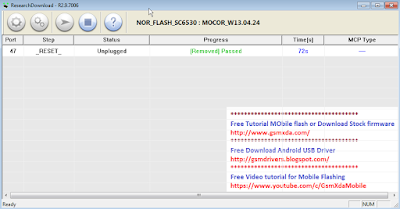
Intex NEO V Plus Flash done with Flash tool Screenshot:
Available link for download

Friday, March 17, 2017
How to Flash Karbonn Titanium S4 Plus with Sp Flash Tool Tested
How to Flash Karbonn Titanium S4 Plus with Sp Flash Tool Tested
Actually this guide is no hard to use if you want to Flash or Upgrade Karbonn Titanium S4 Plus phone because this is tested by me without any error Karbonn Titanium S4 Plus in any type issue software related you can easy solve using this method and this is for everyone who new fresher technician or experience technician in android software related, before use remember of must be working well all are required which you can see in this method it below to be mention, different to be error when you try to flash or upgrade first of USB not recognized this error possible when micro USB not working, battery not charged, phone USB socket not working properly so if you fail with this method just write down your comment on below comment box i will soon possible to fix it, first take backup into device if live otherwise dead you cant take backup, this guide you can use when device in dead condition also but must be in software related issue otherwise if any hardware then you can solve that.
Must Follow:
If you want to repair your device, you can try to repair it by you. You have to charge your battery with any charger and charged it by 70%. Your data is very important for you so it is good to do a backup of your data it may consist like your contact details, your important messages, your emails or any other important thing which you feel to be the backup in your device. This backup can be done on another device. we have to do the backup because after a format of your device, all your data will be gone and it will not be recovered. For backup in other devices you can use other external device like your hard drive, SD card or any other suitable devices. If you are doing by your own do it at your own risk as we dont take any responsibility if your device is damaged
Required for Karbonn Titanium S4 Plus:
- Karbonn Titanium S4 Plus device with good battery charged, do not try to flash when battery in low condition
- Karbonn Titanium S4 Plus Stock ROM Firmware | Download here
- Karbonn Titanium S4 Plus Flash Tool | Download here
- Karbonn Titanium S4 Plus USB (Flashing) Driver | Download here
- Micro USB Cable with Good Quality
- Computer or Laptop
Procedure for Karbonn Titanium S4 Plus:
- Install WinZip or WinRAR Software in your Computer or Laptop, already installed ignore this
- Download all are files from above link which required for flash or upgrade, if link broke or not working just leave your comment on below comment box i will fix it soon if possible
- UnZip to all files anywhere you want from the WinZip
- Open SP Flash Tool folder and choose flash_tool.exe file and open it
- Click on Scatter-loading button and choose MT6582_Android_scatter.txt file from the Stock ROM Firmware folder
- Now click on Download button and Insert USB Cable into device, wait until driver automatically installing, if not take auto then manual update driver from the above links
- If device dead and not detect then try to Press and hold Volume Up and Insert USB Cable (Note : You can Try Volume Down Also for Detection if Volume Up button not working)
- After Device Detected then Downloading star automatically into device wait while finished the process (Note : Do not try to unplug while device in flashing mode)
- Congratulation you are done
Karbonn Titanium S4 Plus Flash done Screenshot:

Available link for download
Thursday, March 16, 2017
Microsoft Office Professional Plus 2013 SP1 June 2016 MultiLanguage
Microsoft Office Professional Plus 2013 SP1 June 2016 MultiLanguage
based on Windows, including tablets. OneNote and Lync are the first applications for the Office, in the style of Windows 8, they are ground for work on the tablets, your fingertips. By the way, it’s claimed broad support Windows 8, including Windows RT.
Feature :
• The new interface, which is closer to the concept of Metro, flat menu buttons by analogy with Office 15 (or Office 2013 – is the name of the market, is rumored to be in the new package);
• Ability to view comments While reading;
• New opportunities to increase / decrease the font size, alignment, line, page width, control the spacing between paragraphs;
• New Menu “page layout” on the panel in edit mode.
• Office 2013 will not support work with operating systems of previous generations, the exception amount to only Windows 7.
• According to employees of the developer, the new version of office software will support work on iPad. Special release will provide users with “apple” tablet to work in the Special edition of Word, Excel and PowerPoint (recall that OneNote for iPad is already there).
• On ARM-plates Office 15 will be an integral part of the Windows RT (special assembly Winodws 8 for PC running ARM-processors).
• Expectedly, an office suite that will integrate with popular social networking sites such as, Facebook, Flickr, Hotmail and SkyDrive.
• You can also say that the software company is preparing an online platform of third party programs Office Marketplace.
• In the Office 15 version abolished Starter Edition, which in practice was not very popular among the users. Instead of this edition, it was decided to distribute 60-day “trial” version of the normal set of Microsoft Office.
Programs included in Microsoft Office Professional Plus 2013:
• Microsoft Access
• Microsoft Excel
• Microsoft InfoPath
• Microsoft Lync
• Microsoft OneNote
• Microsoft Outlook
• Microsoft PowerPoint
• Microsoft Publisher
• Microsoft SkyDrive Pro
• Microsoft Visio Viewer
• Microsoft Word
• Office Shared Features
• Office Tools
Release Names: Microsoft.Office.Professional.Plus.2013.SP1.June.2016.MultiLanguage
Size: 3GB/2.74GB
Links: Homepage
Size: 3GB/2.74GB
Links: Homepage
Downloads
32X: UPLOADED.NET – NITROFLARE64X: UPLOADED.NET – NITROFLARE
Available link for download
Sunday, February 5, 2017
Microsoft Office Professional Plus 2010 Retail Edition 64 Bit x64 Full Version Free
Microsoft Office Professional Plus 2010 Retail Edition 64 Bit x64 Full Version Free

Microsoft Office Professional Plus 2010 is a worthy upgrade for businesses and individual users who need professional-level productivity apps, but it will take some time to get acclimated with the reworked interface. Users looking for bare-bones, dead-simple office software should stick with Googles and other online offerings or continue using older Office versions they have already mastered.The world has changed plenty since Microsoft introduced Office 2007. In that time, Google has become a major player, with its suite of online tools, and even Apple has made inroads with its iWork office suite, though admittedly within a smaller set of computer users.
- Microsoft Office Excel Professional Plus 2010 to analyze your business information, create spreadsheets, and track time, costs, resources, and people
- Microsoft Office Word Professional Plus 2010 to create, manage, save, and edit documents
- Microsoft Office Publisher Professional Plus 2010 to produce professional publications
- Microsoft Office Outlook Professional Plus2010 with Business Contact Manager to manage customers, contacts, and sales
- Microsoft Office PowerPoint Professional Plus 2010 to create dynamic sales presentations
- Microsoft Office Accounting Express Professional Plus 2010 to save time, get organized, and do business online with the complete accounting solution for small businesses
- Microsoft Access Professional Plus 2010 to create a database and then filter, sort, graph, and visualiEdit HTMLze business information
- InfoPath Professional Plus 2010 to lower the cost of executing business transactions and processes with advanced electronic forms technologies
- Communicator Professional Plus 2010 to communicate more easily with colleagues and clients in different locations and time zones using a variety of communication techniques including Instant Messaging, voice, and video
- Groove Professional Plus 2010 to collaborate with others dynamically in a single workspace that puts all team members, tools, documents, and information together
This is Torrent Download file. You must be Install µTorrent in your System
Download Torrent
Available link for download
Friday, December 9, 2016
How to Flash Intex Aqua I 4 Plus with flash tool check here with simple method
How to Flash Intex Aqua I 4 Plus with flash tool check here with simple method

First back to all type data like photos, email, contacts, videos etc because this is factory firmware if dont take backup all then you will lost all type data of above mention.
This flash file tested by me without any error working well, you can use this flash file when your device hang on logo problem, restarting problem, security lock problem, password lock problem, pattern lock problem etc software related problem and you can use this tutorial without any box and this is free for all who know about software in mobile, impotent for flashing first must check your micro usb cable if not good then you cant flash it so check micro usb cable second check your device battery that is impotent for flashing if your device battery low so stop your device between flash so this is impotent for flash, before you flash save your data like contact, photos, videos etc because this is factory flash file so you cant save after full flash so must remember all are impotent notes.
Download Link
Intex Aqua I-4 Plus firmware download here
SP_Flash_Tool_v3.1328.0.183 download here
Required for flash:
1. Intex Aqua I-4 Plus device with well battery charged
2. Tested firmware or flash tool
3. Micro usb cable
4. Computer or Laptop
Procedure:
1. Download tested firmware or flash tool from above link (if link not working just write down comment on below comment box)
2. Extract to desktop or as you like path (must be installed winrar software in your computer or laptop)
3. Open SP Flash tool folder and choose flash_tool.exe file and open it
4. Click on Scatter-loading button and choose MT6572_Android_scatter.txt file
5. Now click on Download button
6. Press and hold Volume Up and insert micro usb cable
7. Wait until driver install, if driver installed in your computer or laptop then downloading automatically start into device
8. Wait until full install android os
9. You are done
Intex Aqua I-4 Plus flash done with flash tool screenshot:

Intex Aqua I-4 Plus flash done with flash tool video:
Available link for download
Sunday, November 13, 2016
Microsoft Office 2013 Plus Free Download Full Version
Microsoft Office 2013 Plus Free Download Full Version


Microsoft Office Professional Plus 2013 Free Download Full Version!

Download
Or
Download In Torrent 32Bit
Available link for download
Wednesday, October 12, 2016
Microsoft Office 2010 Professional Plus No Key Required
Microsoft Office 2010 Professional Plus No Key Required
Microsoft Office Professional Plus 2010 Volume x86 English
SUPPORTING OPERATING SYSTEMS
Windows XP Service Pack 3 (SP3)
Windows Vista (all)
Windows 7 (all)
Windows XP Service Pack 3 (SP3)
Windows Vista (all)
Windows 7 (all)
INSTRUCTIONS
1. Download .torrent and activate .torrent
2. After Files are downloaded; open containing folder
and please seed for at least 24 hours :)
3. Multiple Choices Here!!!
--- Click Setup. It will install all programs included
--- You may individually install one or 2 programs if you
dont need all of them by going into the folder with their
name and click "(name of product)MUI" (Windows Installer Package)
4. Follow installation process
5. Enjoy the 100% FREE software XD

how to activate office 2010 PERMANENTLY :
The notes are based on using Word, but any other Office 2010
application can be used (phone activation takes less than 2 minutes).
01. Disconnect internet, and start Word.
02. If the activation window appears close it.
03. Go to menu File, Help, Change Product Code, and then enter key:
828CH-G4FPY-HMH4R-32GCK-6D9BH
-or-
3W3MQ-H7M6X-3WYP7-TPCH6-8G8T2
04. Untick the "Activate over internet" box at the bottom, and click "Next".
05. In the window that appears click "Install".
06. When finished the Install process, close word an then reopen Word.
07. An activation window will appear (if not, go to menu File, Help, Activate).
08. Select the "Phone Activation" option, and click "Next".
09. Pick your country, then ring the number and follow the instructions.
10. When asked for your ID, input the code given in the Word activation window.
11. When asked which edition, choose business/volume use, used only on 1 pc.
12. A code will be given back, and enter the code into the activation box.
13. Click "Next", and Office will say that its permanently activated.
14. Close Word (and any other Office 2010 application).
15. Restart Word, and go to Help to check the subscription status.
Note:
- If you dont get the automated system when calling then phone back in the evening or Sunday.
- If you are put trough to an operator then just lie and they give you the code.
- If you had used a kms activator previously for 180 day activation then just use the same activator
to uninstall the kms process and any scheduled reactivation., you don’t need to deactivate Office.
The notes are based on using Word, but any other Office 2010
application can be used (phone activation takes less than 2 minutes).
01. Disconnect internet, and start Word.
02. If the activation window appears close it.
03. Go to menu File, Help, Change Product Code, and then enter key:
828CH-G4FPY-HMH4R-32GCK-6D9BH
-or-
3W3MQ-H7M6X-3WYP7-TPCH6-8G8T2
04. Untick the "Activate over internet" box at the bottom, and click "Next".
05. In the window that appears click "Install".
06. When finished the Install process, close word an then reopen Word.
07. An activation window will appear (if not, go to menu File, Help, Activate).
08. Select the "Phone Activation" option, and click "Next".
09. Pick your country, then ring the number and follow the instructions.
10. When asked for your ID, input the code given in the Word activation window.
11. When asked which edition, choose business/volume use, used only on 1 pc.
12. A code will be given back, and enter the code into the activation box.
13. Click "Next", and Office will say that its permanently activated.
14. Close Word (and any other Office 2010 application).
15. Restart Word, and go to Help to check the subscription status.
Note:
- If you dont get the automated system when calling then phone back in the evening or Sunday.
- If you are put trough to an operator then just lie and they give you the code.
- If you had used a kms activator previously for 180 day activation then just use the same activator
to uninstall the kms process and any scheduled reactivation., you don’t need to deactivate Office.
Download Microsoft Office 2010 Professional Plus No Key Required
Available link for download
Saturday, September 24, 2016
Ulead Video Studio 11 Plus Full Version Free
Ulead Video Studio 11 Plus Full Version Free

Ulead Video Studio 11 Plus Easy & Powerful Video Editing + DVD Authoring All the editing and authoring tools found in the standard version, PLUS unique and powerful features including full HD DVD authoring, AVCHD support, Dolby Digital 5.1 surround sound and a full set of easy corrective and creative filters.
Ulead Video Studio Version 11 includes end-to-end HD DVD enhanced movie wizard templates; more flexible user interface; new encoding options; expanded title and subtitle support; more filters and effects; enhanced DVD menus and authoring.
Whats new in this version: Version 11 includes end-to-end HD DVD enhanced movie wizard templates; more flexible user interface; new encoding options; expanded title and subtitle support; more filters and effects; enhanced DVD menus and authoring.
Many users believe that video editing is a complicated task, when the truth is that if we have a simple and intuitive tolls like Ulead Video Studio, it is the exact opposite, because, without having the features and filters of professional application, it can offer similar results.
This program allows us to import videos directly from our camera, crop them, edit them and apply effects, and also to add titles and music, and all this easily, due to the fact that it has a menu based on tabs that will guide us during the full process.
Other functions of this program that are worth highlighting are the capacity to record music from the in-put line or microphone in real-time, the option to export our project to a DVD, adapt the project for mobile devices or to host it over Internet, and native support for DV cameras, that makes it a lot easier to work with the videos that we have recorded.
Now you can create your own videos and share them with whoever your want, because it is only necessary to download Ulead Video Studio and start editing.
This program allows us to import videos directly from our camera, crop them, edit them and apply effects, and also to add titles and music, and all this easily, due to the fact that it has a menu based on tabs that will guide us during the full process.
Other functions of this program that are worth highlighting are the capacity to record music from the in-put line or microphone in real-time, the option to export our project to a DVD, adapt the project for mobile devices or to host it over Internet, and native support for DV cameras, that makes it a lot easier to work with the videos that we have recorded.
Now you can create your own videos and share them with whoever your want, because it is only necessary to download Ulead Video Studio and start editing.
Download
Available link for download
Wednesday, September 7, 2016
Intex Aqua 3G Plus Pattern Unlock done without flash tested
Intex Aqua 3G Plus Pattern Unlock done without flash tested

In this device i was try to hard reset for remove pattern lock but not success using every tricks volume keys for power but if you want to remove pattern lock without flashing then you can use this tutorial because this is every simple tricks no nay risk or will be any issue because this is tested by me without any error and just a few minute in this tutorial i use miracle box for that but dont worry you can other use chines box but will be option in that because you cant pattern unlock without option, in internet one other way for pattern unlock just you have to download few mb flash file and you can do job using sp flash tool and it also simple way for that just remember every needed for pattern unlock now lets go how to pattern unlock intex aqua 3g+ using miracle box ?
Download Link
Intex Aqua 3G+ (Plus) Pattern Unlock file only download here
Intex Aqua 3G+ (Plus) full firmware download here
ResearchDownload_VER_2.9.7006 download here
Required for Pattern Unlock:
1. Intex Aqua 3G+ (plus) device with good battery charged
2. Miracle box (you can use other chines box)
3. Micro usb cable
4. Computer or Laptop
Procedure:
1. First download tested firmware or unlock file from above link
2. Open Miracle box
3. Go to SPD Tab
4. Choose Write option
5. Select correct boot option : SPD8825/6825/Other{Factory File Write)
6. Choose firmware file which you was downloaded
7. Tick on USBCable option
8. Now last click on Start button
9. Press and hold Volume Down button and insert usb cable
10. After few second wait then one popup box there untick all without USERDATA then click ok
11. Wait until process
12. Congratulation you are done
Intex Aqua 3G+ (Plus) Pattern Unlock done screenshot:

Available link for download
Subscribe to:
Comments (Atom)