Showing posts with label frp. Show all posts
Showing posts with label frp. Show all posts
Saturday, March 25, 2017
LENOVO K3 Note K50 A40 Bypass gmail account FRP done without any box
LENOVO K3 Note K50 A40 Bypass gmail account FRP done without any box
This is security lock in new android devices when you first time purchase device then it asked enter your registered gmail account after enter account must be remember because if future you will do hardreset or reset device then asked first entered gmail account if you forgot but dont worry to solution for it just see below procedure but before use must remember which is required for frp solution because if any one do not work then you cant solve that problem first of device battery must be charged up to 80%, second of must be working well scatter file or flash tool, third of must be working well micro usb cable and last must be installed driver without driver you cant do that in this post also link available of driver link first install it after try to unlock.
Without reset FRP lock you cant go ahead if you remember first entered gmail account then you can easy do unlock and for unlock must be device connected with internet without internet you cant go ahead this tutorial i cant try with this device but i think is it success and simple way for frp reset lock without any box before use remember must take out simcard or micro sd card and i think remember from this procedure you cant save data like contacts, photos, videos, mp3 songs, notes, email etc so now lets go how to bypass gmail account in Lenovo K3 Note K50-4A40 ? see below procedure
Download Link
Lenovo K3 Note K50-A40 Bypass Gmail Account file
Download here
Lenovo K3 Note K50-A40 Flash tool
Download here
Lenovo K3 Note K50-A40 USB Driver
Download here
Whats need for FRP Reset ?
- Lenovo K3 Note K50-A40 phone
- Lenovo K3 Note K50-A40 Scatter file
- Lenovo K3 K3 Note K50-A40 Flash tool
- Lenovo K3 K3 Note K50-A40 USB Driver
- Micro usb cable
- Computer or Laptop
How to Reset FRP Lock ?
- Download required from above link (if link dead just leave your comment)
- Extract to desktop or as you like path
- Open MTK_flashtool_v5.1536.00.000 tool and choose flash_tool.exe file and open it
- Click on Scatter-loading button and choose MT6752_Android_scatter.txt file
- Jump to Format Tab shortcut key Alt + A
- Choose Manual Format Flash option
Begin Address[HEX]: 0x7fa0000
Format Length[HEX]: 0x860000
- Write there above code in both box like below images

- Now Click on Start button
- Press and hold Volume Up button and insert usb cable
- Install driver from above link, if driver installed in your computer then starting automatically
- Congratulation you are done
Available link for download

Saturday, February 25, 2017
Lenovo K4 Note A7010a48 FRP Reset or Fix DL Mode done tested
Lenovo K4 Note A7010a48 FRP Reset or Fix DL Mode done tested
What is FRP Lock ?
This is new feature in all new modes when you new purchase device then first starting then asking enter your own gmail account and this account enter one time so remember it because in future device reset or upgrade then first asking device to enter your own gmail account or password after that go ahead otherwise device still but dont worry if forgot gmail account or password here solution for bypass gmail id its very simple if you better understand to this tutorial before use first charged device battery if low then device not properly working like restarting problem or other software related.
About Miracle box:
This tutorial done in miracle box if you have box then you can easy done but this dont have so you can use other box but option to be required in box.
About USB Driver:
For this tutorial must you have to usb driver for connect device with computer or laptop if not install then you cant connect if not connect so you cant done this job so must be installed in your computer or laptop, if you dont have driver so you can download from this post and update or install in your computer or laptop.
About Micro USB Cable:
Must be working well Micro usb cable this is also impotent of part for bypass gmail account (FRP reset) when micro usb cable not working then error like usb not recognized this error also if your device battery low means both reason of usb not recognized and also check device usb socket its must be working well if any problem in that then you cant connect with this box.
Download Link
Lenovo K4 Note A7010a48 Driver Download
Need for Gmail Account bypass:
1. Lenovo K4 Note A7010a48 device
2. Miracle box
3. Lenovo K4 Note A7010a48 usb driver
4. Micro usb cable
5. Computer or Laptop
How to Bypass Gmail Account in Lenovo A7010a48 ?
1. Download usb driver from above link (if link dead just leave your comment)
2. Extract to desktop or as you like path (must be installed winrar software)
3. Install usb driver if there .exe file
4. Open Miracle box
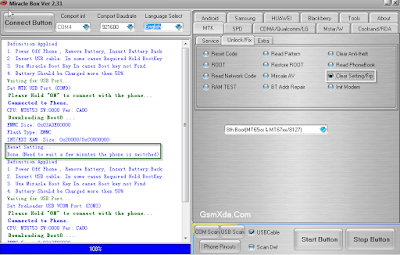
5. Go to MTK Tab and choose Unlock/Fix tab
6. Choose Clear Setting/Frp option
7. Select Boot : 8th Boot(MT65xx & MT67XX/8127) option
8. Tick on USBCable option
9. Click on Start button and Press and hold Volume Up button and insert usb cable
10. Wait until driver install, if driver installed then process start automatically
11. Congratulation you are done
FRP Reset done Screenshot:
How to Fix DL Mode in MTK device ?
1. Download usb driver from above link (if link dead just leave your comment)2. Extract to desktop or as you like path (must be installed winrar software)
3. Install usb driver if there .exe file
4. Open Miracle box
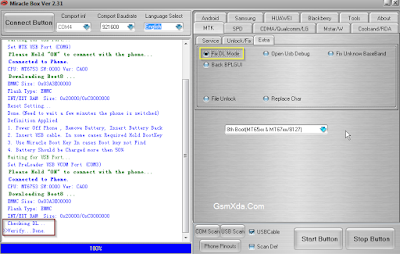
5. Go to MTK Tab and choose Extra tab
6. Choose Fix DL Mode option
7. Select Boot : 8th Boot(MT65xx & MT67XX/8127) option
8. Tick on USBCable option
9. Click on Start button and Press and hold Volume Up button and insert usb cable
10. Wait until driver install, if driver installed then process start automatically
11. Congratulation you are done
Fix DL Mode Screenshot:
Available link for download
Friday, February 24, 2017
Samsung FRP Reset Files Using Odin tool
Samsung FRP Reset Files Using Odin tool

This file you can use with an odin flash tool this files factory reset file this is different file this security you cant remove via hard reset or full flash but you can be done with this files here some model files available but some few day full model available in this list. This security how to make ? when you purchase device then first start device it asking to gmail id or password and this must remember that if forgot then device do hard reset or flash then it asked firsts enter email id or password if remember then first start wifi and enter it if forgot then use this file.
Android Factory Reset Protection (FRP) this is new feature for your device protect and this feature has been added to Android OS 5.1 or higher
New Method Google Bypass Gmail Account
Supported models : Samsung Galaxy A3, A5, A7, J1, J2, J3, J5, J7, S5, S6, Edge, Note, Tab series google bypass Gmail account (FRP) SEE HERE
Model
Samsung G550FY FRP Reset File
Download
Samsung G920T FRP Reset File
Download
Samsung G925i FRP Reset File
Download
Samsung J700F FRP Reset File
Download
Samsung N920G FRP Reset File
Download
Samsung FRP Reset File MODEM G920F OJ1
Download
Samsung FRP Reset File MODEM G920I OJ6
Download
Samsung FRP Reset File MODEM G920T1 OI5
Download
Samsung FRP Reset File MODEM G920T1 OJ6
Download
Samsung FRP Reset File MODEM G920T OJ7
Download
Samsung FRP Reset File MODEM G920w8 OJ7
Download
Samsung FRP Reset File MODEM G925F OJ1
Download
Samsung FRP Reset File MODEM G925I OJ6
Download
Samsung FRP Reset File MODEM G925T OJ7
Download
Samsung FRP Reset File MODEM G925w8 OJ7
Download
Samsung FRP Reset File MODEM G928C OJ5
Download
Samsung FRP Reset File MODEM G928F OJ5
Download
Samsung FRP Reset File MODEM G928G OJ4
Download
Samsung FRP Reset File MODEM G928I OJ4
Download
Samsung FRP Reset File MODEM G928T OJ5
Download
Samsung FRP Reset File MODEM G928w8 OGD
Download
Samsung FRP Reset File MODEM N920C OJ5
Download
Samsung FRP Reset File MODEM N920G OJ4
Download
Samsung FRP Reset File MODEM N920I OJ4
Download
Samsung FRP Reset File MODEM N920T OJ5
Download
Samsung FRP Reset File MODEM N920w8 OI1
Download
Samsung FRP Reset File SBOOT G920F OJ1
Download
Samsung FRP Reset File SBOOT G920I OJ6
Download
Samsung FRP Reset File SBOOT G920t1 OI5
Download
Samsung FRP Reset File SBOOT G920t1 oj6
Download
Samsung FRP Reset File SBOOT G920t oj7
Download-1 | Download-2
Samsung FRP Reset File SBOOT G920w8 OJ7
Download
Samsung FRP Reset File SBOOT G925F OJ1
Download
Samsung FRP Reset File SBOOT G925I OJ6
Download-1 | Download-2
Samsung FRP Reset File SBOOT G925t oj7
Download
Samsung FRP Reset File SBOOT G925w8 OJ7
Download
Samsung FRP Reset File SBOOT G928C OJ5
Download
Samsung FRP Reset File SBOOT G928F OJ5
Download
Samsung FRP Reset File SBOOT G928G OJ4
Download
Samsung FRP Reset File SBOOT G928I OJ4
Download
Samsung FRP Reset File SBOOT G928t oj5
Download
Samsung FRP Reset File SBOOT G928w8 OGD
Download
Samsung FRP Reset File SBOOT N920C OJ5
Download
Samsung FRP Reset File SBOOT N920G OJ4
Download
Samsung FRP Reset File SBOOT N920I OJ4
Download
Samsung FRP Reset File SBOOT N920t oj5
Download
Samsung FRP Reset File SBOOT N920w8 OI1
Download
Samsung FRP Reset File G550FY
Download-1 | Download-2
Samsung FRP Reset File G920T
Download-1 | Download-2
Samsung FRP Reset File G925i OJ6 SBOOT MODEM
Download-1 | Download-2
Samsung FRP Reset File J700F
Download-1 | Download-2
Samsung FRP Reset File N920G
Download
Samsung SM-N920W8 Galaxy Note 5 FRP Sboot
8VLU2AOK5_Sboot Download
8VLU2BPC5_Sboot Download
8VLU2BPD6_Sboot Download
8VLU2BPE3_Sboot Download
Samsung FRP Reset File MODEM G920F OJ1
Download
Samsung FRP Reset File MODEM G920I OJ6
Download
Samsung FRP Reset File MODEM G920T1 OI5
Download
Samsung FRP Reset File MODEM G920T1 OJ6
Download
Samsung FRP Reset File MODEM G920T OJ7
Download
Samsung FRP Reset File MODEM G920w8 OJ7
Download
Samsung FRP Reset File MODEM G925F OJ1
Download
Samsung FRP Reset File MODEM G925I OJ6
Download
Samsung FRP Reset File MODEM G925T OJ7
Download
Samsung FRP Reset File MODEM G925w8 OJ7
Download
Samsung FRP Reset File MODEM G928C OJ5
Download
Samsung FRP Reset File MODEM G928F OJ5
Download
Samsung FRP Reset File MODEM G928G OJ4
Download
Samsung FRP Reset File MODEM G928I OJ4
Download
Samsung FRP Reset File MODEM G928T OJ5
Download
Samsung FRP Reset File MODEM G928w8 OGD
Download
Samsung FRP Reset File MODEM N920C OJ5
Download
Samsung FRP Reset File MODEM N920G OJ4
Download
Samsung FRP Reset File MODEM N920I OJ4
Download
Samsung FRP Reset File MODEM N920T OJ5
Download
Samsung FRP Reset File MODEM N920w8 OI1
Download
Samsung FRP Reset File SBOOT G920F OJ1
Download
Samsung FRP Reset File SBOOT G920I OJ6
Download
Samsung FRP Reset File SBOOT G920t1 OI5
Download
Samsung FRP Reset File SBOOT G920t1 oj6
Download
Samsung FRP Reset File SBOOT G920t oj7
Download-1 | Download-2
Samsung FRP Reset File SBOOT G920w8 OJ7
Download
Samsung FRP Reset File SBOOT G925F OJ1
Download
Samsung FRP Reset File SBOOT G925I OJ6
Download-1 | Download-2
Samsung FRP Reset File SBOOT G925t oj7
Download
Samsung FRP Reset File SBOOT G925w8 OJ7
Download
Samsung FRP Reset File SBOOT G928C OJ5
Download
Samsung FRP Reset File SBOOT G928F OJ5
Download
Samsung FRP Reset File SBOOT G928G OJ4
Download
Samsung FRP Reset File SBOOT G928I OJ4
Download
Samsung FRP Reset File SBOOT G928t oj5
Download
Samsung FRP Reset File SBOOT G928w8 OGD
Download
Samsung FRP Reset File SBOOT N920C OJ5
Download
Samsung FRP Reset File SBOOT N920G OJ4
Download
Samsung FRP Reset File SBOOT N920I OJ4
Download
Samsung FRP Reset File SBOOT N920t oj5
Download
Samsung FRP Reset File SBOOT N920w8 OI1
Download
Samsung FRP Reset File G550FY
Download-1 | Download-2
Samsung FRP Reset File G920T
Download-1 | Download-2
Samsung FRP Reset File G925i OJ6 SBOOT MODEM
Download-1 | Download-2
Samsung FRP Reset File J700F
Download-1 | Download-2
Samsung FRP Reset File N920G
Download
Samsung SM-N920W8 Galaxy Note 5 FRP Sboot
8VLU2AOK5_Sboot Download
8VLU2BPC5_Sboot Download
8VLU2BPD6_Sboot Download
8VLU2BPE3_Sboot Download
Available link for download
Saturday, December 10, 2016
Micromax Canvas Blaze 4G Q400 FRP Reset done without any box
Micromax Canvas Blaze 4G Q400 FRP Reset done without any box

This procedure in no need to any boxes or flashing just few minute you can done this job but need to must installed driver in your computer or laptop because without driver you cant done this job i suggest you before use this procedure first read all tutorial carefully after that following step by step and this content its very easy to understand because we are thing all are better understand without any issue because here not all are master visit this site but everyone visit who master or fresher technician this procedure not yet tested by me but i put here because this is tricks from Micromax service center must check your device USB socket if any issue also check computer or laptop USB port also check micro USB cable if any problem i mentioned then you cant done this job so please carefully following this tutorial
Required for FRP Reset:
- Micromax Canvas Blaze 4G Q400 device with good battery charged
- Driver download here
- Micro USB cable
- Computer or Laptop
Procedure:
- Turn off device with device on
- Press and hold Volume Down + Power For Fastboot Mode
- Insert usb cable to device
- Now go to RUN and type there cmd and then press Hit Enter key Shortcut key win.key + R
- Put ADB Driver into desktop
- Type : Cd desktopadb_drivers then Hit Enter key
- Type : Adb devices>fastboot oem unlock Hit Enter key
- Type : Fastboot -i 0x2a96 erase config Hit Enter key
- Type : Fastboot -i 0x2a96 reboot Hit Enter Key
- After reboot device google id will reset
- Congratulation you are done
Micromax Canvas Blaze 4G Q400 FRP Reset Done Screenshot

Available link for download
Friday, November 25, 2016
Samsung Galaxy J5 J500G FRP Reset done tested
Samsung Galaxy J5 J500G FRP Reset done tested
Must read users:
This tutorial tested by me without any error but remember here some impotent question for successfully done with this tutorial, must be working device sub socket, must be working micro usb cable, must be working volume up or down keys for boot device, must be working computer or laptop usb socket, this tutorial you can use without any box its simple.What happen if not ahead still Gmail Account ?:
When your new purchase device of any company like Samsung, Micromax, HTC, Intex, Lenovo any other company mostly new device then you start device and its asked you exiting gmail account after register exiting account then some few day you forgot pattern lock or security lock so without reset or flash device you cant solve that after new flash installed you have to start device then again asked device gmail account you was first time register in that device if you remember that gmail id or password so your are done but if not remember so you must factory reset to device so here solution if you forget gmail id or password so lets see how to solve that.Required for FRP Reset:
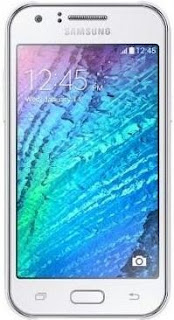
1. Samsung Galaxy J5 (J5500G) device with good battery charged2. Octoplus Box or Z3x box
3. Micro usb cable
4. Computer or Laptop
Procedure:
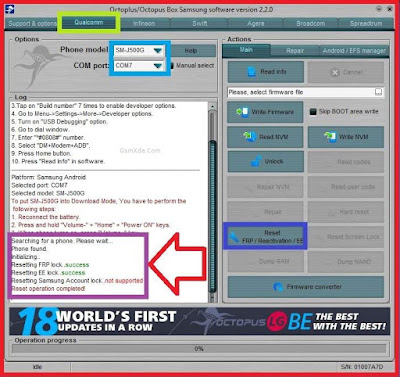
1. First open OctoPlus box (this tutorial in octoplus box so here full procedure of with octoplus)2. Go to Qualcomm CPU tab
3. Chose Phone Model : SM-J500G
4. Press and hold Volume Down + Home + Power button for Download Mode
5. Insert micro usb cable
6. Go to Main Section and click on Reset FRP / Reactivation /EE.. button
7. Wait until process
8. Congratulation you are done
Samsung Galaxy J5 (J500G) FRP Reset done screenshot:
Available link for download
Subscribe to:
Posts (Atom)