Showing posts with label kitkat. Show all posts
Showing posts with label kitkat. Show all posts
Friday, March 10, 2017
How to upgrade Qmobile noir i9 to Kitkat 4 4 2 official
How to upgrade Qmobile noir i9 to Kitkat 4 4 2 official
Disclaimer: Flash at your own risk, I added tutorial so if something gone wrong to your phone, dont blame me.
Quote:
IMEI / NVRAM Backup
Method 1:
Before Installing the KitKat Follow These Steps.
1. Download MTK Droid Tool From Here
2. i9 must be rooted and USB debugging must be enabled before you proceed.
3. Attach the cell phone with data cable and run mtk droid tool as admin.
4. When device got loaded press the root button and grant root access on cell phone.
5. Click on IMEI/NVRAM button and click on backup.
6. Now in case after flashing u lost IMEI follow the same steps but now click on restore.
Quote:
QMobile KitKat Release
Before you update Back Up your current rom using custom recovery in case you want to revert back
Smart Phone Flash Tool and Driver
Firmware Download
1. First of all download the required files.
2. Install Tinno Driver.
3. Extract All Zips.
4. Run the Flashing Tool as admin (Right Click on the file and click on run as admin)
5. Download Scatter File From Attachments And Add It In Firmware Folder Now Load It, all files will be loaded now click on the address bar in front of recovery and select the recovery attached below.
6. Select Firmware Upgrade.
7. Power off the cell phone and remove battery.
8. Now click on download and attach the cell phone without battery to data cable.
9. Wait till flash. You are done.

10. Enjoy Official Noir i9 KitKat.
Available link for download

Monday, February 27, 2017
How to install Kitkat 4 4 2 and ubrick Motorola droid razr m xt907 step by step
How to install Kitkat 4 4 2 and ubrick Motorola droid razr m xt907 step by step

Requirements :
Download firmware file VZW_XT907_4.4.2-KDA20.62-15.1_1FF.xml.zip from
https://www.androidfilehost.com/?fid=24269982087012609
RSD lite tool from
https://drive.google.com/file/d/0B9MQDcmmYShvaXlCVFNRcGFtcWc/edit
https://drive.google.com/file/d/0B9MQDcmmYShvaXlCVFNRcGFtcWc/edit
Download RSD drivers from Motorola site
Installing :
1 : install RSD tool And drivers on your Computer
2 : Run RSD lite program
3 : Extract firmware file
4 : on RSD tool Select this xml file VZW_XT907_4.4.2-KDA20.62-15.1_1FF.xml from firmware extracted folder
5 : put your phone in fastboot mode by power off your phone and press and hold these keys (power+volume up and down) then a new screen appears navigate ap fastboot select it with volume up key And connect with computer Note: make sure drivers installed on your
6: on Rsd tool your device appears
7 : click on start and wait until RSD lite tool pass your phone
8 : if your phone again goes in fastboot mode then press power for 3 sec after off press power+volume up+down and select normal power with volume up key
9 :After reboot set your setting
10: D:)one
Keep visiting for more informations
Take care Good bye and like my facebook page :)
Available link for download
Saturday, January 14, 2017
How to install kitkat 4 4 on Qmobile a900
How to install kitkat 4 4 on Qmobile a900
Installation Instructions:
- Download The file from the given link above.
- To flash this file your A900 must be rooted and have custom recovery If your phone is not rooted kindly refer to this post for rooting procedure http://appsandtips.blogspot.com/2014/09/root-qmobile-all-smartphones-easily.html
- For installing custom recovery in your phone kindly follow these steps:
- download and install MTKtools from playstore
- Download CWMR from here : http://d-h.st/Sle
- Open MTKtools
- Select recovery update option
- Browse to your downloaded CWMR and apply it
- Now place the downloaded file (octarom_kk_discovery_1.zip) in the root of your SD card
- Turn off your phone
- Go to the recovery mode by pressing and holding Volume Up + Power button at the same time
- First make a backup of your current ROM so if you mess up somewhere you can go back to your old ROM
- Select back and restore and then select backup. Wait until its done
- Now go back and select Wipe/data or Factory Reset
- Select wipe cache partition
- Now go to advanced and Wipe Dalvik Cache
- Go back to main menu of recovery mode
- Now select install zip from sd card
- Choose the file “octarom_kk_1.zip”
- Wait for 5-10 minutes for the ROM to flash completely.
- Once its done go back to main menu and reboot your phone
- Tada! Your device is running KitKat now

DOwnload rom from here
https://yadi.sk/d/CD4D5HZ6TentK
Available link for download
Thursday, October 6, 2016
How To Root Galaxy Note 2 N7100 On Kitkat 4 4 2
How To Root Galaxy Note 2 N7100 On Kitkat 4 4 2
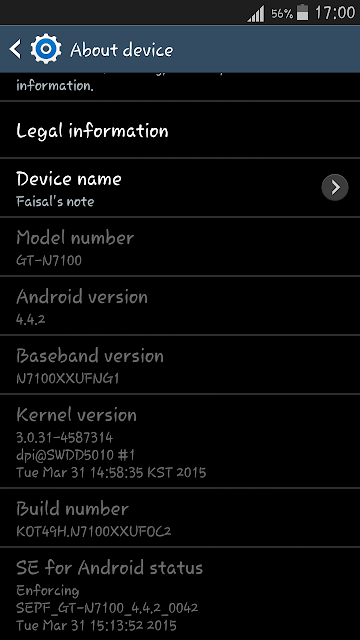
Preparations :
Install Samsung USB Driver From Here
Download root Files For Note 2 From Here
Installation :
1 : Extract CF-Auto-Root-t03g-t03gxx-gtn7100.zip
2 : Run Odin3-v3.07.exe
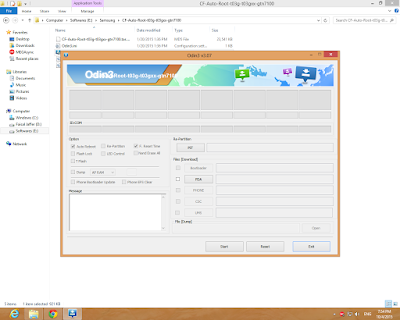
3 : Now Put Your Phone into Downloading Mode
*Turn Off Your Phone
*Press Volume Down + Home Button + Power Button
*Press Volume Up Key To Continue
4 : Connect Your Phone with Computer via USB Cable
5 : Click on PDA Option And Select "CF-Auto-Root-t03g-t03gxx-gtn7100.tar.md5"
6 : Click On Start Button
7 : Wait util Finished
8 : Your Phone Restarts Automatically
9 : See Your App Drawn If Superuser app Exist Your Have Root Acess
Available link for download
Tuesday, September 13, 2016
New Features To Grab in Your Smartphone with Android Kitkat
New Features To Grab in Your Smartphone with Android Kitkat
Android is an operating system which gives life to more than one billion Smartphones, Tablet and Phablets devices. As per their name the various versions of Android OS sweeten up our lives, all of them are named after some desserts such as Cupcake, Donut, Eclair, Froyo, Gingerbread, Honeycomb, Ice Cream Sandwich, and Jelly Bean.
.jpg)
Everyone finds chocolate equally tempting for soothing there taste buds so by keeping this fact in mind the new version on Android OS 5 in named as Android Kitkat.

Android is an open OS from its evolution time, term open OS means that it can run any kind of widget or application. The information about the whole globe is at device screen you can explore the whole world or web just with your finger tips.
.jpg)
Android Kitkat offers you new feature of Screen Recording. This feature enables you to capture lifes moment in a MP 4 video even when you are browsing your smartphone or watching videos. There are many different apps on Google Play, you just need to install the app, tap record allow the permission to sources, adjust the settings after that you are ready to record while you are busy somewhere else on your phone.
You can make your home screen the way you want, by arranging apps and widgets between multiple screens or in folders. Amazing live wallpapers respond to your touch. Every page of the screen contains an omnipresent Google search bar at the top with a 4X4 page layout and theres a dock also at the bottom and an app drawer shortcut which enables users to customize and add frequently used apps.

Another feature of Android OS Kitkat is Voice Typing. This element enables you to input text controlled by your voice actions that means just by speaking all your required operations will be performed thus you can command and control your phone with your voice actions just by speaking.

It gives a new dimension in your gaming experience Android OS is with new sensors which makes your Android device feel great for gaming as well, so now you can touch, tap, shake, tilt and play. It also improved tremendously over camera and gallery experience, the shakes and distortion while shooting video will be reduced. Its HDR feature can take multiple shots at different angles and exposures and blend them into a single image. Specifically good on Nexus 5, with great improvement over colors and details of the picture. The kitkat gallery consist of an inbuilt photo editor having preset filters,image cropping and border options, rotating, mirroring, and straightening your photos.
This version is fast and smooth as compared to the earlier versions with buttery graphics, you can get right information on time with more than 1 million apps on Google Play on thousands of android devices.
The next good and admirable thing about Kitkat is its calling experience computing your contact names of t he people you talk the most not only this by using contact app you can search for the places which are near to you. Thread caller ID is the best app which displays the relevant information about the caller including their pictures, last text messages etc.
With Kitkat Android is super amazing for everyone.
Available link for download
Subscribe to:
Posts (Atom)