Showing posts with label qualcomm. Show all posts
Showing posts with label qualcomm. Show all posts
Monday, March 13, 2017
How To Hard Unbricked LG G2 All Variants Fix Qualcomm HS USB QDLoader 9006 mode
How To Hard Unbricked LG G2 All Variants Fix Qualcomm HS USB QDLoader 9006 mode
After Read This Guide You Will Fix These Situations.
No Recovery Mode.
No Download Mode.
No Boot.
Showing Qualcomm HS-USB QDLoader 9006 mode In Device Manager.
Showing Unknown Device In Device Manager.
Require Tools.
Download Latest SRK Tool From Here
Qualcomm Drivers From Here
Now Solve This Problem.
Step 1.
If Your Phone Show Qualcomm HS-USB QDLoader 9006 mode in Device Manager You Can Skip This Step.
If Your Phone Showing Qualcomm HS-USB QDLoader 9008
And Any Another So Enter Your Phone In 9006 Mode By Follow These Instructions.
If Your Phone Are Not On Qualcomm HS-USB QDLoader 9006 mode So Follow These Instructions To Enter Into Qualcomm Mode.
a) Disassemble Your Phone
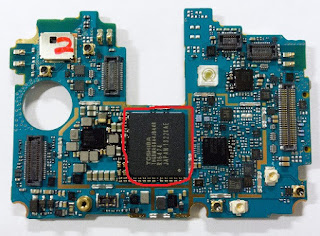
b) On Motherboard Navigate "eMMC" Chip. You Can See In Picture.
c) Now Connect USB With Battery Short Cut These Points With Cooper Wire That Shown In Picture Under The eMMc Chip.
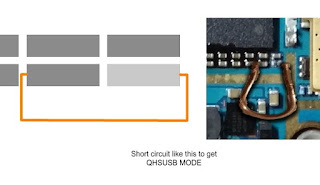
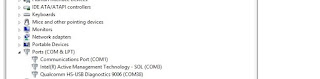
d) Now Your Device Shows In Device Manager As "Unknown Device" Then Install Drivers Which Given In Tools Section.
e) Your Device Will Shows Up.
Step 2.
1 : Download And Extract SRK Tool.
2 : Run SRK Tool.
3 : Press 4 Then 5.
4 : Select Your Device Model Number.
5 : Now Y For Yes, Then Again Y.
6: Then Disk Management Windows Pop-Up Then Select Disk Number Will Shows After Connecting Your Phone.
Note : Select Chose Correct Disk Which Shows lots Of Paritions.
7: Then Enter Disk Number.
8: Then Press Y And Wait
9: After Complete Your Phone Can Boot Into Download Mode.
10 : Then Boot into Download Mode And Flash kdz/tot File.
11 : Finished.... :)
7: Then Enter Disk Number.
8: Then Press Y And Wait
9: After Complete Your Phone Can Boot Into Download Mode.
10 : Then Boot into Download Mode And Flash kdz/tot File.
11 : Finished.... :)
Available link for download

Monday, January 23, 2017
NEW Smart Phone Flash Tool For MTK Phone or Qualcomm Phone
NEW Smart Phone Flash Tool For MTK Phone or Qualcomm Phone
This tool really awesome for MTK phone or Qualcomm cpu based phone you can use this tool when your device hang on logo problem, restarting issue, pattern lock trouble and in this tool mostly mtk cpu support or Qualcomm if when you first time use and message give on display for update so first do update after use so new feature update or also new cpu added and in this tool new feature of automatically update when you open tool but here impotent of for update must be on internet connection without you cant update or showing message for update in this post i put screenshot of which supported for mtk cpu or qualcomm cpu based in mtk cpu based in this feature update first of firmware upgrade second of Download only Third of Recovery fourth of Download user data or FAT or in Qualcomm cpu of first of Other phones second of v1(PD 1007) third of S1(PD1115) fourth of x510(PD1225)
Download Link
Smart Phone Flash Tool For MTK Phone or Qualcomm Phone
Download here
Screenshot: MTK Phone

Screenshot: Qualcomm Phone

Screenshot: ATtool

Flashing video in NEW SP Flash tool:
If any issue using this tool just write down here your query on below comment box i will soon good reply, not yet use this tool for flashing of MTK based cpu or Qualcomm if i use this tool then i will post tutorial and also if to be possible for video tutorial so i also that post if this tool use any one who technician of software related then please give me reply on below comment box.
Available link for download
Subscribe to:
Posts (Atom)