Showing posts with label lg. Show all posts
Showing posts with label lg. Show all posts
Monday, March 13, 2017
How To Hard Unbricked LG G2 All Variants Fix Qualcomm HS USB QDLoader 9006 mode
How To Hard Unbricked LG G2 All Variants Fix Qualcomm HS USB QDLoader 9006 mode
After Read This Guide You Will Fix These Situations.
No Recovery Mode.
No Download Mode.
No Boot.
Showing Qualcomm HS-USB QDLoader 9006 mode In Device Manager.
Showing Unknown Device In Device Manager.
Require Tools.
Download Latest SRK Tool From Here
Qualcomm Drivers From Here
Now Solve This Problem.
Step 1.
If Your Phone Show Qualcomm HS-USB QDLoader 9006 mode in Device Manager You Can Skip This Step.
If Your Phone Showing Qualcomm HS-USB QDLoader 9008
And Any Another So Enter Your Phone In 9006 Mode By Follow These Instructions.
If Your Phone Are Not On Qualcomm HS-USB QDLoader 9006 mode So Follow These Instructions To Enter Into Qualcomm Mode.
a) Disassemble Your Phone
b) On Motherboard Navigate "eMMC" Chip. You Can See In Picture.
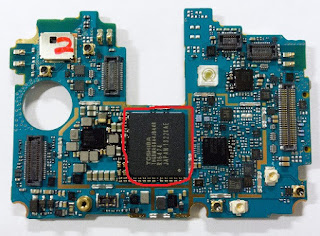
c) Now Connect USB With Battery Short Cut These Points With Cooper Wire That Shown In Picture Under The eMMc Chip.
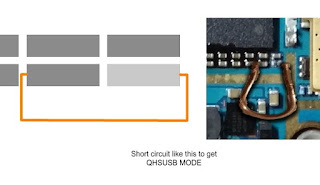
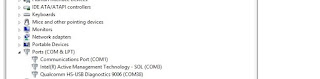
d) Now Your Device Shows In Device Manager As "Unknown Device" Then Install Drivers Which Given In Tools Section.
e) Your Device Will Shows Up.
Step 2.
1 : Download And Extract SRK Tool.
2 : Run SRK Tool.
3 : Press 4 Then 5.
4 : Select Your Device Model Number.
5 : Now Y For Yes, Then Again Y.
6: Then Disk Management Windows Pop-Up Then Select Disk Number Will Shows After Connecting Your Phone.
Note : Select Chose Correct Disk Which Shows lots Of Paritions.
7: Then Enter Disk Number.
8: Then Press Y And Wait
9: After Complete Your Phone Can Boot Into Download Mode.
10 : Then Boot into Download Mode And Flash kdz/tot File.
11 : Finished.... :)
7: Then Enter Disk Number.
8: Then Press Y And Wait
9: After Complete Your Phone Can Boot Into Download Mode.
10 : Then Boot into Download Mode And Flash kdz/tot File.
11 : Finished.... :)
Available link for download

Thursday, February 23, 2017
LG G3 Android 6 0 Marshmallow Firmware download here
LG G3 Android 6 0 Marshmallow Firmware download here

This firmware file you can use this flash file when your device hang on logo problem, restarting problem, security lock problem, password lock problem, pattern lock problem etc software related problem and you can use this tutorial without any box and this is free for all who know about software in mobile, impotent for flashing first must check your micro usb cable if not good then you cant flash it so check micro usb cable second check your device battery that is impotent for flashing if your device battery low so stop your device between flash so this is impotent for flash, before you flash save your data like contact, photos, videos etc because this is factory flash file so you cant save after full flash so must remember all are impotent notes.
Download Link
Model D855-[16gb] -Build-V30B Download here
Model D855-[32gb] -Build-V30B Download here
Available link for download
Wednesday, February 8, 2017
LG G4 H815 Android 6 0 Marshmallw Flash guide here
LG G4 H815 Android 6 0 Marshmallw Flash guide here
This Firmware file you can use this flash file when your device hang on logo problem, restarting problem, security lock problem, password lock problem, pattern lock problem etc software related problem and you can use this tutorial without any box and this is free for all who know about software in mobile, impotent for flashing first must check your micro usb cable if not good then you cant flash it so check micro usb cable second check your device battery that is impotent for flashing if your device battery low so stop your device between flash so this is impotent for flash, before you flash save your data like contact, photos, videos etc because this is factory flash file so you cant save after full flash so must remember all are impotent notes.
Download Link
LG G4 Firmware or Flash tool Download here
Required for flashing:
1. LG G4 device with good battery charged2. LGH815V20A 6.0 Firmware
3. Lg Flash Tool
4. LG Drivers
5. Micro usb cable
6. Computer or Laptop
Procedure:
1. Download firmware or flash tool from above link (if link not working just write down comment on below comment box)
2. Extract to both files to desktop or as you like path (must be installed to winrar in your computer or laptop)
3. Turn off device if your device on
4. Press and hold both Volume keys and Connect Micro usb cable screen will show Download Mode
5. Update the driver if not installed in your computer or laptop
6. Open LG Flash tool 2014
7. Choose CDMA option from Select Type
8. Choose CS_EMERGENCY option from PhoneMode
9. Click on Select KDZ File and choose H81615xxx_00.kdz file
10. Click on CSE Flash button (See below image for more know)

11. Now open second windows screeen
12. Click on Start button (see below image)
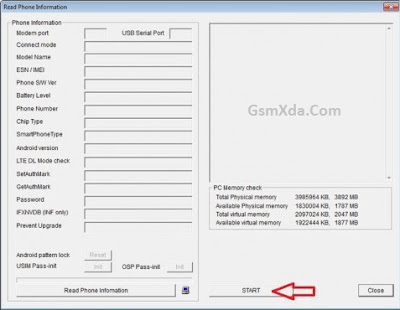
13. Wait until full install (do not unplug while your device in download mode)
14. Congratulation you are done
Available link for download
Friday, January 20, 2017
How To Unbrick LG Optimus G – fix bootloop security issues
How To Unbrick LG Optimus G – fix bootloop security issues
First of all reinstall kdz on your phone :
From here
http://appsandtips.blogspot.com/2014/08/how-to-upgrade-lg-optimus-g-to-kitkat.html
Download the manual adb wipe batch file
http://www.mediafire.com/?ru7erfxsz7p7s3p
http://www.mediafire.com/?ru7erfxsz7p7s3p
1) If the phone is stuck at the booting up LG/Telco logo, you will need to manually wipe the data partition.
2) Force the phone off by holding the power button for appx 15secs.
3) Put the phone into recovery mode by holding the volume up and home button concurrently, then press the power button. Let go of all the buttons after you see the LG logo on screen for the 2nd time and the screen goes blank thereafter (backlight may still be on). The phone will kind of reboot and then enters recovery mode. Repeat the process if you did not get it the first time.
4) With the phone in Recovery Mode, connect it to the computer, wait for the drivers to load (if doing it for the first time), unzip the wipe batch file downloaded earlier from step (4), double click on wipe.bat to execute the wipe command.
5) Your phone will auto reboot when wiped and (hopefully) boot as per normal.
Available link for download
Saturday, December 24, 2016
How to Upgrade LG Optimus G Pro F240L S K To Lollipop 5 0 1 Official
How to Upgrade LG Optimus G Pro F240L S K To Lollipop 5 0 1 Official
Great news for F240KLS users.... Official
Android Lollipop 5.0.1 is released
First Of ALL Download kdz Files
http://pkg02.xcdn.gdms.lge.com/dn/do...240K30d_00.kdz
F240L
http://pkg02.xcdn.gdms.lge.com/dn/do...240L30c_00.kdz
F240S
http://pkg02.xcdn.gdms.lge.com/dn/do...240S30c_00.kdz
2) Make sure you have LG United Drivers already installed Download from here
3) Download LG flash Tool 2014.zip from here
4) Extract zip And copy kdz File in LG flash tool 2014 folder
5) Run LGFlashTool2014.exe
If no run then download and install the Visual C library ++ Runtime:https://googledrive.com/host/0B9l4QOCXUmxXV19jN1ZrTnBwdTQ/VC_RedistInstaller.exe
3) Download LG flash Tool 2014.zip from here
4) Extract zip And copy kdz File in LG flash tool 2014 folder
5) Run LGFlashTool2014.exe
6) Put your Phone Download Mode And connect with computer
attaching the usb cable to the phone, holding both the up and down volume buttons at the same time and lastly inserting the usb cable into the computer; wait for the drivers to finish loading if doing it for the first time.
7) 1.Select type = 3GQCT
2.Phone mode = Emergency
3.Select kdz file
4.click on Normal flash
8) New window pop up
9) Wait For 100%
10) YOu aLL Done
Available link for download
Tuesday, December 20, 2016
How to solve Security error Flash Stock TOT file LG Optimus G all models
How to solve Security error Flash Stock TOT file LG Optimus G all models
First off All Download needed files :
1 : File *.tot (Google Drive)
F180L : LGF180LAT-00-V20l-LGU-KR-FEB-05-2013+0.zip (V20L)
F180S : LGF180SAT-00-V20i-SKT-KR-MAR-04-2013+0.zip (V20I)
F180K : LGF180KAT-00-V20i-KT-KR-MAR-06-2013+0.zip (V20I)
E975 : LGE975AT-00-V10b-EUR-XX-FEB-13-2013_0.tot (V10b)
E970 : LGE970AT-01-V20j-310-410-MAR-08-2013.zip (V20j)
DLL for f180 K L S : LGF180--DLL.zip
DLL E975 EUR : LGE975_130116_LGFLASHv141.dll
F180L : LGF180LAT-00-V20l-LGU-KR-FEB-05-2013+0.zip (V20L)
F180S : LGF180SAT-00-V20i-SKT-KR-MAR-04-2013+0.zip (V20I)
F180K : LGF180KAT-00-V20i-KT-KR-MAR-06-2013+0.zip (V20I)
E975 : LGE975AT-00-V10b-EUR-XX-FEB-13-2013_0.tot (V10b)
E970 : LGE970AT-01-V20j-310-410-MAR-08-2013.zip (V20j)
DLL for f180 K L S : LGF180--DLL.zip
DLL E975 EUR : LGE975_130116_LGFLASHv141.dll
Download link LGNPST automated : http://bit.ly/14hPMxn
This tutorial is for Att model :
Download correct file for your phone
Extract Zip and you will get TOT File

rename it to Bin

Now Download LGNPST automated Zip and Extaract it
After Extracting Run Install.bat as administrator

After completeing installation press enter

Now open Directory where LGNPST is installed
It is in LG electronics folder
for 32 bit system users go to programe files/ LG electronics
for 64 bit system users go to programe files(X86)/ LG electronics

Now open LGNPST in LGNPST folder

Connect your phone in USB by pressing and holding both Vol + and - key
It will connect to Download MOD


As you connect your phone drivers are started to be installed

After drivers are installed you will be able to see your device

Now click right side of DLL file files and select LS970.DLL

Now click right side of bin and select bin file which we renamed

Now click start and it warned you that this process will erase your data
click ok

Flashing will start and at 67-85 % it will flash firmware
if your device is booted then you can unplugg your device If not than you have to keep it plugged up to 100%

PART 2 :

Send feedback
All credit gose to +ShoaibShaikhE970 Thanks to shoaib
All credit gose to +ShoaibShaikhE970 Thanks to shoaib
Available link for download
Thursday, December 15, 2016
All LG Android Google Account Bypass or Verify Account tested
All LG Android Google Account Bypass or Verify Account tested

This guide really awesome because here no need to root device, no need full flash device and this is all variant LG support android 5.1.1 and 6.0 and this guide you can use to all LG android device before use this tutorial first ready all are content to carefully so you can easy done job most impotent of all are required for bypass must be working well like OTG cable, SD card or Pen drive and device usb socket if OTG cable issue so not detect OTG with device, SD Card or Pen Drive issue so OTG connect but not show SD card or Pen drive if this no show so you cant install apk, if your device usb socket issue so not detect OTG to devices so this all are most impotent for that here mention devices which you can done bypass google account using this tutorial.
Download Link
All LG Android Google Account Bypass APK Download here
Supported Models:
LG G4 – ALL MODEL, Flex2 – ALL MODEL, H320-H324-H324T,TR-H326-H343-H540,F,T-H5*42TR-H631-H635-LS660-LS665, LS770-MS345-MS631, H735-H736-H736P, LG G3, G4, g4 stylus,g4 stylo, LG G4C, LG G4S LFlex, LG G4 F500, LG G4 F500S, LG G4 F500K, LG G4 F500L, LG G4 H811VK, LG G4 H810, LG G4 H815, LG G4 H815T, LG G4 H815P, LG G4 H815TR, LG G4 H815L, LG G4 H815N, LG G4 H818, LG G4 H818P, LG G4 H818N, LG G4 VS986, LG G4 LS991, LG Flex 2 F510, LG Flex 2 F510S, LG Flex 2 F510K, LG Flex 2 F510L, LG Flex 2 H955, LG Flex 2 H955P, LG Flex 2 H955A, LG Flex 2 H959, LG Flex 2 VS996, LG G4 Stylus H635 LG G4 Stylus H542TR LG G4 Stylus H540T LG G Stylo (Stylus LS770), LG Tribute LS660, LG Tribute 2 LS665), LG G4 Stylus H635, LG G4 Stylus H542TR, LG G4 Stylus H540T, LG G Stylo (Stylus LS770), LG G4 F500, LG G4 F500S, LG G4 F500K, LG G4 F500L, LG G4 H811VK, LG G4 H810, LG G4 H815, LG G4 H815T, LG G4 H815P, LG G4 H815TR, LG G4 H815L, LG G4 H815N, LG G4 H818, LG G4 H818P, LG G4 H818N, LG G4 VS986, LG G4 LS991, LG Flex 2 F510, LG Flex 2 F510S, LG Flex 2 F510K, LG Flex 2 F510L, LG Flex 2 H955, LG Flex 2 H955P, LG Flex 2 H955A, LG Flex 2 H959, LG Flex 2 VS996, LG Flex 2 F510, LG Flex 2 F510S, LG Flex 2 F510K, LG Flex 2 F510L, LG Flex 2 H955, LG Flex 2 H955P, LG Flex 2 H955A, LG Flex 2 H959, LG Flex 2 VS996, LG G4 F500, LG G4 F500S, LG G4 F500K, LG G4 F500L, LG G4 H811VK, LG G4 H810, LG G4 H815, LG G4 H815T, LG G4 H815P, LG G4 H815TR, LG G4 H815L, LG G4 H815N, LG G4 H818, LG G4 H818P, LG G4 H818N, LG G4 VS986, LG G4 LS991, LG Tribute LS660, LG Tribute 2 LS665), LG G4 Stylus H635, LG G4 Stylus H542TR
Required For Bypass:
- Above Mention LG Android phone with good battery charged
- Shortcut.apk file
- OTG Cable
- SD card or Pen Drive
Procedure:
- Go to Accessibility
- Choose Switch Access and do turn ON
- Click on Settings button
- Go Down and choose Key Combo For OVERVIEW
- Press Volume Down button from behind to device then click Ok
- Go Back and attach SD Card to Compute and paste apk
- Now attach OTG to device
- Click on Emergency Call option
- Type 112 and click on Call
- Press Volume Down button to during call
- Click on Dual Window and choose File Manager
- Now click on End Call option
- Press Volume Down button and choose All Files
- Cilck on USB Storage
- Touch on Shortcut.apk file
- Click on Settings and choose Unknown sources option and do Enable and then click OK
- Install Shortcut.apk file
- Choose OPEN option
- Now Type Settings in Search option and open it
- Click on TRY option
- Go to General Tab
- Click on Users option
- Click on ADD USER and choose SET UP
- Click NEXT button and connect your WI-FI and then click NEXT
- Choose SKIP button and click again SKIP button
- Type any in FIRST NAME and also Type any in Last NAME and then click NEXT
- Click More option and click NEXT button
- Now Open Menu and choose Settings option
- Go to General and choose Users
- Click on Owner account and choose YES option (Switch user)
- Now again click on TRY option and go to GENERAL Tab
- And Go Down and choose Backup & reset option
- Again Go Down and choose Factory data reset
- Click on RESET PHONE option
- Choose Delete All and then click OK (Wait until device Turn on)
- Now choose Your Language and click on NEXT button
- Choose SKIP Wi-Fi again choose SKIP ANYWAY
- Click NEXT again choose NEXT (Date & time)
- Choose NEXT and SKIP option until your device arrive HOME Screen
- Congratulation you are done
All LG Android Google Account Bypass or Verify Account Video HERE
Available link for download
Thursday, December 1, 2016
LG Android Original Firmware Download tool here
LG Android Original Firmware Download tool here

This tool really working well because i downloaded firmware using this tool and this tool by xdadevelopers if you want to download tested firmware just need to model number or phone serial number after click on save button and choose path where you want to save i use firmware which downloaded from using this tool and device working well but everyone know how to flash using firmware so please carefully flash device, this tool in benefit which original download if you have to original download then not risk after flash device will dead or other issue and in this blog many LG android device flash tutorial if you dont know how to flash LG android device you can search using this blog and if not put tutorial then you can do comment on below comment box then i will soon reply with best.
Download Link
LG Android Original Firmware Download Tool here
Available link for download
Friday, September 30, 2016
How to Fix Service Disabled Problem in LG Mobiles
How to Fix Service Disabled Problem in LG Mobiles
First Of All :
Install Stock rom on your phone
Then
Run phone App
Then
Enter this code
5457#* enter your model number #
i.e, 5457#*240# for LG G Pro F240
Then
A menu popup
click on Wcdma channel
and select on full option
then press back button
then click on band selection
select Gsm bands only
your Signal will come Back :)
Available link for download
Tuesday, September 20, 2016
How To Hard UnBricked LG G3 All Variants
How To Hard UnBricked LG G3 All Variants
After Read This Tutorial You Will Able To Fix These Situations.
NO BOOT , NO RECOVERY , NO DOWNLOAD MODE
1 : Shows "LGE AndroidNet USB port"
1 : Shows "LGE AndroidNet USB port"
"LGE AndroidNet USB Modem"

2 : Only Shows "Qualcomm 9008"

Now Start Fixing
If You Are On Situation "1" You To Need To Change "LGE AndroidNet USB port" To "Qualcomm 9008"
1- open the phone
2- On MotherBoard Remove The Cover Of "eMMC"
 |
| MotherBoard |
3- short cut the pins in the photo you provided "without the battery" After Connect The "USB Data Cable"

After This Your Phone Show "Qualcomm 9008"
Reassemble Your Phone
And Connect With PC With Out Battary
Now Fixing "Qualcomm HS-USB QDLoader 9008"
*Smart Boot Diagnostic Tool Link
*QDLoader HS-USB driver for 64bit windows pc Link
*QDLoader HS-USB driver for 32bit windows pc Link
*AP-CHIP dll and ATT achive for Flash Tool for use without LG B2B connection Link
*LG FlashTool 1.5.10.1120 Link
*Megalock .dll file to overwrite in flash tool folder for B2B nologin Link
*How To Calibrate document Link This A Microsoft Excel Document
Here is a Microsoft Powerpoint document that shows how to Flash a "dead boot" LG phone Link Read This Document And Follow This Instruction.
*QDLoader HS-USB driver for 64bit windows pc Link
*QDLoader HS-USB driver for 32bit windows pc Link
*AP-CHIP dll and ATT achive for Flash Tool for use without LG B2B connection Link
*LG FlashTool 1.5.10.1120 Link
*Megalock .dll file to overwrite in flash tool folder for B2B nologin Link
*How To Calibrate document Link This A Microsoft Excel Document
Here is a Microsoft Powerpoint document that shows how to Flash a "dead boot" LG phone Link Read This Document And Follow This Instruction.
Available link for download
Monday, September 12, 2016
LG G4 Android 6 0 Marshmallow Firmware download here
LG G4 Android 6 0 Marshmallow Firmware download here
This Firmware file you can use this flash file when your device hang on logo problem, restarting problem, security lock problem, password lock problem, pattern lock problem etc software related problem and you can use this tutorial without any box and this is free for all who know about software in mobile, impotent for flashing first must check your micro usb cable if not good then you cant flash it so check micro usb cable second check your device battery that is impotent for flashing if your device battery low so stop your device between flash so this is impotent for flash, before you flash save your data like contact, photos, videos etc because this is factory flash file so you cant save after full flash so must remember all are impotent notes.
Download Link
Model H815 -Build-V20A Download here
Model VS986 -Build-V24C Download here
LGH815V20A 6.0 Firmware Download here
LG Flash tool Download here
LG Drivers Download here
LGH815V20A 6.0 Firmware Download here
LG Flash tool Download here
LG Drivers Download here
Available link for download
Thursday, September 1, 2016
LG Optimus L7II P713 Flash done Flash tool tested
LG Optimus L7II P713 Flash done Flash tool tested

This device in hang logo issue when first time customer take to our shop when i first try in hardreset device was done but its very slow so i means not done then decide to flash for solution but you can flash device while your device in restarting problem, hang on logo, pattern unlock etc software issue and here some impotent notes for flash first of must your device battery charged up 80% if low and try to flash then your device will be dead or other issue.
This flash file tested by me without any error working well, you can use this flash file when your device hang on logo problem, restarting problem, security lock problem, password lock problem, pattern lock problem etc software related problem and you can use this tutorial without any box and this is free for all who know about software in mobile, impotent for flashing first must check your micro usb cable if not good then you cant flash it so check micro usb cable second check your device battery that is impotent for flashing if your device battery low so stop your device between flash so this is impotent for flash, before you flash save your data like contact, photos, videos etc because this is factory flash file so you cant save after full flash so must remember all are impotent notes.
Download Link
LG Optimus L7II (P713) Flash file Download here
LG Optimus L7II (P713) Flash tool Download here
Required for flash:
1. LG Optimus L7II (P713) with good battery charged
2. LG Optimus L7II (P713) tested firmware
3. KDZ_FW_UPD_EN Flash tool
4. Micro usb cable
5. Computer or Laptop
Procedure:
1. First download tested firmware or flash tool from above link
2. Extract to desktop or as you like path (must be installed winrar software in your computer)
3. Open KDZ_FW_UPD_EN folder and choose KDZ_FW_UPD.exe file and open it
4. Select CDMA in Software update type option
5. Select EMERGENCY in Phone Mode option
6. Click on Select KDZ file button and choose V20C_00.kdz file
7. Click on Start Upgrade button
8. Press and hold Volume Down button and insert usb cable (for Emergency mode)
9. Wait until driver installed, if driver installed in your computer then download start automatically
10. Wait until full installed android system into device
11. Congratulation you are done
LG Optimus L7II (P713) Flash done Flash tool Screenshot:

LG Optimus L7II (P713) Flash done Flash tool Video HERE
Available link for download
Subscribe to:
Posts (Atom)