Showing posts with label error. Show all posts
Showing posts with label error. Show all posts
Saturday, January 7, 2017
Fix External Hard Drive Error The Disk Structure is Corrupted or Unreadable in Windows 7
Fix External Hard Drive Error The Disk Structure is Corrupted or Unreadable in Windows 7
External hard drive are more popular these days because of their portability and availability in verity of sizes (still growing). It offers flexibility to carry large amount of data as well as helps you restore data if the primary location becomes inactive or seriously damaged. However, at times, external hard drive itself becomes inaccessible or prevent users to access the stored files. Be it virus infection, directory structure corruption, file system damages etc.
Once such external hard drives holding GB’s of valuable stuff, you may become panicked and frustrated as you’d have no idea about how to deal with such problems. Disk Structure corruption is yet another common error that comes whenever you tries to access your external hard drive and prevent users to access or copy the stored files.
As all of your files were stored there, formatting will permanently wipes your important files and make it permanent non recoverable even by using professional recovery tools. We’ll go through series of steps mentioned in this tutorial to fix this error easily (if you are lucky) and retrieve all of your important files as well as make the external drive usable again.
Below are the common error types you’ll see once similar situation strikes to your external hard drive:
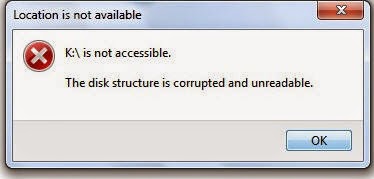
Error 0x80070571 : The disk structure is corrupted or unreadable
This disk in the drive is damaged
Please format this disk!!
The Drive isn’t accessible
The disk in drive is not formatted. Do you want to format it now?
Common reasons behind this error
External hard drive is created using moving mechanical moving parts which will may fails either sooner or later. Some unavoidable instances makes these drive inaccessible or damaged immediately and makes user data beyond the reach of known recovery software. Below are the some common reasons responsible for this situation:
- Improperly connecting or removing the drive
- The file system itself become damaged cannot be used to access the drive
- File system has become RAW which cannot be used any longer to access, manage or format the drive. In most instances, those drives becomes completely unusable.
- Large number of bad sectors and blocks has been emerged which prevents externally drive to perform normally. You’ll get freezing, hanging, corrupt files or similar issues when bad sectors took place on your drive.
Troubleshooting steps
As the drive is going through serious damages, there is no guarantee that any specific or subsequent steps could help you fixing the problem. However, let’s follow the standard procedure to deal with this error and see if we may able to resolve it:
- Right click on My Computer and choose Manage.
- Enter administrative details if asked and hit enter
- Go to Disk Management located under Storage at the left hand side menus.
- From the image below, check and make sure that any or all the volumes is listed along with the drive that’s connected externally. If you’ve recently faced the above mentioned error, you’ll see the volume status as RAW or offline
- Right click on that drive and choose to format it. As stated earlier, formatting will permanently wipes off all your important files and folders and your hope to get it back ever.
- Alternatively, you can right click on the external drive from Windows explorer interface and go to its properties.
- Choose the Tools tab and hit enter after selecting the check box stating ‘Check this disk for errors’.
- Once the operation completed successfully, try restarting your system and see if the error resolved.
Nothing helps, still can’t able to retrieve files?
Many times, the error will continue to persist even after following all the troubleshooting steps carefully. Additionally, nothing matters except your precious files that still clicking somewhere on your hard drive, right?? Don’t worry, as we are covering up some really useful utility that helps windows enthusiasts in getting back their data from various crucial situations of data loss like above.
Stellar Phoenix Partition Recovery is a life savior utility that can easily detect drives (both internal and external) going through serious damages and later, allows you to safely restore all your important files. Download the software from here and install it on your PC. Once installed, start the software from the desktop or installed software location. Make sure the drive is connected properly and shown in the software interface.
This tool offers powerful recovery options to recover data even from the severely damaged or inaccessible drives. As talked in the situation above and if the problem drive status is shown as RAW, you’ll still be able to recover data from RAW drives using this efficient partition recovery tool.
Many times, the error will continue to persist even after following all the troubleshooting steps carefully. Additionally, nothing matters except your precious files that still clicking somewhere on your hard drive, right?? Don’t worry, as we are covering up some really useful utility that helps windows enthusiasts in getting back their data from various crucial situations of data loss like above.
Stellar Phoenix Partition Recovery is a life savior utility that can easily detect drives (both internal and external) going through serious damages and later, allows you to safely restore all your important files. Download the software from here and install it on your PC. Once installed, start the software from the desktop or installed software location. Make sure the drive is connected properly and shown in the software interface.
This tool offers powerful recovery options to recover data even from the severely damaged or inaccessible drives. As talked in the situation above and if the problem drive status is shown as RAW, you’ll still be able to recover data from RAW drives using this efficient partition recovery tool.
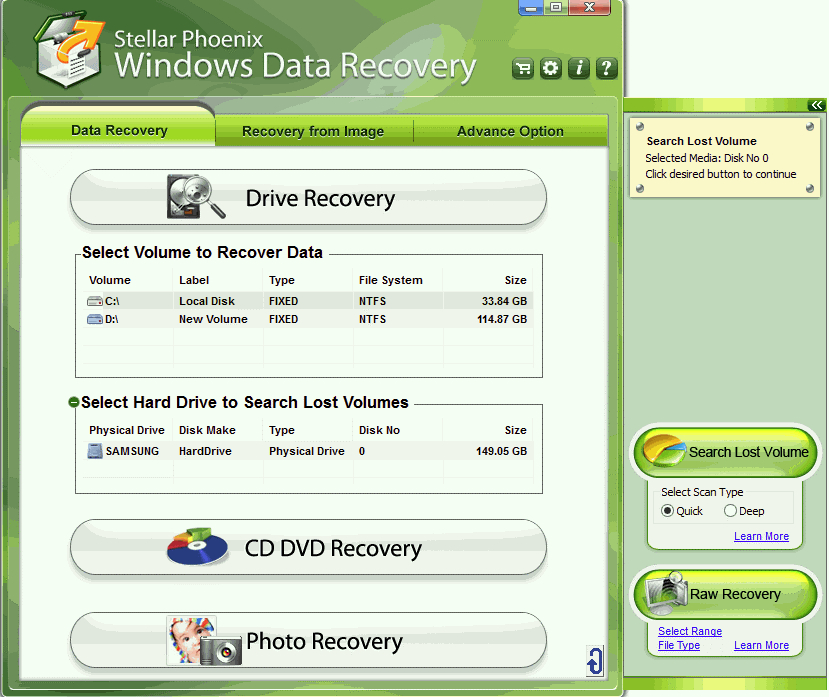
Click on the problem drive, listed under ‘Data Recovery’ > ‘Drive Recovery’ tab. The subsequent recovery methods will pop up as soon as you click on any particular drive or volume. Choose ‘Advanced Recovery’ from the available methods and let the software scans your drive completely (do not stop scanning at mid). Don’t panic if the software is taking too long to scan your problem drive. It may also possible that sometime the whole system freezes and needs you to restart the it. That’s because of the data recovery tools limitations and drive nature (RAW status) which takes really tough luck to getting detected on the system and recover data off the drive.
Once the scanning is completed, you’ll be able to see preview of any or all the recoverable files and folders using the preview pane, located at the top right corner. Chose or select desired files for recovery and click on Recovery button. Make sure that you’ve activated the software before start recovering your files as saving is disabled in demo version.
Do let us know your feedback or your particular situation if the error still persists!!
Available link for download

Tuesday, December 20, 2016
How to solve Security error Flash Stock TOT file LG Optimus G all models
How to solve Security error Flash Stock TOT file LG Optimus G all models
First off All Download needed files :
1 : File *.tot (Google Drive)
F180L : LGF180LAT-00-V20l-LGU-KR-FEB-05-2013+0.zip (V20L)
F180S : LGF180SAT-00-V20i-SKT-KR-MAR-04-2013+0.zip (V20I)
F180K : LGF180KAT-00-V20i-KT-KR-MAR-06-2013+0.zip (V20I)
E975 : LGE975AT-00-V10b-EUR-XX-FEB-13-2013_0.tot (V10b)
E970 : LGE970AT-01-V20j-310-410-MAR-08-2013.zip (V20j)
DLL for f180 K L S : LGF180--DLL.zip
DLL E975 EUR : LGE975_130116_LGFLASHv141.dll
F180L : LGF180LAT-00-V20l-LGU-KR-FEB-05-2013+0.zip (V20L)
F180S : LGF180SAT-00-V20i-SKT-KR-MAR-04-2013+0.zip (V20I)
F180K : LGF180KAT-00-V20i-KT-KR-MAR-06-2013+0.zip (V20I)
E975 : LGE975AT-00-V10b-EUR-XX-FEB-13-2013_0.tot (V10b)
E970 : LGE970AT-01-V20j-310-410-MAR-08-2013.zip (V20j)
DLL for f180 K L S : LGF180--DLL.zip
DLL E975 EUR : LGE975_130116_LGFLASHv141.dll
Download link LGNPST automated : http://bit.ly/14hPMxn
This tutorial is for Att model :
Download correct file for your phone
Extract Zip and you will get TOT File

rename it to Bin

Now Download LGNPST automated Zip and Extaract it
After Extracting Run Install.bat as administrator

After completeing installation press enter

Now open Directory where LGNPST is installed
It is in LG electronics folder
for 32 bit system users go to programe files/ LG electronics
for 64 bit system users go to programe files(X86)/ LG electronics

Now open LGNPST in LGNPST folder

Connect your phone in USB by pressing and holding both Vol + and - key
It will connect to Download MOD


As you connect your phone drivers are started to be installed

After drivers are installed you will be able to see your device

Now click right side of DLL file files and select LS970.DLL

Now click right side of bin and select bin file which we renamed

Now click start and it warned you that this process will erase your data
click ok

Flashing will start and at 67-85 % it will flash firmware
if your device is booted then you can unplugg your device If not than you have to keep it plugged up to 100%

PART 2 :

Send feedback
All credit gose to +ShoaibShaikhE970 Thanks to shoaib
All credit gose to +ShoaibShaikhE970 Thanks to shoaib
Available link for download
Thursday, December 15, 2016
How To Fix XAMPP – Error Apache shutdown unexpectedly
How To Fix XAMPP – Error Apache shutdown unexpectedly
Changing XAMPP Default Port
If you are desperate to get XAMPP up and running, you should consider changing the port from the default 80 to say 7777.
 In the XAMPP Control Panel, click on the Apache – Config button which is located next to the ‘Logs’ button. Select ‘Apache (httpd.conf)’ from the drop down. (Notepad should open) Do Ctrl+F to find ’80’ and change line Listen 80 to Listen 7777 Find again and change line ServerName localhost:80 to
ServerName localhost:7777
Save and re-start Apache. It should be running by now.The only demerit to this technique is, you have to explicitly include the port number in the localhost url. Rather than
http://localhost it becomes http://localhost:7777.
Available link for download
Subscribe to:
Posts (Atom)