Showing posts with label of. Show all posts
Showing posts with label of. Show all posts
Friday, March 24, 2017
types of computer network
types of computer network
Ethernet Tutorial - Part I: Networking Basics
Computer networking has become an integral part of business today. Individuals, professionals and academics have also learned to rely on computer networks for capabilities such as electronic mail and access to remote databases for research and communication purposes. Networking has thus become an increasingly pervasive, worldwide reality because it is fast, efficient, reliable and effective. Just how all this information is transmitted, stored, categorized and accessed remains a mystery to the average computer user.This tutorial will explain the basics of some of the most popular technologies used in networking, and will include the following:
- Types of Networks - including LANs, WANs and WLANs
- The Internet and Beyond - The Internet and its contributions to intranets and extranets
- Types of LAN Technology - including Ethernet, Fast Ethernet, Gigabit Ethernet, 10 Gigabit Ethernet,
ATM, PoE and Token Ring - Networking and Ethernet Basics - including standard code, media, topographies, collisions and CSMA/CD
- Ethernet Products - including transceivers, network interface cards, hubs and repeaters
Types of Networks
In describing the basics of networking technology, it will be helpful to explain the different types of networks in use.Local Area Networks (LANs)
A network is any collection of independent computers that exchange information with each other over a shared communication medium. Local Area Networks or LANs are usually confined to a limited geographic area, such as a single building or a college campus. LANs can be small, linking as few as three computers, but can often link hundreds of computers used by thousands of people. The development of standard networking protocols and media has resulted in worldwide proliferation of LANs throughout business and educational organizations.Wide Area Networks (WANs)
Often elements of a network are widely separated physically. Wide area networking combines multiple LANs that are geographically separate. This is accomplished by connecting the several LANs with dedicated leased lines such as a T1 or a T3, by dial-up phone lines (both synchronous and asynchronous), by satellite links and by data packet carrier services. WANs can be as simple as a modem and a remote access server for employees to dial into, or it can be as complex as hundreds of branch offices globally linked. Special routing protocols and filters minimize the expense of sending data over vast distances.Wireless Local Area Networks (WLANs)
Wireless LANs, or WLANs, use radio frequency (RF) technology to transmit and receive data over the air. This minimizes the need for wired connections. WLANs give users mobility as they allow connection to a local area network without having to be physically connected by a cable. This freedom means users can access shared resources without looking for a place to plug in cables, provided that their terminals are mobile and within the designated network coverage area. With mobility, WLANs give flexibility and increased productivity, appealing to both entrepreneurs and to home users. WLANs may also enable network administrators to connect devices that may be physically difficult to reach with a cable.The Institute for Electrical and Electronic Engineers (IEEE) developed the 802.11 specification for wireless LAN technology. 802.11 specifies over-the-air interface between a wireless client and a base station, or between two wireless clients. WLAN 802.11 standards also have security protocols that were developed to provide the same level of security as that of a wired LAN.
The first of these protocols is Wired Equivalent Privacy (WEP). WEP provides security by encrypting data sent over radio waves from end point to end point.
The second WLAN security protocol is Wi-Fi Protected Access (WPA). WPA was developed as an upgrade to the security features of WEP. It works with existing products that are WEP-enabled but provides two key improvements: improved data encryption through the temporal key integrity protocol (TKIP) which scrambles the keys using a hashing algorithm. It has means for integrity-checking to ensure that keys have not been tampered with. WPA also provides user authentication with the extensible authentication protocol (EAP).
Wireless Protocols
| Specification | Data Rate | Modulation Scheme | Security |
| 802.11 | 1 or 2 Mbps in the 2.4 GHz band | FHSS, DSSS | WEP and WPA |
| 802.11a | 54 Mbps in the 5 GHz band | OFDM | WEP and WPA |
| 802.11b/High Rate/Wi-Fi | 11 Mbps (with a fallback to 5.5, 2, and 1 Mbps) in the 2.4 GHz band | DSSS with CCK | WEP and WPA |
| 802.11g/Wi-Fi | 54 Mbps in the 2.4 GHz band | OFDM when above 20Mbps, DSSS with CCK when below 20Mbps | WEP and WPA |
The Internet and Beyond
More than just a technology, the Internet has become a way of life for many people, and it has spurred a revolution of sorts for both public and private sharing of information. The most popular source of information about almost anything, the Internet is used daily by technical and non-technical users alike.The Internet: The Largest Network of All
With the meteoric rise in demand for connectivity, the Internet has become a major communications highway for millions of users. It is a decentralized system of linked networks that are worldwide in scope. It facilitates data communication services such as remote log-in, file transfer, electronic mail, the World Wide Web and newsgroups. It consists of independent hosts of computers that can designate which Internet services to use and which of their local services to make available to the global community.Initially restricted to military and academic institutions, the Internet now operates on a three-level hierarchy composed of backbone networks, mid-level networks and stub networks. It is a full-fledged conduit for any and all forms of information and commerce. Internet websites now provide personal, educational, political and economic resources to virtually any point on the planet.
Intranet: A Secure Internet-like Network for Organizations
With advancements in browser-based software for the Internet, many private organizations have implemented intranets. An intranet is a private network utilizing Internet-type tools, but available only within that organization. For large organizations, an intranet provides easy access to corporate information for designated employees.Extranet: A Secure Means for Sharing Information with Partners
While an intranet is used to disseminate confidential information within a corporation, an extranet is commonly used by companies to share data in a secure fashion with their business partners. Internet-type tools are used by content providers to update the extranet. Encryption and user authentication means are provided to protect the information, and to ensure that designated people with the proper access privileges are allowed to view it.Types of LAN Technology
Ethernet
Ethernet is the most popular physical layer LAN technology in use today. It defines the number of conductors that are required for a connection, the performance thresholds that can be expected, and provides the framework for data transmission. A standard Ethernet network can transmit data at a rate up to 10 Megabits per second (10 Mbps). Other LAN types include Token Ring, Fast Ethernet, Gigabit Ethernet, 10 Gigabit Ethernet, Fiber Distributed Data Interface (FDDI), Asynchronous Transfer Mode (ATM) and LocalTalk.Ethernet is popular because it strikes a good balance between speed, cost and ease of installation. These benefits, combined with wide acceptance in the computer marketplace and the ability to support virtually all popular network protocols, make Ethernet an ideal networking technology for most computer users today.
The Institute for Electrical and Electronic Engineers developed an Ethernet standard known as IEEE Standard 802.3. This standard defines rules for configuring an Ethernet network and also specifies how the elements in an Ethernet network interact with one another. By adhering to the IEEE standard, network equipment and network protocols can communicate efficiently.
Fast Ethernet
The Fast Ethernet standard (IEEE 802.3u) has been established for Ethernet networks that need higher transmission speeds. This standard raises the Ethernet speed limit from 10 Mbps to 100 Mbps with only minimal changes to the existing cable structure. Fast Ethernet provides faster throughput for video, multimedia, graphics, Internet surfing and stronger error detection and correction.There are three types of Fast Ethernet: 100BASE-TX for use with level 5 UTP cable; 100BASE-FX for use with fiber-optic cable; and 100BASE-T4 which utilizes an extra two wires for use with level 3 UTP cable. The 100BASE-TX standard has become the most popular due to its close compatibility with the 10BASE-T Ethernet standard.
Network managers who want to incorporate Fast Ethernet into an existing configuration are required to make many decisions. The number of users in each site on the network that need the higher throughput must be determined; which segments of the backbone need to be reconfigured specifically for 100BASE-T; plus what hardware is necessary in order to connect the 100BASE-T segments with existing 10BASE-T segments. Gigabit Ethernet is a future technology that promises a migration path beyond Fast Ethernet so the next generation of networks will support even higher data transfer speeds.
Gigabit Ethernet
Gigabit Ethernet was developed to meet the need for faster communication networks with applications such as multimedia and Voice over IP (VoIP). Also known as "gigabit-Ethernet-over-copper" or 1000Base-T, GigE is a version of Ethernet that runs at speeds 10 times faster than 100Base-T. It is defined in the IEEE 802.3 standard and is currently used as an enterprise backbone. Existing Ethernet LANs with 10 and 100 Mbps cards can feed into a Gigabit Ethernet backbone to interconnect high performance switches, routers and servers.From the data link layer of the OSI model upward, the look and implementation of Gigabit Ethernet is identical to that of Ethernet. The most important differences between Gigabit Ethernet and Fast Ethernet include the additional support of full duplex operation in the MAC layer and the data rates.
10 Gigabit Ethernet
10 Gigabit Ethernet is the fastest and most recent of the Ethernet standards. IEEE 802.3ae defines a version of Ethernet with a nominal rate of 10Gbits/s that makes it 10 times faster than Gigabit Ethernet.Unlike other Ethernet systems, 10 Gigabit Ethernet is based entirely on the use of optical fiber connections. This developing standard is moving away from a LAN design that broadcasts to all nodes, toward a system which includes some elements of wide area routing. As it is still very new, which of the standards will gain commercial acceptance has yet to be determined.
Asynchronous Transfer Mode (ATM)
ATM is a cell-based fast-packet communication technique that can support data-transfer rates from sub-T1 speeds to 10 Gbps. ATM achieves its high speeds in part by transmitting data in fixed-size cells and dispensing with error-correction protocols. It relies on the inherent integrity of digital lines to ensure data integrity.ATM can be integrated into an existing network as needed without having to update the entire network. Its fixed-length cell-relay operation is the signaling technology of the future and offers more predictable performance than variable length frames. Networks are extremely versatile and an ATM network can connect points in a building, or across the country, and still be treated as a single network.
Power over Ethernet (PoE)
PoE is a solution in which an electrical current is run to networking hardware over the Ethernet Category 5 cable or higher. This solution does not require an extra AC power cord at the product location. This minimizes the amount of cable needed as well as eliminates the difficulties and cost of installing extra outlets.LAN Technology Specifications
| Name | IEEE Standard | Data Rate | Media Type | Maximum Distance |
| Ethernet | 802.3 | 10 Mbps | 10Base-T | 100 meters |
| Fast Ethernet/ 100Base-T | 802.3u | 100 Mbps | 100Base-TX 100Base-FX | 100 meters 2000 meters |
| Gigabit Ethernet/ GigE | 802.3z | 1000 Mbps | 1000Base-T 1000Base-SX 1000Base-LX | 100 meters 275/550 meters 550/5000 meters |
| 10 Gigabit Ethernet | IEEE 802.3ae | 10 Gbps | 10GBase-SR 10GBase-LX4 10GBase-LR/ER 10GBase-SW/LW/EW | 300 meters 300m MMF/ 10km SMF 10km/40km 300m/10km/40km |
Token Ring
Token Ring is another form of network configuration. It differs from Ethernet in that all messages are transferred in one direction along the ring at all times. Token Ring networks sequentially pass a “token” to each connected device. When the token arrives at a particular computer (or device), the recipient is allowed to transmit data onto the network. Since only one device may be transmitting at any given time, no data collisions occur. Access to the network is guaranteed, and time-sensitive applications can be supported. However, these benefits come at a price. Component costs are usually higher, and the networks themselves are considered to be more complex and difficult to implement. Various PC vendors have been proponents of Token Ring networks.Networking and Ethernet Basics
Protocols
After a physical connection has been established, network protocols define the standards that allow computers to communicate. A protocol establishes the rules and encoding specifications for sending data. This defines how computers identify one another on a network, the form that the data should take in transit, and how this information is processed once it reaches its final destination. Protocols also define procedures for determining the type of error checking that will be used, the data compression method, if one is needed, how the sending device will indicate that it has finished sending a message, how the receiving device will indicate that it has received a message, and the handling of lost or damaged transmissions or "packets".The main types of network protocols in use today are: TCP/IP (for UNIX, Windows NT, Windows 95 and other platforms); IPX (for Novell NetWare); DECnet (for networking Digital Equipment Corp. computers); AppleTalk (for Macintosh computers), and NetBIOS/NetBEUI (for LAN Manager and Windows NT networks).
Although each network protocol is different, they all share the same physical cabling. This common method of accessing the physical network allows multiple protocols to peacefully coexist over the network media, and allows the builder of a network to use common hardware for a variety of protocols. This concept is known as "protocol independence," which means that devices which are compatible at the physical and data link layers allow the user to run many different protocols over the same medium.
The Open System Interconnection Model
The Open System Interconnection (OSI) model specifies how dissimilar computing devices such as Network Interface Cards (NICs), bridges and routers exchange data over a network by offering a networking framework for implementing protocols in seven layers. Beginning at the application layer, control is passed from one layer to the next. The following describes the seven layers as defined by the OSI model, shown in the order they occur whenever a user transmits information.- Layer 7: Application
- This layer supports the application and end-user processes. Within this layer, user privacy is considered and communication partners, service and constraints are all identified. File transfers, email, Telnet and FTP applications are all provided within this layer.
- Layer 6: Presentation (Syntax)
- Within this layer, information is translated back and forth between application and network formats. This translation transforms the information into data the application layer and network recognize regardless of encryption and formatting.
- Layer 5: Session
- Within this layer, connections between applications are made, managed and terminated as needed to allow for data exchanges between applications at each end of a dialogue.
- Layer 4: Transport
- Complete data transfer is ensured as information is transferred transparently between systems in this layer. The transport layer also assures appropriate flow control and end-to-end error recovery.
- Layer 3: Network
- Using switching and routing technologies, this layer is responsible for creating virtual circuits to transmit information from node to node. Other functions include routing, forwarding, addressing, internetworking, error and congestion control, and packet sequencing.
- Layer 2: Data Link
- Information in data packets are encoded and decoded into bits within this layer. Errors from the physical layer flow control and frame synchronization are corrected here utilizing transmission protocol knowledge and management. This layer consists of two sub layers: the Media Access Control (MAC) layer, which controls the way networked computers gain access to data and transmit it, and the Logical Link Control (LLC) layer, which controls frame synchronization, flow control and error checking.
- Layer 1: Physical
- This layer enables hardware to send and receive data over a carrier such as cabling, a card or other physical means. It conveys the bitstream through the network at the electrical and mechanical level. Fast Ethernet, RS232, and ATM are all protocols with physical layer components.
Standard Ethernet Code
In order to understand standard Ethernet code, one must understand what each digit means. Following is a guide:Guide to Ethernet Coding
| 10 | at the beginning means the network operates at 10Mbps. |
| BASE | means the type of signaling used is baseband. |
| 2 or 5 | at the end indicates the maximum cable length in meters. |
| T | the end stands for twisted-pair cable. |
| X | at the end stands for full duplex-capable cable. |
| FL | at the end stands for fiber optic cable. |
For example: 100BASE-TX indicates a Fast Ethernet connection (100 Mbps) that uses a
twisted pair cable capable of full-duplex transmissions.
twisted pair cable capable of full-duplex transmissions.
Media
An important part of designing and installing an Ethernet is selecting the appropriate Ethernet medium. There are four major types of media in use today: Thickwire for 10BASE5 networks; thin coax for 10BASE2 networks; unshielded twisted pair (UTP) for 10BASE-T networks; and fiber optic for 10BASE-FL or Fiber-Optic Inter-Repeater Link (FOIRL) networks. This wide variety of media reflects the evolution of Ethernet and also points to the technologys flexibility. Thickwire was one of the first cabling systems used in Ethernet, but it was expensive and difficult to use. This evolved to thin coax, which is easier to work with and less expensive. It is important to note that each type of Ethernet, Fast Ethernet, Gigabit Ethernet, 10 Gigabit Ethernet, has its own preferred media types.The most popular wiring schemes are 10BASE-T and 100BASE-TX, which use unshielded twisted pair (UTP) cable. This is similar to telephone cable and comes in a variety of grades, with each higher grade offering better performance. Level 5 cable is the highest, most expensive grade, offering support for transmission rates of up to 100 Mbps. Level 4 and level 3 cable are less expensive, but cannot support the same data throughput speeds; level 4 cable can support speeds of up to 20 Mbps; level 3 up to 16 Mbps. The 100BASE-T4 standard allows for support of 100 Mbps Ethernet over level 3 cables, but at the expense of adding another pair of wires (4 pair instead of the 2 pair used for 10BASE-T). For most users, this is an awkward scheme and therefore 100BASE-T4 has seen little popularity. Level 2 and level 1 cables are not used in the design of 10BASE-T networks.
For specialized applications, fiber-optic, or 10BASE-FL, Ethernet segments are popular. Fiber-optic cable is more expensive, but it is invaluable in situations where electronic emissions and environmental hazards are a concern. Fiber-optic cable is often used in inter-building applications to insulate networking equipment from electrical damage caused by lightning. Because it does not conduct electricity, fiber-optic cable can also be useful in areas where heavy electromagnetic interference is present, such as on a factory floor. The Ethernet standard allows for fiber-optic cable segments up to two kilometers long, making fiber-optic Ethernet perfect for connecting nodes and buildings that are otherwise not reachable with copper media.
Cable Grade Capabilities
| Cable Name | Makeup | Frequency Support | Data Rate | Network Compatibility |
| Cat-5 | 4 twisted pairs of copper wire -- terminated by RJ45 connectors | 100 MHz | Up to 1000Mbps | ATM, Token Ring,1000Base-T, 100Base-TX, 10Base-T |
| Cat-5e | 4 twisted pairs of copper wire -- terminated by RJ45 connectors | 100 MHz | Up to 1000Mbps | 10Base-T, 100Base-TX, 1000Base-T |
| Cat-6 | 4 twisted pairs of copper wire -- terminated by RJ45 connectors | 250 MHz | 1000Mbps | 10Base-T, 100Base-TX, 1000Base-T |
Topologies
Network topology is the geometric arrangement of nodes and cable links in a LAN. Two general configurations are used, bus and star. These two topologies define how nodes are connected to one another in a communication network. A node is an active device connected to the network, such as a computer or a printer. A node can also be a piece of networking equipment such as a hub, switch or a router.A bus topology consists of nodes linked together in a series with each node connected to a long cable or bus. Many nodes can tap into the bus and begin communication with all other nodes on that cable segment. A break anywhere in the cable will usually cause the entire segment to be inoperable until the break is repaired. Examples of bus topology include 10BASE2 and 10BASE5.
 General Topology Configurations
10BASE-T Ethernet and Fast Ethernet use a star topology where access is controlled by a central computer. Generally a computer is located at one end of the segment, and the other end is terminated in central location with a hub or a switch. Because UTP is often run in conjunction with telephone cabling, this central location can be a telephone closet or other area where it is convenient to connect the UTP segment to a backbone. The primary advantage of this type of network is reliability, for if one of these point-to-point segments has a break; it will only affect the two nodes on that link. Other computer users on the network continue to operate as if that segment were non-existent.Collisions
Ethernet is a shared medium, so there are rules for sending packets of data to avoid conflicts and to protect data integrity. Nodes determine when the network is available for sending packets. It is possible that two or more nodes at different locations will attempt to send data at the same time. When this happens, a packet collision occurs.Minimizing collisions is a crucial element in the design and operation of networks. Increased collisions are often the result of too many users on the network. This leads to competition for network bandwidth and can slow the performance of the network from the users point of view. Segmenting the network is one way of reducing an overcrowded network, i.e., by dividing it into different pieces logically joined together with a bridge or switch.
CSMA/CD
In order to manage collisions Ethernet uses a protocol called Carrier Sense Multiple Access/Collision Detection (CSMA/CD). CSMA/CD is a type of contention protocol that defines how to respond when a collision is detected, or when two devices attempt to transmit packages simultaneously. Ethernet allows each device to send messages at any time without having to wait for network permission; thus, there is a high possibility that devices may try to send messages at the same time.After detecting a collision, each device that was transmitting a packet delays a random amount of time before re-transmitting the packet. If another collision occurs, the device waits twice as long before trying to re-transmit.
Ethernet Products
The standards and technology just discussed will help define the specific products that network managers use to build Ethernet networks. The following presents the key products needed to build an Ethernet LAN.Transceivers
Transceivers are also referred to as Medium Access Units (MAUs). They are used to connect nodes to the various Ethernet media. Most computers and network interface cards contain a built-in 10BASE-T or 10BASE2 transceiver which allows them to be connected directly to Ethernet without the need for an external transceiver.Many Ethernet devices provide an attachment unit interface (AUI) connector to allow the user to connect to any type of medium via an external transceiver. The AUI connector consists of a 15-pin D-shell type connector, female on the computer side, male on the transceiver side.
For Fast Ethernet networks, a new interface called the MII (Media Independent Interface) was developed to offer a flexible way to support 100 Mbps connections. The MII is a popular way to connect 100BASE-FX links to copper-based Fast Ethernet devices.
Network Interface Cards
Network Interface Cards, commonly referred to as NICs, are used to connect a PC to a network. The NIC provides a physical connection between the networking cable and the computers internal bus. Different computers have different bus architectures. PCI bus slots are most commonly found on 486/Pentium PCs and ISA expansion slots are commonly found on 386 and older PCs. NICs come in three basic varieties: 8-bit, 16-bit, and 32-bit. The larger the number of bits that can be transferred to the NIC, the faster the NIC can transfer data to the network cable. Most NICs are designed for a particular type of network, protocol, and medium, though some can serve multiple networks.Many NIC adapters comply with plug-and-play specifications. On these systems, NICs are automatically configured without user intervention, while on non-plug-and-play systems, configuration is done manually through a set-up program and/or DIP switches.
Cards are available to support almost all networking standards. Fast Ethernet NICs are often 10/100 capable, and will automatically set to the appropriate speed. Gigabit Ethernet NICs are 10/100/1000 capable with auto negotiation depending on the user’s Ethernet speed. Full duplex networking is another option where a dedicated connection to a switch allows a NIC to operate at twice the speed.
Hubs/Repeaters
Hubs/repeaters are used to connect together two or more Ethernet segments of any type of medium. In larger designs, signal quality begins to deteriorate as segments exceed their maximum length. Hubs provide the signal amplification required to allow a segment to be extended a greater distance. A hub repeats anyAvailable link for download

Sunday, March 12, 2017
Prince of Persia Warrior Within PC Game Full Version Free
Prince of Persia Warrior Within PC Game Full Version Free

Prince of Persia: Warrior Within is a video game and sequel to Prince of Persia: The Sands of Time. Warrior Within was developed and published by Ubisoft, and released on December 2, 2004 for the Xbox, PlayStation 2, GameCube, and Microsoft Windows. It picks up where The Sands of Time left off, adding new features, specifically, options in combat. The Prince now has the ability to wield two weapons at a time as well as the ability to steal his enemies weapons and throw them. The Princes repertoire of combat moves has been expanded into varying strings that allow players to attack enemies with more complexity than was possible in the previous game. Warrior Within has a darker tone than its predecessor adding in the ability for the Prince to dispatch his enemies with various finishing moves. In addition to the rewind, slow-down, and speed-up powers from The Sands of Time, the Prince also has a new sand power: A circular "wave" of sand that knocks down all surrounding enemies, it is the first "Prince of Persia" game to be rated M by the ESRB.
Instructions
1. Mount "DiscPrince of Persia - Warrior Within.iso" with your favorite disc-mounting software, and run "setup.exe" off the disc.
2. Copy "POP2.exe" from the "Crack" folder to the folder where you installed Warrior Within (usually "C:Program FilesUbisoftPrince of Persia Warrior Within"), overwriting the Original file.
This is Torrent Download file
Available link for download
Tuesday, February 14, 2017
Gang Of Ghosts 2014 Movie Mp3 Song Free Download
Gang Of Ghosts 2014 Movie Mp3 Song Free Download

01 – Dasni Sharab Di.mp3 [Download File]
02 – Ishq Behn Ka Dinna.mp3 [Download File]
03 – Jaayen To Jaayen Kahan.mp3 [Download File]
04 – Naach Madhubala.mp3 [Download File]
05 – Nahin Dungi.mp3 [Download File]
06 – Parody.mp3 [Download File]
07 – Rimco.mp3 [Download File]
08 – Sheeshe Ka Dil.mp3 [Download File]
Available link for download
Sunday, February 12, 2017
Company Of Heroes Pc Game Free Download Full Version
Company Of Heroes Pc Game Free Download Full Version


Company Of Heroes Full Version Free Download For Pc!
System Requirements!
Intel Pentium 4: 2.0 Ghz
Ram: 512 MB
Video Memory: 64 MB
Windows Xp,7,Vista
Hard Space: 6.5 GB

.. :: Download :: ..
Available link for download
Monday, January 16, 2017
Uses of Pay Per Click in Small Business Free Drivers Softwares
Uses of Pay Per Click in Small Business Free Drivers Softwares
Hello,
Today, I am going to tell you in this post about :-
Uses of Pay-Per-Click in Small Business
 1. Fast, Effective And Relevant Result: Every business owner wants fast and relevant results for their business. Like SEO, PPC campaign published frequently and bring targeted traffic on your website. But SEO takes time to generate visitors, on the other hand, PPC gives result instantly. Probably, PPC is one of the fastest way to get immediate results. In short, PPC is the best way to reach your target.
2. No Dependency On SEO: Everyone know that SEO is an important factor to promote website. But the main benefit of PPC is that once you start PPC on your website and create a campaign, you dont need SEO.
3. Increase Keyword Value: Keywords are most important to drive traffic and visitors on your website. For small business it good to get PPC services to increase traffic in short time. In PPC advertising, set the goal of keywords which you think most important for your website.
4. Competitive Price And Budget Friendly: In PPC, there are no restrictions to set your budget or goal of payment. You can choose as per your requirement that how much you pay for one click and how much money you spend for PPC campaign or advertising?

5. Great Way Of Remarketing Or Retargeting:Remarketing helps to reach visitors who visit your website for your product or services. To create a remarketing, you need a remarketing tag and after that you can easily create remarketing or retargeting list.
6. Increase Local Customer: Pay per click is highly dominant for local searches. Mostly people search for any product or service in their local location on their mobile or desktop. Its good for your business if you listed your products and services in local searches.
7. Geographically Target Business: If you want to spread your business globally, it is possible only through PPC. PPC campaign allows you to choose the place where your ads appear. Through this campaign, any businessmen can easily improve or promote their services and products easily on different locations.
Path Interactive is a leading web designer, PPC service provider company based in Canada. Have any question about PPC and our other services, feel free call us today.
-------------------
If Found any Issue,
Please Comment below.
Thank You
Available link for download
Saturday, January 14, 2017
How to Improve the Efficiency of Mac OS X by Finding and Removing the Useless Apps
How to Improve the Efficiency of Mac OS X by Finding and Removing the Useless Apps
If you are a passionate user of Mac like me and want your system to always be fast, then you should look through your hard drives regularly and remove all the useless files. Today, majority of Mac devices provide up to 800 GB+ hard drives but as we have lots of data to store, it also fills very rapidly. So, instead of increasing your Hard Drive space, it is better to get some spaces by deleting these unwanted files. Now the question is how to check these useless files and folders from your Mac OS X.

First, find the used space according to applications such as iMovie’s, iPhoto etc. To do so, go to the Apple Menu and select About This Mac option and select More Info button, which is followed by the Storage tab. You can try some manual approaches, which might be helpful for you in removing these unwanted apps.
1. Delete all the Duplicate Files: -
Delete useless files is the first priority as these files took so much spaces without any use. To identify these duplicate files you can use professional tool like Stellar Speedup Mac, which analyze your Mac system and provide all the necessary information about your duplicate apps. These duplicate file finder software’s are very fast and affordable, which not only identify your duplicate applications but also remove them safely without any changes in the original file system.
2. Empty the Mac OS X Trash Folder: -
Emptying trash is the second most important step, which you can use to initiate in order to remove unwanted apps in Mac hard drive. There are applications having their own Trash so it is better to remove all the trash application from your Mac OS.
3. Clean up Mac OS: -
If you have an advanced version of Mac like Mac OS X 10.10 (Yosemite) then there must be many new ways to free more drive space. Clean Web browser and application caches, which grows with time and take valuable disk space. Usually caches and browser history increase the speed and saves re-downloading content time for frequently visited websites, however if the information become outdated it is better to remove it for new entries. Cleaning up cache can contribute few more free GBs for sure. And when you visit new websites then it will automatically generate new optimized cache files.
4. Remove Unwanted Files Daily/Weekly:-
There must be many files in your Mac that are of no use but still have occupied spaces so it’s better to find out all those files and remove them as per your suitability. Junks files are also included in unwanted files so it is better to clear your old junk or unused file regularly. Additionally remove application’s leftovers as well, which can be available on your HDD or SSD even after you had uninstalled those files. It will not only make space for new applications but also improve the efficiency of your Mac OS.
5. Move Old Files into a new Storage Device:-
There are many photos, videos and movies which we do not want to remove and always wanted to keep with on our system. So, it is highly advisable that you must store these files and folders into a new storage device so that you can keep them safer for later use. This process will free up more space on your Mac OS and you do not have to upgrade your hard drive to get more space and also your mac will remain fast as it was, when you purchased it.
Final Conclusion:-
If despite implementing all the above mentioned the efficiency of your Mac OS doesn’t improve, then I suggest you to give a try to some software like Stellar Speedup Mac. This software will definitely do its task and you will see a great improvement in your Mac.
Available link for download
Monday, January 2, 2017
Latest PC Suite Of Samsung Mobiles For Windows 7 32 Bit And 64 Bit Free Download
Latest PC Suite Of Samsung Mobiles For Windows 7 32 Bit And 64 Bit Free Download

Samsung mobiles PC Suite free download for windows 7 32-bit and 64-bit for free. Samsung mobiles are one of the best mobile phones are now every ones favorite. So, if you are looking to connect your Samsung mobile phone to the computer to transfer your data files or to connect to the internet as well. Now, its easy to connect the Samsung mobile device to the computer Via USB data cable. In here, we are sharing the most perfect and free software that easily connect the mobile phone devices to the computers. We are talking about PC Suite of Samsung devices. From here, you can download the latest and updated version of PC Suite of Samsung mobile phones for your computer windows operating systems 7 32-bit or 64-bit. This version of PC Suite is supporting on windows 7 all versions. Just follow the download link url and click to start your download of PC Suite of Samsung. In the below of this post, you can find the download link of PC Suite for absolutely free. PC Suite of Samsung mobile phones download link is official and ready free to download. Follow the provided download link location and after a one click, your download of PC Suite will begin automatically.
Description: Samsung Mobiles PC Suite Download
Supporting OS: Windows 7 (32-Bit and 64-Bit)
Download PC Suite (For Low Android OS)
PC Suite Download (Higher Than Android 4.3)
Available link for download
Breaking the myths of Mac defragmentation
Breaking the myths of Mac defragmentation
I own a Mac which means mean no computer virus, hacker or malware can penetrate into my system. This is not only a single myth that Mac users have in their minds. Another one is regarding fragmentation of the hard drive with the passage of time. Mac users are not to be blamed for the profiling of Mac hard drive fragmentation because, Apple itself suggest that there is no need to defrag a Mac hard drive because the OS is smart enough to defrag files of up to 20 MB of size by its own.
How Apple explains not to choose defragmentation for the drive:
- In comparison to traditional hard drive, today the drives are of larger capacity offering huge amount of free space even after plenty amount of stored data.
- The later line on OS (10.2 & so-on), incorporates & permits small number of allocations to get combine into a single big allocation. This happens due to delayed allocation in Ex-formatted volumes.
- Hot-File-Adaptive-Clustering system works to revise the entire file space rather than just adding the new data to a current file.
However, defragmentation is not entirely denied by Apple:
Defragging thousands of minor files which are rarely or never accessed will have no effect on the performance of the OS X hard drive. Apparently, a users profession and interest may require to work upon large applications like, video editing (other software), and this might result in fragmentation files in the drive. Thus, a need of removing fragments from the files may be knocking at the door of a Mac OS X.
Will partitioning the drive help in minimizing fragmentation:
Yes, splitting the hard drive into multiple volumes will separate the system files that undergoes number of read/writes from those delicate zones where files are repeatedly added and removed. To some extent, the partitioning strategy will help in defragmentation and optimization of the drive.
To Note: You wont find an in-built defrag option in Macs disk utility, instead have to rely on a non-Apple tool.
Taking help of a non-Apple utility to defrag:
- Eliminating slacks spaces on the drive: With the available feature of the Optimization, a specific volume can be selected for removing slacks. Slacks are nothing but the unused free space created when files are stored on irregular memory locations thus creating blank spaces between files. These blank spaces becomes useless and need for optimization arises. To do the needful, select the drive and choose the optimization option to remove these slacks by arranging the files on verging memory locations.
- Full defragmentation enables the software to represent the entire hard drive into block-wise formation to the user where each block is analyzed for fragments and free space. The blocks are presented by particular colors indicating the report.


Precautions before opting for defragmentation:
- If the hard drive is out of space then the software might prompt you with an error message which is "No Unused space available". To solve this error, try to free some of the space on the hard drive so that the defrag tool can use that space for repositioning of the files.
- If you select a drive with bad sectors then the drive defrag software might freezes up depending upon the presence of bad blocks on the drive.
- Arrange proper backup measures before opting for defrag.
Available link for download
Friday, December 9, 2016
Harry Potter And The Chamber Of Secrets Pc Game Free Download Full Version
Harry Potter And The Chamber Of Secrets Pc Game Free Download Full Version


Harry Potter And The Chamber Of Secrets Pc Game Free Download Full Version!
System Requirements!
Windows,Xp,Vista
Cpu:1 Ghz
Ram:64Mb
Video Memory:8 Mb
Hard: 1 Gb
Password=fullypcgames.blogspot.com
.. :: Download :: ..

Available link for download
Sunday, November 20, 2016
Know to Configuration of Windows 8 Virtual Machine Step By Step guide
Know to Configuration of Windows 8 Virtual Machine Step By Step guide

With the launch of Windows 8s Consumer Preview, youre probably itching to spend some quality time with Microsofts latest operating system. Although you may have already downloaded the ISO, we bet some of you havent decided how youre going to install it.
Considering youve just met, we assume most of you arent ready to clear a dresser drawer for Windows 8. Overwriting your current stable OS with pre-release code could be a recipe for disaster, though at least one TechSpot staffer is taking the plunge.
Dual booting is popular, but in our experience, rebooting into a separate environment is more trouble than its worth when youre just trying to sample beta (err, "preview") software. The same could be said for using the OS on a secondary PC near your primary rig.

This write-up wont have much to offer folks experienced with virtual machines, but many users are still intimidated by them. We hope to demystify the process with a guide that installs a fully functional, commitment-free copy of Windows 8 inside your main OS.
So, what do I need?
Not much! You probably want 1-2GB of RAM and 20-30GB of storage allocated to the Windows 8 VM. You need a processor that supports virtualization (basically any major chip from Intel or AMD released since 2006). In other words, you need a semi-modern PC.Accompanying said hardware, you need to download a copy of Windows 8 (either 32-bit or 64-bit will work fine, but the former calls for half the RAM and 4GB less storage). You also need virtualization software. Were using VirtualBox, a free solution from Oracle.
Got it. Lets do this!
Honestly, by the time youre done, youll probably wonder why you even consulted a walkthrough. Configuring a basic virtual machine is a lot easier than it might seem if youve never done it. Start by clicking New in VirtualBox and click Next on the first prompt.Youll be asked to name your virtual machine. The name is purely for identification purposes, so you know exactly what the machine is later on. Were using Windows 8 CP 64-bit. You also have to choose the OS youre installing (hint: Windows 8 or Windows 8 64-bit).

Assuming this is your first VM youll have to choose "Create new hard disk" on the following screen. In doing so, youll be asked to pick a format. You can leave VDI (VirtualBoxs own format) selected unless you want to run the VM with other virtualization software.

By default, the virtual disk will be created in C:UsersUSERNAMEVirtualBox VMs. If your C: drive is short on space or if you simply want the VM stored elsewhere, you can set it now. My C: drive is an 80GB SSD, so Im creating the virtual disk on a secondary HDD.

Wait. What about Windows 8?
Youre only moments away from installing Windows 8. Right click your new VM and open Settings. In the left column, click Storage > Empty (under IDE Controller) > the CD/DVD icon (under Attributes) > Virtual CD/DVD disk file and navigate to the Windows 8 ISO.

Youll be prompted to set your language, time and currency format, and input method. Youll also have to supply a product key (DNJXJ-7XBW8-2378T-X22TX-BKG7J). Agree to the terms, choose a Custom setup and install Windows 8 to the only unallocated space.

Son of a... this wont work!


Available link for download
Wednesday, November 16, 2016
Protect your Eyes By Automatically Adjusting Computer Screen Brightness Based On Time of the Day
Protect your Eyes By Automatically Adjusting Computer Screen Brightness Based On Time of the Day
Today Most of the youngsters using their computers at night very long time rather than using in the daytime. Staring at your computer screen for the long time could lead to some physical problems, that is eye related diseases. Especially at night the eyes may go rough. At the end you might suffer with dry problems or may be with some serious eye problems.
To get rid of this problems while you are working late night, you have the option to adjust your screen brightness manually in any systems. This remedy work for some time but not greater extent. Also dimming your screen alone won’t protect your eyes. It needs much more tweaking in your computer screen to get the perfect screen that will fit for eyes.
What is it and How it will help
F.lux is the light weight utility that automatically adjusts your computer screen brightness depending on the time of the day with some advanced tweaking facilities. It makes the color of your computers display adapt to the time of day, warm at night and like sunlight during the day.
Most Useful Features
- It makes you sleep better and Protect your eyes
- it makes your computer screen look like the room you’re in, all the time. In day time It gives you the bright screen like sun, in night-time it gives you the best night screen
- It has the Change location option enter your GPS Co-ordinates to make things better for adjusting your screen brightness based on the time automatically.
- If you want to do Color-sensitive work, You can disable this app for one hour to give you the default brightness
- You can also control the transition of your screen brightness in the transition speed settings: fast 0r slow.

Just download and install this application, it will run in the background all time. Only uses just 3.3 MB RAM in my system when I have tested this little handy utility. Double click to open this program in your computer as a window. Click the 24 hour preview to know that how this app changes your computer screen based on the time.
Enter GPS Co-ordinates
This application isn’t suitable for the individuals doing color sensitive works like Graphical design at night. Because this app changes your screen brightness and colors. So that your screen will look orange or light pinkish color. So It will not be suitable for any color sensitive work. Apart from that anyone can use this app to protect their eyes from bright light.
Conclusion
My Personal Experience about this app is good. I work a lot at night. And this app helps me a lot to protect my eyes during night-time when I have written articles for this blog or doing some other activities Online. If you are like me, Just try this app and post your opinions here.
This app supports Windows, Mac OS X, Linux, iPhone and iPad. I have tested this app in Windows 8, and it works without any problem.
Update :
F.lux 3 beta Released. Here’s a quick look of F.lux 3 Beta
- Warmer colors, down to 2700K
- f.lux for Philips Hue
- Support for calibrated monitors
- Movie mode (partially disable to watch a movie)
- Disable until morning
- Screen warms as you dim it
- Fixes for Intel chipsets
- Ffixes for Windows 7+
Download: f.lux 3.0 BetaDownload F.lux (HomePage)
Available link for download
Friday, November 11, 2016
Causes Fixes Prevention of Bad Sectors in Your Hard Drive
Causes Fixes Prevention of Bad Sectors in Your Hard Drive
A sector in a hard drive platter is a small cluster or area where actual data is stored. Normal hard drive can have from 1 to 6 platters and a single platter can have over millions of sectors. Including platter, any hard drive will also have heads, spindle motor, firmware, PCB etc. responsible for its smooth functioning. However, being an electronic device, hard drive may have one or more failing mechanical equipments which gives birth to data inaccessibility, permanent hard drive failure or system startup failure etc. After which, one may not able to retrieve the stored content as well as permanently looses accessibility to their system.
Bad sectors on the hard drive platter could be developed throughout its lifespan which may make OS unable to read or write information on that particular section. Moreover, bad sector would stress the read/write head of hard drive and causes subsequent delays in accessing the memory/information. As a result, hard drive will start failing, throwing system freezes or sometime gives black or blue screen of death (BSOD).
What causes bad sectors?
Sector is usually a block of information stored on the hard disk and having standard size of 512 bytes. These sectors can easily become bad due to imperfections of this real world. Though, you can found some most common causes which contributes heavily towards building bad sectors and blocks on the hard drive platter,
Bad sectors on the hard drive platter could be developed throughout its lifespan which may make OS unable to read or write information on that particular section. Moreover, bad sector would stress the read/write head of hard drive and causes subsequent delays in accessing the memory/information. As a result, hard drive will start failing, throwing system freezes or sometime gives black or blue screen of death (BSOD).
What causes bad sectors?
Sector is usually a block of information stored on the hard disk and having standard size of 512 bytes. These sectors can easily become bad due to imperfections of this real world. Though, you can found some most common causes which contributes heavily towards building bad sectors and blocks on the hard drive platter,
- System infected with Virus / Trojan / Malware – Any malicious computer program can physically harm your computer and damage surfaces of the platter or inject wrong information on the sector. However, Some DOS attacks were used to misguide operating system to treat sector as bad even if they werent.
- Abnormal Shutdown: Not properly shutting down the PC may results in wrong positioning of read/write head which tends to move around the platters when system is running. Sometime, sudden system shutdown due to power failure could make platters to get in contact with the read/write arm and damage that area called sectors.
- Power Surge: Improper power supply or not using the reliable electricity medium causes hard drive equipments to be overheated sometime and thus, damages the magnetic area around the hard drive platter.
- Aging Equipments: Being an electronic device, hard drive equipments may start wearing out and bad sectors were created over time. As this process seems bit natural and depends on the overall hard drive age, these cases are least considered but worth checking.
- Faulty Heads: Heads plays crucial role in retrieving or storing information on/from the platter. It keeps rotating over platter without making contacts to the platter but when it does, produces bad sectors. Shaking or moving hard drive while any ongoing operation could make the head to get in contact with the platter and again, produces bad sectors.
- Manufacturer faults: Bad supplier or low quality manufacturer could deliver hard drive with poor quality equipments which reduces overall lifespan of your hard drive. Bad sectors were developed quite frequently on hard drive with bad equipments. Most often, bad sectors were already created when the drive is first manufactured.
Once the bad sector is developed, it starts damaging nearby sectors and soon make your whole hard drive with thousands of bad sectors. You can use various hard disk checker utility like S.M.A.R.T. To check hard drive for bad sectors as well as other crucial parameters like spin rotation, heat, equipments status and many more.
Type of Bad Sectors
There are usually two types of bad sectors took place in modern as well as traditional hard drives:
Hard or Mechanical or Physical are the one caused by heads after coming in contact with platter surface of the hard drive. For ex, if the computer is bumped or dropped while reading/writing data from/to the disk would make hard drive heads to crash or damage the area. Extreme heat, faulty heads, dust or other ageing equipments could also contributes heavily towards hard bad sectors.
Once the hard bad sectors is created, it can only be prevented, neither removed or reformed. Best bet is copy/save all your important stuff into another hard drive and replace the drive as soon as possible to stay away from various catastrophic data loss situations.
Though, if your hard drive fails due to hard bad sectors and youve lost any or all your important data, using data recovery services would be the last hope. Highly cleaned room with skilled equipments where special treatments were used to carefully open hard drive equipments and recover data from the storage area.
Soft or logical bad sectors are less drastic and delivers minimum harm to your PC or the stored data. It is created when an error correction code of a sector cant verify the content of the same sector due to virus/threats injection on the BIOS section, improper system shutdown or directory structure corruption.
Soft bad sectors can be repaired by using low level formatting (quick format) or disk check/repair tools which fills zeros in all the soft bad sectors. Disk wiping process is pretty effective and completely removes soft bad sectors around the hard drive, however you might permanently lose the stored data and data recovery isnt possible even by using professional recovery program.
How to repair bad sectors?
There are choices to repair bad sectors by using either inbuilt utility or software provided from third party. As there is no guarantee of repairing bad sectors, you can still try any of the options mentioned below.
Using Inbuilt Utility
Various inbuilt check disk utility is available to check hard drive health status or any running issues and repair them immediately. Microsoft provided this utility for free of cost with Windows to help troubleshoot file system errors, scan and fix bad sectors found around the hard drive.
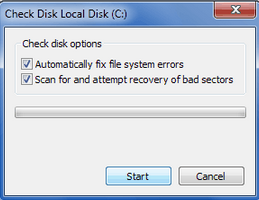
Running check disk utility is completely safe and doesnt harm overall functioning of your PC. As check disk utility will perform scan and recovery concurrently, this process might takes time little longer than usual.
Heres how you can start check disk utility in your PC:
Type of Bad Sectors
There are usually two types of bad sectors took place in modern as well as traditional hard drives:
Hard or Mechanical or Physical are the one caused by heads after coming in contact with platter surface of the hard drive. For ex, if the computer is bumped or dropped while reading/writing data from/to the disk would make hard drive heads to crash or damage the area. Extreme heat, faulty heads, dust or other ageing equipments could also contributes heavily towards hard bad sectors.
Once the hard bad sectors is created, it can only be prevented, neither removed or reformed. Best bet is copy/save all your important stuff into another hard drive and replace the drive as soon as possible to stay away from various catastrophic data loss situations.
Though, if your hard drive fails due to hard bad sectors and youve lost any or all your important data, using data recovery services would be the last hope. Highly cleaned room with skilled equipments where special treatments were used to carefully open hard drive equipments and recover data from the storage area.
Soft or logical bad sectors are less drastic and delivers minimum harm to your PC or the stored data. It is created when an error correction code of a sector cant verify the content of the same sector due to virus/threats injection on the BIOS section, improper system shutdown or directory structure corruption.
Soft bad sectors can be repaired by using low level formatting (quick format) or disk check/repair tools which fills zeros in all the soft bad sectors. Disk wiping process is pretty effective and completely removes soft bad sectors around the hard drive, however you might permanently lose the stored data and data recovery isnt possible even by using professional recovery program.
How to repair bad sectors?
There are choices to repair bad sectors by using either inbuilt utility or software provided from third party. As there is no guarantee of repairing bad sectors, you can still try any of the options mentioned below.
Using Inbuilt Utility
Various inbuilt check disk utility is available to check hard drive health status or any running issues and repair them immediately. Microsoft provided this utility for free of cost with Windows to help troubleshoot file system errors, scan and fix bad sectors found around the hard drive.
Running check disk utility is completely safe and doesnt harm overall functioning of your PC. As check disk utility will perform scan and recovery concurrently, this process might takes time little longer than usual.
Heres how you can start check disk utility in your PC:
- Double click on My Computer from the desktop or press window button + E.
- Right click on the desired drive you want to check and choose properties. Note:You cant check and repair all the drive at once.
- From the opened properties window, select Tools tab and click on Check Now.
- Check disk box will open containing options like Automatically fix file system errors and Scan for and attempt recovery of bad sectors. Mark both the options or can leave the first one only if you wants to check only hard drive for bad sectors and repair it.
- Click on Start to initiate check disk operation.
- Enter administrator password if requested and click OK.
- Wait for sometime and then restart PC once the operation is completed successfully.
Using third party software
Spinrite is a professional hard disk check and repair utility suitable for all the latest Windows operating system and works effectively on FAT, NTFS and Linux formatted volume. The software is self explanatory and requires simple steps to boot from DOS environment and repair almost any kind of bad sectors.
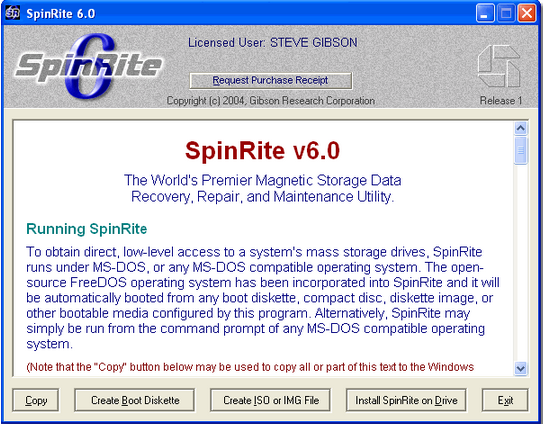
Note: Spinrite could costs your around $ 89 USD.
Preventing bad sectors in future
Below are the precautions steps you could take to avoid bad sectors from being developed around your hard drive,
- Use inbuilt disk defragmenter utility to stabilize operations and reduces stress from heads. Run this utility at least once or twice in a month or schedule it to run periodically. It also helps in managing disk spaces and thus, reducing overall burden from the heads.
- Always use, professional and recommend anti virus software to keep your system clean and malware free.
- Avoid bumping or throwing during ongoing operations.
- Use system in cooled and dust free environment.
- Use standard cables or connecting media for longer durability.
- Use proper shutdown or standard way to turn your system off. Use UPS or similar power backup devices to make sure that you always have enough time to safely shutdown your PC when the power is absent.
- Running OS repair utility could also shorten the occurrences of bad sectors around the hard drive.
Have you found bad sectors in your hard drive or planning to check, what utility youre using or the way youll recommend to repair bad sectors? Dont forget sounds all this using the comment form below.
Available link for download
Subscribe to:
Posts (Atom)