Showing posts with label possible. Show all posts
Showing posts with label possible. Show all posts
Monday, March 20, 2017
3 Possible Things You Can Do to Repair Hard Drive Bad Sectors
3 Possible Things You Can Do to Repair Hard Drive Bad Sectors
Traditional hard drive carries multiple mechanical parts which degrades over time and affect its standard operation. Hard disk platter is one such equipment which plays the crucial role in saving and transferring the stored data. Due to its magnetic nature, the surface of the platter starts wearing out more often than normal. Once the magnetic area of the hard disk platter becomes damaged, it can’t be used by the system to store further data as well as the existing data become corrupt or damaged. Damaged area on the platters are known as Bad sectors of hard drive which will result in data loss of that particular area.
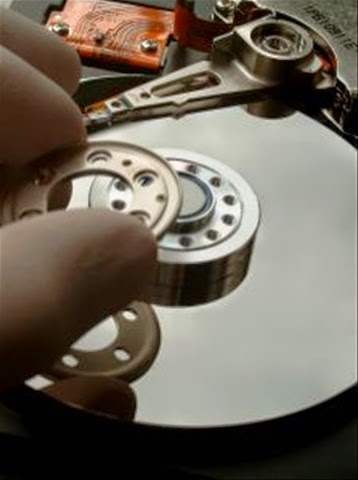
Bad sectors can also surfaced by physical damage delivered by dropping or throwing it on the floor. It is impossible to repair the damaged sectors physically, there are still some way out to repair it if the corruptions are logical (soft bad sectors) by running disk error checking tool in Windows or running disk utility in Mac. These utilities are designed to cooperate bad sectors smoothly so that it won’t hamper the saved data consistency and not damage its nearby sectors.
There are specially two types of bad sectors on the hard disk which may ends up in making your data corrupt or unreadable.
Soft bad sectors: Such problems arises due to software malfunction, read/write head problems which scratched the data area of the hard drive and makes data become unreadable by the operating system. These bad sectors are fairly common and can happen with hard drive of any age. The easiest possible solution to get rid of the soft bad sectors is by completely formatting or erasing the hard drive. Formatting will fill zero bytes on each and every sectors of the hard drive and make it ready to be used once again.
Hard bad sectors: Any mechanical problems with the hard drive itself can result in hard bad sectors. Such bad sectors has tendency to damage its nearby sectors and soon, makes the entire hard drive with loads of bad sectors enough for making it completely failed. Hard bad sectors can’t be repaired and the best bet is to copy/move all your data immediately and purchase another hard drive to continue using your system without any trouble. Using hard drive recovery software will not help at all in such circumstances as the drive already becomes unreable by the BIOS and therefore, recovery software too cant read it anymore.
Investigating Bad Sectors
There are few simple steps to find out whether your hard drive having bad sectors; however we suggest you to follow the extensive method of pin pointing the bad sectors on your hard drive.
Disk error checking: Windows have inbuilt utility that performs detailed analysis for files and folders and check for their consistencies. In case you’re experiencing problem with scan such as crashing, showing error while checking disk, freezing etc. , it might be a sign of failing hard disk as the bad sectors might preventing the normal operation of disk error checking operation.
Surface scan test: This test is performed on the hard drive with suspected with bad sectors symptoms. While checking, it’ll check and mark the bad sectors and use spare sectors to replace them.
SMART Tool:It performs the series of test on the problem hard drive and gives exact record of health status of problem hard drive including the bad sectors count.
Once you found that the hard drive has fairly large number of bad sectors, you should immediately start seeking for alternative options to repair it or replacing the whole hard drive (if your budget allows).
Repairing bad sectors
Bad sectors can result in major disaster and all your hard disk data soon become inaccessible. While it’s almost impossible to get back data from the damaged sectors, you can try repairing the logically damaged bad sectors so it won’t affect the remaining area of the hard drive.
Follow steps carefully mentioned below and see if you can overcome with any or all the bad sectors you may have found during scanning.
#1. Check Disk Utility
Microsoft Windows comes with an inbuilt disk repair utility to fix minor or major problems with the system such as problems with the volume, cross linked files, bad sectors, directory related errors and more.
You can run this utility directly from ‘My Computer’ > Windows Explorer or using elevated command prompt window. Below are the steps to run this utility from ‘My computer’:
- Open ‘My Computer’ by double clicking on it or directly press ‘window’ button + E.
- Right click on desired hard disk volume/partition and choose properties for which, you want to check errors. In case you are not sure which volume to select first, start by selecting any volume and if the problem is not resolved, follow the same procedure to check errors for another volume.
- On the Tools tab, click on Check Now button located under error checking section.
- Pop up window will open and ask you to choose the desired task to perform. Ensure that you’ve check mark the two boxes stating ‘Automatically fix file system errors’ and ‘Scan for and attempt recovery of bad sectors’.
- Click on Start to begin the scanning procedure.
Note: This utility wants exclusive access on the volume you’ve chosen to perform disk error check function. Also, the whole procedure may takes little longer time depending on the size of the targeted volume.
#2. Utilities provided from hard drive manufacturer
Famous hard drive manufacturer such as Western Digital, Seagate or Maxtor provide their own drive check utility such as Data Lifegaurd Diagnostics, Seatools for Windows and PowerMax.
These utilities were designed to perform error check function on the hard drive of only relevant manufacturer except WD Data Lifegaurd Diagnostics which generally detects hard drive from any manufacturers and attempt to repair bad sectors.
These utilities are fairly easy to use and runs in wizard based interface. Users with basic to advanced computer knowledge can efficiently use these tools.
#3. Disk Checkup from PassMark
It is a little different and comparatively easy to use utility which clearly draws barrier between normal and problem hard drive by executing tests based on the series of attributes. It comes with prebuilt SMART diagnostic tool which fetch all the required details from the hard disk and later, compares it with any normal hard drive which has nearly new or in perfect condition.
#2. Utilities provided from hard drive manufacturer
Famous hard drive manufacturer such as Western Digital, Seagate or Maxtor provide their own drive check utility such as Data Lifegaurd Diagnostics, Seatools for Windows and PowerMax.
These utilities were designed to perform error check function on the hard drive of only relevant manufacturer except WD Data Lifegaurd Diagnostics which generally detects hard drive from any manufacturers and attempt to repair bad sectors.
These utilities are fairly easy to use and runs in wizard based interface. Users with basic to advanced computer knowledge can efficiently use these tools.
#3. Disk Checkup from PassMark
It is a little different and comparatively easy to use utility which clearly draws barrier between normal and problem hard drive by executing tests based on the series of attributes. It comes with prebuilt SMART diagnostic tool which fetch all the required details from the hard disk and later, compares it with any normal hard drive which has nearly new or in perfect condition.
Available link for download

Tuesday, October 4, 2016
A Look Into Causes Of Hard Drive Crash And Possible Data Recovery
A Look Into Causes Of Hard Drive Crash And Possible Data Recovery
We all are well aware that Hard Disk drive is a storage device used for storing and retrieving digital information using rapidly rotating disks known as platters coated with magnetic material. A HDD preserve its data even when it is powered off or not in use. Data is read in a random manner that means particular single blocks of data can be stored, retrieved or accessed in any order somewhat sequentially.
It consist of one or more hard swiftly rotating platters having magnetic heads, arranged on a moving actuator arm to read and write data to the surfaces.

What is a HDD Failure ?
A hard disk drive failure occurs when the drive malfunctions and the stored information cannot be accessed with a properly configured computer. A disk failure may also occur in between of normal operation, or due to an external factor such as exposure to fire or water or high magnetic fields, suffering a sharp impact , environmental contamination which leads to a head crash.
Causes of the HDD Failure
As discussed above, the most notorious cause of hard-drive failure is the head crash. The internal read-and-write head of the device usually just flying above the surface touches a platter, or scratches the magnetic data-storage surface. A head crash leads to severe data loss and data recovery attempts may cause further damage if not done by a specialist with proper equipment. Hard-drive platters are coated with a very thin layer of non-electrostatic lubricant, so that the read-and-write head will simply rebound the surface of the platter so that a collision occur.
Whereas, this head Flickr only nano-meters away from the platters surface which confirms the risk of collision. Another cause of failure can be a defective air filter. The air filters regulates the atmospheric pressure and moisture between the hard-drive cage and its outside environment. If the filter fails to catch a dust particle, then that tiny dust particle can cause a head crash if the head reach over it. After a hard-drive crash, each particle from the damaged platter and head media can cause a bad sector. In such cases, it may be possible to recover all data.

Types of HDD Failures:-
As discussed above, the most notorious cause of hard-drive failure is the head crash. The internal read-and-write head of the device usually just flying above the surface touches a platter, or scratches the magnetic data-storage surface. A head crash leads to severe data loss and data recovery attempts may cause further damage if not done by a specialist with proper equipment. Hard-drive platters are coated with a very thin layer of non-electrostatic lubricant, so that the read-and-write head will simply rebound the surface of the platter so that a collision occur.
Whereas, this head Flickr only nano-meters away from the platters surface which confirms the risk of collision. Another cause of failure can be a defective air filter. The air filters regulates the atmospheric pressure and moisture between the hard-drive cage and its outside environment. If the filter fails to catch a dust particle, then that tiny dust particle can cause a head crash if the head reach over it. After a hard-drive crash, each particle from the damaged platter and head media can cause a bad sector. In such cases, it may be possible to recover all data.
Types of HDD Failures:-
Operating system crash and a hard drive crash both are different from each other
If your are using Mac, Windows or Linux and your operating system crashes then it is called as a Logical Failure.
And, If your hard disk is not functioning properly or having some physical issues and if hard drive itself malfunctions, then such situation is known as Physical Failure.
In both the ways the data is not easily accessible but still present on the hard drive.
Of course, you should have a backup or an image of your computers hard drive and if you dont have backup, still there is hope to get back precious Gigabytes of data through a data recovery solution.
The best way to prevent damage from a hard disk crash is to take a cautious approach and back up the data stored on the drive.
Logical Failure:- Logical failure is when your computer BIOS can identify your hard drive but unable to access it then this sort of failure is known as logical failure. It may not be able to mount the partition or Operating system can simply report that no drive is present at all. In a logical failure the hard drives electronic and mechanical components are all working properly. But the failures occur due to defective media/bad platter or data corruption.
In some cases of logical failure a hard drive that rotates fine, but is not even recognized by the computer’s BIOS as being present.
Almost all logical failures can be retrieved without opening the hard drive. Whereas there are a number of logical data recovery software programs available in market. But, its important to know why your drive had a logical failure before you proceed further to recover your data.
Physical Failure?
A physical failure is any time a drive can not be accessed because of electronic malfunction or internal hardware failure.
These failures results as drive being not recognized by the computer’s BIOS or operating system, as well as repetitious clicking or grinding noises. If your hard disk is producing such kind of unusual sound, the you must power off your PC and don’t attempt to use it again until you sent your HDD to a recovery center.
The noises which a hard drive is producing is due to a head crash. A head crash happens with the arms that read the data on the surface of your hard drive’s platters smash into the rotating platter instead of gliding across it on a cushion of air like they are supposed to.This results in physical damage to that platters and can cause a complete and permanent data loss.
The only way to recover your data after a physical failure is to either replace the damaged hard drive integral or move the data platters to a donor drive where they can be recovered to a stable destination drive. This kind of recovery process is performed in a cleanroom with a special handling.

Hard Drive Failure – Resolutions.
It is not easy to fix a damaged Hard Disk Drive, there are a number of things that you have to look into when it comes to hard drive recovery. This is because hard drive problems could involve issues with the logical and physical areas. Damage on the electronic circuit board can leads to hard disk problems. Some cases of hard drive failure requires several years of experience on hard disk recovery. Consulting a hard disk recovery expert is the best way to get back your data. You will have to pay for the hard disk repair service. But if you are going to think about it, paying the services of an expert is more sensible than threaten the condition of the device and data. The hard disk recovery expert will go through the condition of the device first. He will determine if the damage is still within control and if the data can still be retrieved or not.
You Can try following mentioned Free data Recovery Tools
1) TestDisk(Windows/Mac/Linux)
2) Recuva(Windows)
3) PhotoRec(Windows/Mac/Linux
4) Restoration(Windows)
5) Undelete Plus(Windows)
Available link for download
Subscribe to:
Posts (Atom)