Showing posts with label a. Show all posts
Showing posts with label a. Show all posts
Tuesday, March 7, 2017
All about E mails or What E mails tell about you A COMPLETE STORY
All about E mails or What E mails tell about you A COMPLETE STORY
A COMPLETE review on what your email address says about you. Probably this has become very popular nowadays that email addresses are required for the living of common people especially the people who are working in offices, companies, etc.
So you can create your email Id with many providers like Gmail, hotmail, mail.com and many more............
.........................................
.........................................
So lets see a complete review in e-mail Ids.........
.......................................
What does your email address says about you? What do you want it to say about you?
........................................
What does your email address says about you? What do you want it to say about you?
........................................
I grew up in a world without the Internet until I reached 15 years old. At that point AOL came onto the scene… America online! Great I thought but I live in England? Nevertheless, it was the start of a dramatic shift in the way communication happened; communication between one human being to another, between businesses and people, between people in the same room.
................................................
................................................
The Internet as powerful, revolutionary, and incredible an entity it is, comes with some strings attached. For the first time in human existence we are faced with the challenge of creating an online representation of ourselves. We have more tools to refine our online image than ever; more ways to refine what we show people, what we choose not to show them, and the platform we use. If you are still not convinced we should think about our online image, I’d ask you to reflect on the times you casually browse an old “friends” Facebook page, trying as hard as you can to not pass judgment, or ascertain the quality of their life, by the content in front of you.
So what does this have to do with email address choice? Does it matter if someone tells you they areJohnsmith@msn.com vs.johnsmith@gmail.com vs.johnsmith@lycos.com? Lycosreally?........
..................................................
..................................................
I can vividly remember the first time someone gave me their @mac.com email address, it was the virtual equivalent of “Excuse me do you have the time?” “Sure let me just check my Rolex.” It begs the question, if people are assigning status to an email address, looking for some sort of semi-tangible value, when I’m applying for a job should I use gmail? It seems to be universally accepted as the go-to search engine & email provider. Perhaps it shows I’m forward thinking,I keep up with technology! This actually makes a lot more sense when taken in the context of a job application; if someone sent me a resume with @hotmail.com I would probably think twice..
................................................
................................................
And then… there are the @googlemail.com people. Where did they come from? Are they deliberately articulating a difference? Perhaps they feel it sets them apart from the crowd? If I were to place a bet, I’d guess they are the same folk that respond to “You’ve won 100 million dollars, all we need is your social security number and date of birth” emails.
....................................................
....................................................
I feel this is all part of the underlying theme of this article: the need to create an E-Persona. The alternative is rebellion and simply not caring, perhaps keeping the same email address for the next ten years. I’ve actually heard people relate it to the steadiness and reliability of the person behind the old school yahoo account; but I find this highly ironic given the unreliability and steadiness of the very service they are referring to.
............................................
............................................
There are always exceptions to the rule: I know a couple of CEO’s that still use Hotmail to communicate. They tell me proudly “Nobody will ever expect it!” To which I reply “That’s great, but what about the 3,000 junk emails you need to hunt through to find the genuine email?”
..........................................
..........................................
I wonder if we may look back and laugh at gmail, in the same way we do AOL? As being dated and providing an electronic time stamp. It is interesting to see the way we interact with technology as Internet users. We often share the same options but make very different choices, and this is beauty of the freedom the Internet provides.
.........................................
.........................................
Thank you for reading my blog..
If you have any query please feel free by commenting below .
You can download drivers for your pc/laptop for free by using our website .
Click here :
...................................
...................................
Available link for download

Wednesday, March 1, 2017
Cambridge IGCSE English as a Second Language
Cambridge IGCSE English as a Second Language

title has been written for the latest Cambridge IGCSE English as a Second Language.
Cambridge IGCSE English as a Second Language
English | 2014 | ISBN: 1444191624 | 146 pages | PDF | 28.58 MB
Download
English | 2014 | ISBN: 1444191624 | 146 pages | PDF | 28.58 MB
Download
Cambridge IGCSE English as a Second Language
Mirror
Mirror
Available link for download
Monday, February 20, 2017
Mac OS X How to manually add a Windows shared printer
Mac OS X How to manually add a Windows shared printer
Mac OS X: How to manually add a Windows shared printer
In some situations, you may be unable to locate a Microsoft Windows shared (SMB) printer while adding a printer, yet you can still add the printer manually if you know the name or address of the Windows computer sharing the printer and the name of the shared printer.
Mac OS X v10.5 or later
- Choose System Preferences from the Apple menu.
- Choose Print & Fax from the View menu.
- Click the + button to add a printer.
- Press the Control key while clicking the "Default" icon (or any other icon on the toolbar), then choose Customize Toolbar from the contextual menu that appears.
- Drag the Advanced (gear) icon to the toolbar.
- Click Done.
- Click the Advanced icon that was added to the toolbar.
- Choose Windows from the Type pop-up menu.
- In the URL field, type the printers address in one of the following formats:
smb://workgroup/server/sharename
smb://server/sharename
Note: "workgroup" is the name of the Windows workgroup that the computer sharing the printer belongs to. "server" is the name of the computer sharing the printer (or its IP address). "sharename" is the shared Windows printers share name. If the share name contains spaces, replace each space with "%20" (without quotation marks).
Tip: You dont need a "workgroup" when specifying the IP address of the computer (such as when the printer is on a different subnet), or if your Mac belongs to the same Windows (SMB) workgroup.
- In the Name field, type the name you would like to use for this printer in Mac OS X.
- Choose the appropriate PPD or printer driver from the "Print Using" pop-up menu.
- Click Add.
Mac OS X v10.3 through v10.4.11
- Open Printer Setup Utility (located in /Applications/Utilities).
- Mac OS X 10.4.x: Choose Add Printer from the Printers menu, then hold the Option key while clicking the "More Printers" button.?
Mac OS X 10.3.x: Hold the Option key while choosing Add Printer from the Printers menu.
- Choose Advanced from the first pop-up menu.
- Choose "Windows Printer via SAMBA" from the Device pop-up menu.
- In the Device Name field, type the name you would like to use for this printer in Mac OS X.
- In the Device URL field, use one of the following formats to link to the printer:
smb://user:password@workgroup/server/sharename
smb://user:password@server/sharename
smb://workgroup/server/sharename
smb://server/sharename
Notes: "user" is the name of a Windows user who has privileges to use the printer. "password" is the password of that Windows user. "workgroup" is the name of the Windows workgroup to which the computer sharing the printer belongs. "server" is the name of the computer sharing the printer or its IP address. "sharename" is the shared Windows printers share name.
Tip: You dont need a "workgroup" when specifying the IP address of the computer (such as when the printer is on a different subnet), or if your Mac belongs to the same Windows (SMB) workgroup.
- Choose the appropriate PPD or printer driver from the "Printer Model" pop-up menu.
- Click Add.
Available link for download
Sunday, February 19, 2017
3 A M 2014 Mp3 Song Free Download
3 A M 2014 Mp3 Song Free Download

Raeth Ki Tarah
Teri Adaaon Mein
Meherbaan
Sab Bhulake
Tera Shukriya
Teri Adaaon Mein (Remix)
Tera Shukriya (Remix)
Raeth Ki Tarah (3 AM) Full Mp3 Song
Available link for download
Sunday, February 5, 2017
Open a port in Windows Firewall
Open a port in Windows Firewall
Open a port in Windows Firewall
If Windows Firewall is blocking a program and you want to allow that program to communicate through the firewall, you can usually do that by selecting the program in the list of allowed programs (also called the exceptions list) in Windows Firewall. To learn how to do this, see Allow a program to communicate through Windows Firewall.
However, if the program isnt listed, you might need to open a port. For example, to play a multiplayer game with friends online, you might need to open a port for the game so that the firewall allows the game information to reach your computer. A port stays open all the time, so be sure to close ports that you dont need open anymore.
- Open Windows Firewall by clicking the Start button
, and then clicking Control Panel. In the search box, type firewall, and then click Windows Firewall.
- In the left pane, click Advanced settings.
If youre prompted for an administrator password or confirmation, type the password or provide confirmation.
- In the Windows Firewall with Advanced Security dialog box, in the left pane, click Inbound Rules, and then, in the right pane, click New Rule.
- Follow the instructions in the New Inbound Rule wizard.
If you’re having trouble allowing other computers to communicate with your computer through Windows Firewall, you can try using the Incoming Connections troubleshooter to automatically find and fix some common problems.
Open the Incoming Connections troubleshooter by clicking the Start button , and then clicking Control Panel. In the search box, type troubleshooter, and then click Troubleshooting. Click View all, and then click Incoming Connections.
, and then clicking Control Panel. In the search box, type troubleshooter, and then click Troubleshooting. Click View all, and then click Incoming Connections. For information about advanced firewall troubleshooting, see Windows Firewall with Advanced Security Troubleshooting Guide: Diagnostics and Tools and Troubleshooting Windows Firewall settings in Windows XP Service Pack 2 for advanced users.
Available link for download
Wednesday, February 1, 2017
Install a Network Printer in Mac OS X
Install a Network Printer in Mac OS X
Install a Network Printer in Mac OS X

What You Need to Print to a Networked MSL Printer
Printing Instructions
- Computer running Mac OS X 10.5 or newer
- Internet access
Printing Instructions
- Select System Preferences from the Apple menu.
- Double-click on Print & Scan (Print & Fax).
- In the Print & Scan (Print & Fax) window, click on the plus sign button.
- Click on the IP tab in the Print Browser window.
- Set Protocol to HP Jetdirect - Socket.
- For Address, enter the IP address of the printer you want to add. IP addresses of MSL printers are available on the printer list.
- Leave the Queue field blank. The Name and Location fields are for your reference to keep track of your printers and differentiate between multiple ones.
- For Print Using, do not select Generic Postscript Printer. OS X will try to locate an appropriate driver but if it cannot then It is recommended to download the correct driver from the manufacturer. Click on the name of the printer on the printer list to be taken to the manufacturers driver download page.
- Click Add. The lab printer will be added to your list of printers.


Available link for download
Thursday, November 10, 2016
M A D – Mad About Dance 2014 Full Songs Free Download
M A D – Mad About Dance 2014 Full Songs Free Download

Ishq Da Bukhar
Party Is Going Mad
Kahan Hai Khuda
Punjabi Mundeya
Kahan Hai Khuda (Dubstep)
Kahan Hai Khuda (Remix)
Available link for download
Wednesday, October 26, 2016
Google Person Finder A help from Google for 2013 Uttarakhand Floods
Google Person Finder A help from Google for 2013 Uttarakhand Floods
How to search for the missing people in the recent 2013 Uttarakhand Floods?
As you all know how the recent floods in Uttarakhand (North India) effected the people in India. The Uttarakhand Floods which is also called as "Himalayan Tsunami" had effected most of the people who are staying around the Uttarakhand area. Apart from them, most of the effected people are the pilgrims who came on pilgrimage to visit the temples like Kedarnath, Badrinath etc around the Uttarakhand area.
Though there is no conformed reports on number of people dead, as per rumors in the Electronic Media more than 5000 people are dead in the Uttarakhand Floods and many people are still missing.
To help the relatives/friends of missing people in the Uttarakhand 2013 Floods, Google created a webpage called "Person finder:2013 Uttarakhand Floods" in which one can search for the name of the person who is missing. One can also create a new page and enter the details of the person who is missing.

Available link for download
Friday, October 14, 2016
Easy Steps to Make A Recovery Drive in Windows 8 Using Standard Flash Drive or USB
Easy Steps to Make A Recovery Drive in Windows 8 Using Standard Flash Drive or USB
Recovery drive in Windows 8 is another great features to help user resurrect problems with their PC. Windows 8 facilitates easy ways to create recovery drive and let you free up some space (around 16 GB) by deleting the recovery partition. Creating recovery drive will move all the system repair and maintenance functionality of recovery partition to the USB (your recovery drive) and thus, youll no longer need the inbuilt recovery partition.
All you need is a USB Drive of capacity up to 16 GB or more to store all the OEM recovery partition content & Windows 8 recovery & maintenance features. Make sure that you havent stored your valuable files on it as this procedure will permanently wipes off all your current USB Data and make it very fresh. Remember, once youve successfully created the recovery drive, you cant use it for anything else.
Heres how to create recovery drive?
All you need is a USB Drive of capacity up to 16 GB or more to store all the OEM recovery partition content & Windows 8 recovery & maintenance features. Make sure that you havent stored your valuable files on it as this procedure will permanently wipes off all your current USB Data and make it very fresh. Remember, once youve successfully created the recovery drive, you cant use it for anything else.
Heres how to create recovery drive?
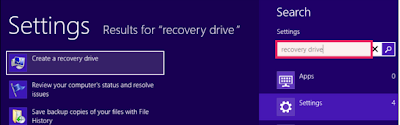
- On the desktop screen at Windows 8 PC, press “CTRL + W ” altogether and type Recovery Drive in the search box.
- Click on the Settings category and again, click on Create a Recovery Drive option from the left side of the window.
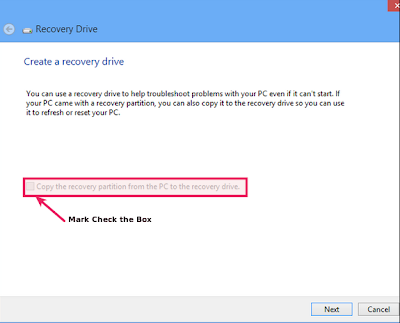
- Recovery drive window will now open. Check mark the option stating “Copy the recovery partition from the PC to the recovery drive” and click Next. Clearly, the recovery partition is much heavier in size and thats why were ask you to have USB of at least 16 GB capacity.
- On the next step, youll require to connect the blank USB that were talking about. You may able to see your USB drive as soon as you connect it to your PC.
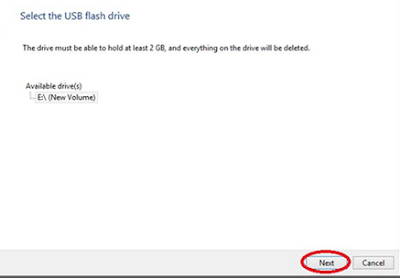
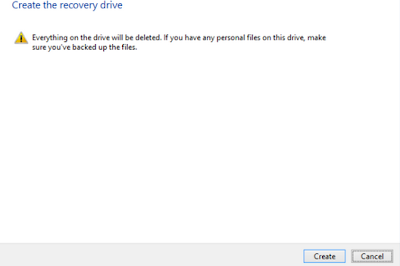
Note: 2 GB is required space according to the image above, however itll ask you for 16 GB space when the “Recovery Option” is selected to be backed up. - On the next screen (Create the recovery drive screen), a warning message will appear to confirm you that everything on the drive will be deleted. Once you assured that youve successfully copied all your data from the USB, can go for “Create” option.
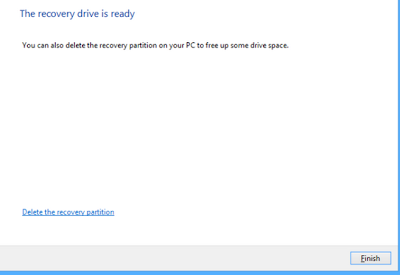
- Thats all youve to do for creating recovery drive. Depending on the system specs, this step will take some time and finally comes with confirmation dialog that your recovery drive is successfully created.
Available link for download
Tuesday, October 4, 2016
A Look Into Causes Of Hard Drive Crash And Possible Data Recovery
A Look Into Causes Of Hard Drive Crash And Possible Data Recovery
We all are well aware that Hard Disk drive is a storage device used for storing and retrieving digital information using rapidly rotating disks known as platters coated with magnetic material. A HDD preserve its data even when it is powered off or not in use. Data is read in a random manner that means particular single blocks of data can be stored, retrieved or accessed in any order somewhat sequentially.
It consist of one or more hard swiftly rotating platters having magnetic heads, arranged on a moving actuator arm to read and write data to the surfaces.

What is a HDD Failure ?
A hard disk drive failure occurs when the drive malfunctions and the stored information cannot be accessed with a properly configured computer. A disk failure may also occur in between of normal operation, or due to an external factor such as exposure to fire or water or high magnetic fields, suffering a sharp impact , environmental contamination which leads to a head crash.
Causes of the HDD Failure
As discussed above, the most notorious cause of hard-drive failure is the head crash. The internal read-and-write head of the device usually just flying above the surface touches a platter, or scratches the magnetic data-storage surface. A head crash leads to severe data loss and data recovery attempts may cause further damage if not done by a specialist with proper equipment. Hard-drive platters are coated with a very thin layer of non-electrostatic lubricant, so that the read-and-write head will simply rebound the surface of the platter so that a collision occur.
Whereas, this head Flickr only nano-meters away from the platters surface which confirms the risk of collision. Another cause of failure can be a defective air filter. The air filters regulates the atmospheric pressure and moisture between the hard-drive cage and its outside environment. If the filter fails to catch a dust particle, then that tiny dust particle can cause a head crash if the head reach over it. After a hard-drive crash, each particle from the damaged platter and head media can cause a bad sector. In such cases, it may be possible to recover all data.

Types of HDD Failures:-
As discussed above, the most notorious cause of hard-drive failure is the head crash. The internal read-and-write head of the device usually just flying above the surface touches a platter, or scratches the magnetic data-storage surface. A head crash leads to severe data loss and data recovery attempts may cause further damage if not done by a specialist with proper equipment. Hard-drive platters are coated with a very thin layer of non-electrostatic lubricant, so that the read-and-write head will simply rebound the surface of the platter so that a collision occur.
Whereas, this head Flickr only nano-meters away from the platters surface which confirms the risk of collision. Another cause of failure can be a defective air filter. The air filters regulates the atmospheric pressure and moisture between the hard-drive cage and its outside environment. If the filter fails to catch a dust particle, then that tiny dust particle can cause a head crash if the head reach over it. After a hard-drive crash, each particle from the damaged platter and head media can cause a bad sector. In such cases, it may be possible to recover all data.
Types of HDD Failures:-
Operating system crash and a hard drive crash both are different from each other
If your are using Mac, Windows or Linux and your operating system crashes then it is called as a Logical Failure.
And, If your hard disk is not functioning properly or having some physical issues and if hard drive itself malfunctions, then such situation is known as Physical Failure.
In both the ways the data is not easily accessible but still present on the hard drive.
Of course, you should have a backup or an image of your computers hard drive and if you dont have backup, still there is hope to get back precious Gigabytes of data through a data recovery solution.
The best way to prevent damage from a hard disk crash is to take a cautious approach and back up the data stored on the drive.
Logical Failure:- Logical failure is when your computer BIOS can identify your hard drive but unable to access it then this sort of failure is known as logical failure. It may not be able to mount the partition or Operating system can simply report that no drive is present at all. In a logical failure the hard drives electronic and mechanical components are all working properly. But the failures occur due to defective media/bad platter or data corruption.
In some cases of logical failure a hard drive that rotates fine, but is not even recognized by the computer’s BIOS as being present.
Almost all logical failures can be retrieved without opening the hard drive. Whereas there are a number of logical data recovery software programs available in market. But, its important to know why your drive had a logical failure before you proceed further to recover your data.
Physical Failure?
A physical failure is any time a drive can not be accessed because of electronic malfunction or internal hardware failure.
These failures results as drive being not recognized by the computer’s BIOS or operating system, as well as repetitious clicking or grinding noises. If your hard disk is producing such kind of unusual sound, the you must power off your PC and don’t attempt to use it again until you sent your HDD to a recovery center.
The noises which a hard drive is producing is due to a head crash. A head crash happens with the arms that read the data on the surface of your hard drive’s platters smash into the rotating platter instead of gliding across it on a cushion of air like they are supposed to.This results in physical damage to that platters and can cause a complete and permanent data loss.
The only way to recover your data after a physical failure is to either replace the damaged hard drive integral or move the data platters to a donor drive where they can be recovered to a stable destination drive. This kind of recovery process is performed in a cleanroom with a special handling.

Hard Drive Failure – Resolutions.
It is not easy to fix a damaged Hard Disk Drive, there are a number of things that you have to look into when it comes to hard drive recovery. This is because hard drive problems could involve issues with the logical and physical areas. Damage on the electronic circuit board can leads to hard disk problems. Some cases of hard drive failure requires several years of experience on hard disk recovery. Consulting a hard disk recovery expert is the best way to get back your data. You will have to pay for the hard disk repair service. But if you are going to think about it, paying the services of an expert is more sensible than threaten the condition of the device and data. The hard disk recovery expert will go through the condition of the device first. He will determine if the damage is still within control and if the data can still be retrieved or not.
You Can try following mentioned Free data Recovery Tools
1) TestDisk(Windows/Mac/Linux)
2) Recuva(Windows)
3) PhotoRec(Windows/Mac/Linux
4) Restoration(Windows)
5) Undelete Plus(Windows)
Available link for download
Tuesday, September 13, 2016
How to secure both a failing Mac volume data inside
How to secure both a failing Mac volume data inside
 This time again the Mac disk utility showed up several error codes that made the doubt clear in my mind about the failing volumes. Navigating through Utilities—Applications--DiskUtility--FirstAid--VerifyDiskPermissions ends up displaying the below outcome. At the first glance, these errors wont even look familiar or understandable to a moderate user. Either only a geek or a software developer for Mac systems would be able to hunt out its real meaning for permission error codes. A person like me or a non-geek would succumb to such errors even before giving it a last try for repair.
Fig (1)
I am clear on this; Permissions on Mac are predefined and associated with each and every single files/folders. To perform a read-write operation, the permissions should be clearly stated for users to execute without a halt. Any errors on Disk Utility would show up only after the permissions are either damaged or redefined for OS X to understand. Such a case would invite logical disaster either in no time or will slowly crawl the Mac to the ultimate logical failure. Since permission errors are reported on time still they could malfunction the Mac OS X, it is the need of time to repair the corruption with the help of an alternative solution.
“Had it been basic volume errors, Disk Utility must have fixed it.”
Further, the damaged hard drive (volumes) is at high risk of resulting in no mountable file systems, ceasing the user to access the data stored on the partition. This is a highly unfavorable situation where the drive along-with the data becomes prone to failure. The disk utility would let you know about the unmounted hard drive from the left panel by diminishing the hard drive icon. In this case, one can make attempts to at-least ensures the data recovery from unmounted drive with the help of an OS X file recovery program. Consider the below snapshot of a file recovery software that successfully scans an unmounted hard drive & previews the list of data to the user for recovery. If this attempt utilizes then trust this, user can feel bit relieved with securing the data from an unmounted hard drive. Otherwise, the integrity of the Mac hard drive is still in question which might demand for logical or physical repair.
Video:How to recovered unmounted data on Mountain Lion

Fig(2):-

An important point to be noted is, the volume repair utility would be only helpful in fixing out the logical damage done to the hard drive. Sadly, talking of a physical damage, no software would be of help other than the repair services. However, there are certain instances of hard drives which had bad sectors on their surfaces but with the help of Imaging, the data stored on the drive was successfully recovered although the drive still be required a helping hand.
Fig (3): - Fig (1) errors sorted out
Available link for download
Subscribe to:
Posts (Atom)