Showing posts with label desire. Show all posts
Showing posts with label desire. Show all posts
Thursday, March 9, 2017
How to flash Intex Aqua Desire flash with sp flash tool see here with simple method
How to flash Intex Aqua Desire flash with sp flash tool see here with simple method
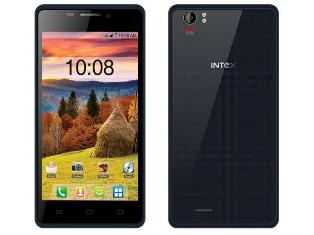
About Firmware or Tutorial:
This is tested firmware or flash tool you can do using this tutorial because this tutorial tested by me any error or issue and also this is simple method for everyone who know about android software related this tutorial use new user technician lets see how to flash intex aqua desire with sp flash tool ?
This flash file tested by me without any error working well, you can use this flash file when your device hang on logo problem, restarting problem, security lock problem, password lock problem, pattern lock problem etc software related problem and you can use this tutorial without any box and this is free for all who know about software in mobile, impotent for flashing first must check your micro usb cable if not good then you cant flash it so check micro usb cable second check your device battery that is impotent for flashing if your device battery low so stop your device between flash so this is impotent for flash, before you flash save your data like contact, photos, videos etc because this is factory flash file so you cant save after full flash so must remember all are impotent notes.
Download Link
Intex Aqua Desire Firmware or Flash tool Download here
Required for flash:
1. Intex Aqua desire device with good battery charged
2. Intex Aqua desire tested firmware or flash tool
3. Micro usb cable
4. Computer or Laptop
Procedure:
1. Download tested firmware or flash tool from above link (if link not working just write down comment on below comment box) 2. Extract winrar file to desktop or as you like path (must installed winrar software in your computer or laptop) 3. Open SP Flash Tool v3.1344.214 flash tool folder and choose flash_tool.exe file and open it 4. Click on Scatter-Loading button and choose MT6572_Android_scatter.txt file 5. Click on Download button and Press and hold Volume Up button and insert usb cable then wait until driver install if driver installed in your computer or laptop then downloading automatically start into android device 6. Wait until full os install in your device (not : do not disconnect device while your device in flashing mode) 7. Congratulation you are done from many problem and problem are mention above description.
Intex Aqua Desire Flash done with sp flash tool screenshot:

Intex Aqua Desire Flash done with sp flash tool video:
Available link for download

Wednesday, March 8, 2017
How to Flash HTC Desire 820 820MU dual sim by using Fastboot code Tested
How to Flash HTC Desire 820 820MU dual sim by using Fastboot code Tested
HTC Desire 820 Dual Sim to be different Stock ROM Firmware in this method using stock rom model of A31_DTUL, Build : 1.01.709.1, CID : 11111111, HBoot : 3.19.0.0000, MID : 0PE621000, Security : OFF, Region : Super_CID, if you want to use this method first check this mention model number if not then do not try with this Stock ROM Firmware but you can use this guide if you want to correct Stock ROM firmware put on fastboot mode and readinfo using HTX Multi Tool.exe software and this software also available in this guide.
HTC Desire 820 in any type issue software related you can easy solve using this method and this is for everyone who new fresher technician or experience technician in android software related, before use remember of must be working well all are required which you can see in this method it below to be mention, different to be error when you try to flash or upgrade first of USB not recognized this error possible when micro USB not working, battery not charged, phone USB socket not working properly so if you fail with this method just write down your comment on below comment box i will soon possible to fix it, first take backup into device if live otherwise dead you cant take backup, this guide you can use when device in dead condition also but must be in software related issue otherwise if any hardware then you can solve that.
If you want to repair your device, you can try to repair it by you. You have to charge your battery with any charger and charged it by 95%. Your data is very important for you so it is good to do a backup of your data it may consist like your contact details,your important messages, your emails or any other important thing which you feel to be the backup in your device. This backup can be done on another device. we have to do the backup because after a format of your device, all your data will be gone and it will not be recovered. For backup in other devices you can use other external device like your hard drive, SD card or any other suitable devices. If you are doing by your own. do it at your own risk as we dont take any responsibility if your device is damaged
This method you can use without any box its done from flash tool its also available here, and impotent of must be installed phones driver, you cant flash or upgrade if not installed in your computer or laptop it must be installed and also available in this post, here all are linked that tested and working fine just in one try, you can use this guide when your device in hang on logo, restarting, auto turn on internet connection, auto turn on wifi connection, auto apk installing, auto gone balance, pattern lock, screen lock.
Requisite for HTC Desire 820MU
- HTC Desire 820 (820MU) dual sim with well battery charged, do not try with low battery
- HTC Desire 820 (820MU) dual sim Stock ROM tested | Download here
- HTC Desire 820 (820MU) dual sim HTC Fastboot Driver spl | Download here
- HTC HTX Multi Tool | Download here
- HTC Desire 820 (820MU) sual sim fastboot code | Download here
- Good Quality Micro USB Cable
- Computer or Laptop
Procedure for HTC Desire 820 (820MU) dual sim
- Download needed files from above link, if link not working just leave your comment on below comment box i will soon fix it if possible
- Install WinRAR in your Computer or Laptop if already installed ignore this
- UnZip to Desktop or as you like path from the WinRAR
- Install HTC USB (Flashing) Driver already installed ignore this
- Unplug battery socket wait few second and gain Insert battery socket
- Press and hold Volume Down + Power button and choose Fastboot mode and Insert Micro USB Cable into device
- Open RBSoft folder and choose HTX Multi Tool.exe file and open it
- Go to Fastboot Tab and click on Read Boot Info button and wait until full readinfo to your device
- If above mention model to be in your device then use this Stock ROM Firmware, if different readinfo then just write down your info on below comment box i will give you correct stock ROM firmware link
- Rename Stock ROM Firmware 0PE6IMG_A31_DTUL_K44_DESIRE_SENSE60_HTCCN_CHS_CMCC_1.20.1403.1_R6_Radio_01.01.110_U1030481_08.01.1119_F_release_414395_combined_signed to 0PE6IMG and do Copy
- Open htc fastboot driver spl folder and Paste there Stock ROM Firmware
- Right click with Shift key on White area and choose Open command windows here option (see below image)
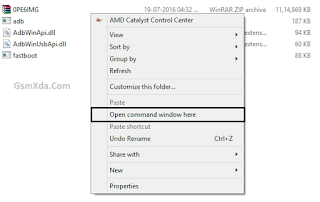
- Write down there first command of "fastboot devices" and press Enter key
- Write down again "fastboot oem rebootRUU" and Press Enter key
- Write down "fastboot flash zip 0PE6IMG.zip" and Press Enter key and wait until full installed Stock ROM Firmware
- After finished Stock ROM Firmware flashing procedure and use last command "fastboot reboot" and Hit Enter key
- Congratulation you are done
Available link for download
Friday, January 20, 2017
How to Flash or Upgrade HTC Desire 620G dual sim with SP Flash tool tested
How to Flash or Upgrade HTC Desire 620G dual sim with SP Flash tool tested
You have to HTC Desire 620G dual sim phone device ? and in problem like auto turn on internet connection, auto turn on wifi connection, auto apk installing, auto gone balance, hang on logo, restarting, pattern lock, screen lock these problem you can solve using this method without any box just need to some impotent i think it is to be with you which one you can see in requirement tab there to be which need for above type problem solve this method you can use without any box its done from flash tool its also available here, and impotent of must be installed phones driver, you cant flash or upgrade if not installed in your computer or laptop it must be installed and also available in this post, here all are linked that tested and working fine just in one try this method and this is for everyone who new fresher technician or experience technician in android software related, before use remember of must be working well all are required which you can see in this method it below to be mention, different to be error when you try to flash or upgrade first of USB not recognized this error possible when micro USB not working, battery not charged, phone USB socket not working properly so if you fail with this method just write down your comment on below comment box i will soon possible to fix it, first take backup into device if live otherwise dead you cant take backup, this method use when device in dead condition also but must be in software problem in hardware device not be live.
Must read users:
This tutorial tested by me without any error but remember here some impotent question for successfully done with this tutorial, must be working device sub socket, must be working micro usb cable, must be working volume up or down keys for boot device, must be working computer or laptop usb socket, this tutorial you can use without any box its simple.
Must read users:
This tutorial tested by me without any error but remember here some impotent question for successfully done with this tutorial, must be working device sub socket, must be working micro usb cable, must be working volume up or down keys for boot device, must be working computer or laptop usb socket, this tutorial you can use without any box its simple.
Required for HTC Desire 620G
- HTC Desire 620G dual Sim with good battery charged, it to be 80% up, and do not try with low battery
- HTC Desire 620G dual Sim tested Stock ROM Firmware | Download Mirror | Mirror
- HTC Desire 620G dual Sim USB (Flashing) Driver | Download here
- HTC Desire 620G dual Sim Flash tool | Download here
- Quality Micro USB Cable
- Computer or Laptop
Procedure for HTC Desire 620G
- First take files from above link which required for Flash or Upgrade, if link not working just leave your comment on below comment box
- Extract to Desktop or As you like path from the WinZip, Must be installed WinZip software in your computer or laptop
- Open SP Flash tool folder and choose flash_tool.exe file and open it
- Click on Scatter-loading button and choose MT6592_Android_scatter.txt file and click OK
- Now click on Download button and Just Insert Micro USB Cable into device after auto installing driver if installed in your computer or laptop
- If device not detect so just Press and hold Volume Up key and Insert USB cable into device
- If driver not take device after installed so just update Driver which above links from the device manager
- After updated flashing star automatically and wait until finished process, do not try to unplug device which in flashing
- You are done, Congratulation
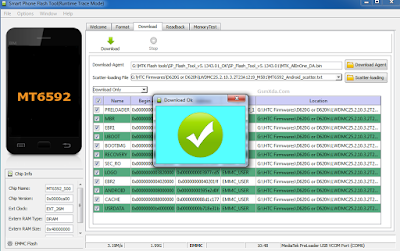
HTC Desire 620G Flash done Screenshot:
Available link for download
Wednesday, December 21, 2016
HTC Desire 210 dual sim Flash done with Flash tool tested
HTC Desire 210 dual sim Flash done with Flash tool tested
HTC Desire 210 dual sim sometime many trouble come in device like hang on logo, restarting, pattern lock, automatically apps installed, auto start wifi, auto start data connection so this is very issue for android device. What happen when in device starting automatically wifi connection or data connection ? your main balance gone, some time auto working touch pad, hidden installed apps from internet that reason of virus so carefully use internet, you can use this tutorial when your device in above mention issues its very simple no difficult to use this way this tutorial for every one who working in software related new technician also because this is very simple way if your device live then first backup all type data like contacts, photos, videos, notes, emails etc if backup not take then you will loss all because this is factory firmware so to be all are format so please carefully use this tutorial i suggest you first read all content after try following step by step see below description for about firmware.
This flash file tested by me without any error working well, you can use this flash file when your device hang on logo problem, restarting problem, security lock problem, password lock problem, pattern lock problem etc software related problem and you can use this tutorial without any box and this is free for all who know about software in mobile, impotent for flashing first must check your micro usb cable if not good then you cant flash it so check micro usb cable second check your device battery that is impotent for flashing if your device battery low so stop your device between flash so this is impotent for flash, before you flash save your data like contact, photos, videos etc because this is factory flash file so you cant save after full flash so must remember all are impotent notes.
Download Link
HTC Desire 210 dual sim Flash file Download here
HTC Desire 210 dual sim Flash tool Download here
HTC Desire 210 dual sim USB Driver Download here
Whats need for flash ?
1. HTC Desire 210 dual sim with good battery charged
2. HTC Desire 210 dual sim stock rom firmware
3. HTC Desire 210 dual sim flash tool
4. HTC Desire 210 dual sim usb driver
5. Micro usb cable
6. Computer or Laptop
Procedure:
1. Take needed files from above link (if link dead just leave your comment)
2. Extract to desktop or as you like path (must be installed winrar)
3. Open SP flash tool folder and choose flash_tool.exe file and open it
4. Click on Scatter-loading button and choose MT6572_Android_scatter.txt file
5. Click on Download button and Press and hold Volume Up button and insert usb cable
6. Update driver if not installed in your computer from above link if installed start automatically
7. Wait until process (do not disconnect while device in flash mode)
8. Congratulation you are done
HTC Desire 210 dual sim flash done Screenshot:

Available link for download
Friday, September 23, 2016
HTC Desire 616 dual sim Flash done with Flash tool tested
HTC Desire 616 dual sim Flash done with Flash tool tested
In this device issue of automatically data connection started or wi-fi connection automatically star and in this device running very slowly and also hang when customer take device in our office then i try with reset but device same issue after i decided must device to flash then i try in flash and it full tutorial put in this post so lets how to flash HTC Desire 616 dual sim with sp flash tool.
This flash file tested by me without any error working well, you can use this flash file when your device hang on logo problem, restarting problem, security lock problem, password lock problem, pattern lock problem etc software related problem and you can use this tutorial without any box and this is free for all who know about software in mobile, impotent for flashing first must check your micro usb cable if not good then you cant flash it so check micro usb cable second check your device battery that is impotent for flashing if your device battery low so stop your device between flash so this is impotent for flash, before you flash save your data like contact, photos, videos etc because this is factory flash file so you cant save after full flash so must remember all are impotent notes.
Download Link
HTC Desire 616 dual sim firmware or flash tool download here
Whats need for flash ?
- HTC Desire 616 dual sim device with good battery charged
- HTC Desire 616 tested firmware or flash tool
- Micro usb cable
- Computer or laptop
Procedure:
- Download tested firmware or flash tool from above link (if link not working just write down comment on below comment box i will update it)
- Extract to desktop or as you like path
- Open SP_Flash_Tool_v5.1352.01 folder and choose flash_tool.exe file and open it
- Click on Scatter-loading button and choose MT6592_Android_scatter.txt file from SoftwareUsbUpgradePackage folder
- Now click on Download button
- Press and hold Volume up button and insert usb cable (must working well of device key or micro usb cable)
- Wait until driver install, if driver installed in your computer or laptop then downloading automatically start into device.
- Wait until install os in device (do not unplug device while device in flashing mode)
- Congratulation you are done
HTC Desire 616 dual sim Flash done with Flash tool screenshot:

HTC Desire 616 dual sim Flash done with Flash tool video:
Available link for download
Tuesday, September 13, 2016
Intex Aqua Desire HD Flash done with SP Flash tool Tested
Intex Aqua Desire HD Flash done with SP Flash tool Tested
This tutorial tested by me without any problem i was done this job in this device when i started then in problem of hang on logo so first i try with hard reset but not start properly some time device was started but some error coming on display like not unsupported or other error so better is try to flash its best way because your time save otherwise time waste before use this tutorial first carefully read all content because if direct start process and some one missing then you cant flash it or before use check all are required in below mention its all are working well if any issue then you cant solve problem of software related now lets see stock rom firmware description.
This flash file tested by me without any error working well, you can use this flash file when your device hang on logo problem, restarting problem, security lock problem, password lock problem, pattern lock problem etc software related problem and you can use this tutorial without any box and this is free for all who know about software in mobile, impotent for flashing first must check your micro usb cable if not good then you cant flash it so check micro usb cable second check your device battery that is impotent for flashing if your device battery low so stop your device between flash so this is impotent for flash, before you flash save your data like contact, photos, videos etc because this is factory flash file so you cant save after full flash so must remember all are impotent notes.
Download Link
Intex Aqua Desire HD Stock Rom Download here
Intex Aqua Desire HD Flash tool Download here
Intex Aqua Desire HD USB Driver Download here
Requirement for Upgrade:
1. Intex Aqua Desire HD Device
2. Intex Aqua Desire HD Stock Rom
3. Intex Aqua Desire HD Flash tool
4. Intex Aqua Desire HD USB Driver
5. Micro usb cable
6. Computer or Laptop
Method:
1. Download stock rom firmware from above link ( if link not working just leave your comment)
2. Unzip from winzip to desktop or as you like path (must be installed winzip)
3. Open SP Flash tool folder and choose flash_tool.exe file and open it
4. Click on Scatter-loading button and choose MT6592_Android_scatter.txt file and then click OK
5. Wait until read stock rom firmware
6. Now click on Download button
7. Press and hold Volume Up button and Insert usb cable
8. Wait until auto driver installing if not installed then manual update from above link
9. After driver installed device will detect with pc and flash tool
10. Wait until full process (do not disconnect device while flashing mode)
11. Congratulation you are done
Intex Aqua Desire HD Flash done Screenshot:

Available link for download
Subscribe to:
Posts (Atom)