Showing posts with label sim. Show all posts
Showing posts with label sim. Show all posts
Wednesday, March 8, 2017
How to Flash HTC Desire 820 820MU dual sim by using Fastboot code Tested
How to Flash HTC Desire 820 820MU dual sim by using Fastboot code Tested
HTC Desire 820 Dual Sim to be different Stock ROM Firmware in this method using stock rom model of A31_DTUL, Build : 1.01.709.1, CID : 11111111, HBoot : 3.19.0.0000, MID : 0PE621000, Security : OFF, Region : Super_CID, if you want to use this method first check this mention model number if not then do not try with this Stock ROM Firmware but you can use this guide if you want to correct Stock ROM firmware put on fastboot mode and readinfo using HTX Multi Tool.exe software and this software also available in this guide.
HTC Desire 820 in any type issue software related you can easy solve using this method and this is for everyone who new fresher technician or experience technician in android software related, before use remember of must be working well all are required which you can see in this method it below to be mention, different to be error when you try to flash or upgrade first of USB not recognized this error possible when micro USB not working, battery not charged, phone USB socket not working properly so if you fail with this method just write down your comment on below comment box i will soon possible to fix it, first take backup into device if live otherwise dead you cant take backup, this guide you can use when device in dead condition also but must be in software related issue otherwise if any hardware then you can solve that.
If you want to repair your device, you can try to repair it by you. You have to charge your battery with any charger and charged it by 95%. Your data is very important for you so it is good to do a backup of your data it may consist like your contact details,your important messages, your emails or any other important thing which you feel to be the backup in your device. This backup can be done on another device. we have to do the backup because after a format of your device, all your data will be gone and it will not be recovered. For backup in other devices you can use other external device like your hard drive, SD card or any other suitable devices. If you are doing by your own. do it at your own risk as we dont take any responsibility if your device is damaged
This method you can use without any box its done from flash tool its also available here, and impotent of must be installed phones driver, you cant flash or upgrade if not installed in your computer or laptop it must be installed and also available in this post, here all are linked that tested and working fine just in one try, you can use this guide when your device in hang on logo, restarting, auto turn on internet connection, auto turn on wifi connection, auto apk installing, auto gone balance, pattern lock, screen lock.
Requisite for HTC Desire 820MU
- HTC Desire 820 (820MU) dual sim with well battery charged, do not try with low battery
- HTC Desire 820 (820MU) dual sim Stock ROM tested | Download here
- HTC Desire 820 (820MU) dual sim HTC Fastboot Driver spl | Download here
- HTC HTX Multi Tool | Download here
- HTC Desire 820 (820MU) sual sim fastboot code | Download here
- Good Quality Micro USB Cable
- Computer or Laptop
Procedure for HTC Desire 820 (820MU) dual sim
- Download needed files from above link, if link not working just leave your comment on below comment box i will soon fix it if possible
- Install WinRAR in your Computer or Laptop if already installed ignore this
- UnZip to Desktop or as you like path from the WinRAR
- Install HTC USB (Flashing) Driver already installed ignore this
- Unplug battery socket wait few second and gain Insert battery socket
- Press and hold Volume Down + Power button and choose Fastboot mode and Insert Micro USB Cable into device
- Open RBSoft folder and choose HTX Multi Tool.exe file and open it
- Go to Fastboot Tab and click on Read Boot Info button and wait until full readinfo to your device
- If above mention model to be in your device then use this Stock ROM Firmware, if different readinfo then just write down your info on below comment box i will give you correct stock ROM firmware link
- Rename Stock ROM Firmware 0PE6IMG_A31_DTUL_K44_DESIRE_SENSE60_HTCCN_CHS_CMCC_1.20.1403.1_R6_Radio_01.01.110_U1030481_08.01.1119_F_release_414395_combined_signed to 0PE6IMG and do Copy
- Open htc fastboot driver spl folder and Paste there Stock ROM Firmware
- Right click with Shift key on White area and choose Open command windows here option (see below image)
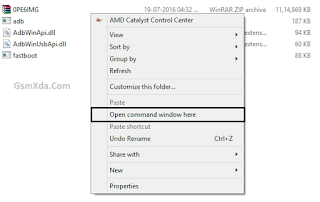
- Write down there first command of "fastboot devices" and press Enter key
- Write down again "fastboot oem rebootRUU" and Press Enter key
- Write down "fastboot flash zip 0PE6IMG.zip" and Press Enter key and wait until full installed Stock ROM Firmware
- After finished Stock ROM Firmware flashing procedure and use last command "fastboot reboot" and Hit Enter key
- Congratulation you are done
Available link for download

Saturday, March 4, 2017
HTC One Dual Sim 802W Flash done with HTC ARUWizard flash tool tested
HTC One Dual Sim 802W Flash done with HTC ARUWizard flash tool tested
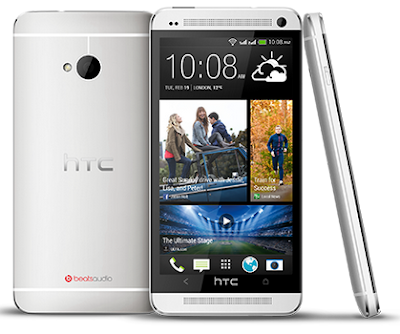
In this device different flashing way because in this device different CID different version number so please carefully in htc very complicated flash system some device you can flash from flash tool and some device flashing via CMD command base if you want to flash custom rom so must need to unlock bootloader after you can flashing custom rom.
This flash file tested by me without any error working well, you can use this flash file when your device hang on logo problem, restarting problem, security lock problem, password lock problem, pattern lock problem etc software related problem and you can use this tutorial without any box and this is free for all who know about software in mobile, impotent for flashing first must check your micro usb cable if not good then you cant flash it so check micro usb cable second check your device battery that is impotent for flashing if your device battery low so stop your device between flash so this is impotent for flash, before you flash save your data like contact, photos, videos etc because this is factory flash file so you cant save after full flash so must remember all are impotent notes.
Download Link
HTC One Dual Sim 802W Firmware download here
HTC One Dual Sim 802W Driver Download here
Note : This is tutorial tested in 7.17.401.5 HTC__A07 firmware
Note : This is tutorial tested in 7.17.401.5 HTC__A07 firmware
Required for flash:
- HTC One Dual Sim 802W device with good battery charged
- HTC One Dual Sim 802W tested firmware
- HTC One Dual Sim 802W Driver
- Micro usb cable
- Computer or Laptop
Procedure:
- Download firmware or driver from above link (if link not working just leave your comment on below comment box)
- Extract to desktop or as you like path (must be installed winrar software in your computer)
- Turn off device if on
- Press and hold Volume Down + Power button
- Select Fastboot mode and Press Power buttonInsert Micro usb cable into device
- Open ARUWizard.exe file
- Wait until full install
- After full flash device automatically reseting
- Congratulation you are done
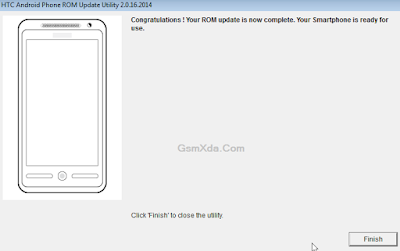
HTC One Dual Sim 802W Flash done with HTC ARUWizard flash tool screenshot:
Available link for download
Thursday, February 9, 2017
How to boot repair or Flash Redmi Note 2 Prime Dual Sim 4G Model 2014912 with Flash tool Tested
How to boot repair or Flash Redmi Note 2 Prime Dual Sim 4G Model 2014912 with Flash tool Tested
This tutorial tested by me without any error some time we are flashing this device so many time take in flashing so we are search other tool for flashing and easy to flash this device from the many time i search but after many time i found other flash tool and i try this device in this tool so easy procedure easy or not was give many time for flashing so this tool with i have experience so here post new with different tool but here some different procedure from the before flashing tool this tool you can use if before post not success then you can use this tool if you want to first try use so dont worry because this is tested by me its very easy to flash and just remember of required for flashing if any issue in required from yours so first prepare to required after try in flash and we are mention which need to flashing in below and also must remember before use this tutorial which one first read all carefully this tutorial after try in flash because if you read tutorial then you can easy flashing this device this my own experience and must be working well micro USB cable if any issue in this then you cant connect device with computer or laptop also must be working device charging socket if any issue so also you cant connect with computer or laptop must be installed driver in your computer or laptop if not install in your computer or laptop then device not connect so you cant flash see below description about firmware.
If you want to repair your device, you can try to repair it by you.
You have to charge your battery with any charger and charged it by 70%, Your data is very important for you so it is good to do a backup of your data it may consist like your contact details, your important messages, your emails or any other important thing which you feel to be the backup in your device, this backup can be done on another device. we have to do the backup because after a format of your device, all your data will be gone and it will not be recovered. For backup in other devices you can use other external device like your hard drive, sd card or any other suitable devices. If you are doing by your own.do it at your own risk as we dont take any responsibility if your device is damaged.Required for flash:
- Redmi Note 2 Prime (Dual Sim 4G) Model : 2014912 device with well battery charged, and do not try with low battery
- Redmi Note 2 Prime (Dual Sim 4G) Model : 2014912 Stock ROM Firmware (tested) | Download Mirror-1, Mirror-2
- Redmi Note 2 Prime (Dual Sim 4G) Model : 2014912 USB (Flashing) OR Dead Boot Repair driver | Download here
- Redmi Note 2 Prime (Dual Sim 4G) Model : 2014912 Flash Tool | Download here
- Good Quality Micro usb cable
- Computer or Laptop
Procedure:
- First download tested Firmware, Flash tool or driver from above link (if link not working just leave your comment on below comment box i will soon fix it)
- Extract to all are zip files to desktop or as you like path (must be installed winrar software to Extract)
- Open Driver folder and choose Qualcomm_USB_Driver_Setup.exe file and wait until finish installation
- Open QPST.WIN.2.7_Installer-00430.1 folder and chose setup.exe file and open and install it
- Now open QFIL from the "C:Program FilesQualcommQPST in" path
- Tick on Flat Build option
- Go to Programmer Path and click on Browse.. button and choose prog_emmc_firehose_8916.mbn file
- Click on Load XML.. button and choose rawprogram_unsparse.xml file and second choose patch0.xml file from the Firmware folder
- Insert USB cable and wait until driver install
- After drier installed just Click on Download button and wait until finish procedure
- Congratulation you are done
Redmi Note 2 Prime Dead Boot Repair done Screenshot:

Available link for download
Friday, January 20, 2017
How to Flash or Upgrade HTC Desire 620G dual sim with SP Flash tool tested
How to Flash or Upgrade HTC Desire 620G dual sim with SP Flash tool tested
You have to HTC Desire 620G dual sim phone device ? and in problem like auto turn on internet connection, auto turn on wifi connection, auto apk installing, auto gone balance, hang on logo, restarting, pattern lock, screen lock these problem you can solve using this method without any box just need to some impotent i think it is to be with you which one you can see in requirement tab there to be which need for above type problem solve this method you can use without any box its done from flash tool its also available here, and impotent of must be installed phones driver, you cant flash or upgrade if not installed in your computer or laptop it must be installed and also available in this post, here all are linked that tested and working fine just in one try this method and this is for everyone who new fresher technician or experience technician in android software related, before use remember of must be working well all are required which you can see in this method it below to be mention, different to be error when you try to flash or upgrade first of USB not recognized this error possible when micro USB not working, battery not charged, phone USB socket not working properly so if you fail with this method just write down your comment on below comment box i will soon possible to fix it, first take backup into device if live otherwise dead you cant take backup, this method use when device in dead condition also but must be in software problem in hardware device not be live.
Must read users:
This tutorial tested by me without any error but remember here some impotent question for successfully done with this tutorial, must be working device sub socket, must be working micro usb cable, must be working volume up or down keys for boot device, must be working computer or laptop usb socket, this tutorial you can use without any box its simple.
Must read users:
This tutorial tested by me without any error but remember here some impotent question for successfully done with this tutorial, must be working device sub socket, must be working micro usb cable, must be working volume up or down keys for boot device, must be working computer or laptop usb socket, this tutorial you can use without any box its simple.
Required for HTC Desire 620G
- HTC Desire 620G dual Sim with good battery charged, it to be 80% up, and do not try with low battery
- HTC Desire 620G dual Sim tested Stock ROM Firmware | Download Mirror | Mirror
- HTC Desire 620G dual Sim USB (Flashing) Driver | Download here
- HTC Desire 620G dual Sim Flash tool | Download here
- Quality Micro USB Cable
- Computer or Laptop
Procedure for HTC Desire 620G
- First take files from above link which required for Flash or Upgrade, if link not working just leave your comment on below comment box
- Extract to Desktop or As you like path from the WinZip, Must be installed WinZip software in your computer or laptop
- Open SP Flash tool folder and choose flash_tool.exe file and open it
- Click on Scatter-loading button and choose MT6592_Android_scatter.txt file and click OK
- Now click on Download button and Just Insert Micro USB Cable into device after auto installing driver if installed in your computer or laptop
- If device not detect so just Press and hold Volume Up key and Insert USB cable into device
- If driver not take device after installed so just update Driver which above links from the device manager
- After updated flashing star automatically and wait until finished process, do not try to unplug device which in flashing
- You are done, Congratulation
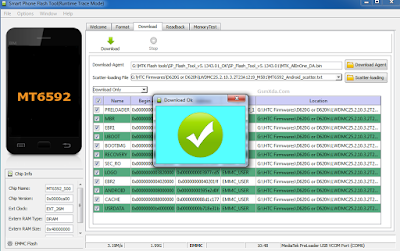
HTC Desire 620G Flash done Screenshot:
Available link for download
Wednesday, December 21, 2016
HTC Desire 210 dual sim Flash done with Flash tool tested
HTC Desire 210 dual sim Flash done with Flash tool tested
HTC Desire 210 dual sim sometime many trouble come in device like hang on logo, restarting, pattern lock, automatically apps installed, auto start wifi, auto start data connection so this is very issue for android device. What happen when in device starting automatically wifi connection or data connection ? your main balance gone, some time auto working touch pad, hidden installed apps from internet that reason of virus so carefully use internet, you can use this tutorial when your device in above mention issues its very simple no difficult to use this way this tutorial for every one who working in software related new technician also because this is very simple way if your device live then first backup all type data like contacts, photos, videos, notes, emails etc if backup not take then you will loss all because this is factory firmware so to be all are format so please carefully use this tutorial i suggest you first read all content after try following step by step see below description for about firmware.
This flash file tested by me without any error working well, you can use this flash file when your device hang on logo problem, restarting problem, security lock problem, password lock problem, pattern lock problem etc software related problem and you can use this tutorial without any box and this is free for all who know about software in mobile, impotent for flashing first must check your micro usb cable if not good then you cant flash it so check micro usb cable second check your device battery that is impotent for flashing if your device battery low so stop your device between flash so this is impotent for flash, before you flash save your data like contact, photos, videos etc because this is factory flash file so you cant save after full flash so must remember all are impotent notes.
Download Link
HTC Desire 210 dual sim Flash file Download here
HTC Desire 210 dual sim Flash tool Download here
HTC Desire 210 dual sim USB Driver Download here
Whats need for flash ?
1. HTC Desire 210 dual sim with good battery charged
2. HTC Desire 210 dual sim stock rom firmware
3. HTC Desire 210 dual sim flash tool
4. HTC Desire 210 dual sim usb driver
5. Micro usb cable
6. Computer or Laptop
Procedure:
1. Take needed files from above link (if link dead just leave your comment)
2. Extract to desktop or as you like path (must be installed winrar)
3. Open SP flash tool folder and choose flash_tool.exe file and open it
4. Click on Scatter-loading button and choose MT6572_Android_scatter.txt file
5. Click on Download button and Press and hold Volume Up button and insert usb cable
6. Update driver if not installed in your computer from above link if installed start automatically
7. Wait until process (do not disconnect while device in flash mode)
8. Congratulation you are done
HTC Desire 210 dual sim flash done Screenshot:

Available link for download
Sunday, October 23, 2016
How to Flash iBall Prince 1 8G Dual SIM with Flash tool Tested
How to Flash iBall Prince 1 8G Dual SIM with Flash tool Tested
This is feature phone and you can use this guide when phone in problem of phone lock, hang on logo, restarting these type, before use this guide must be charged phone battery and do not try with low battery, must be installed USB Driver in your computer or laptop, check also USB Socket some time what happen device not detect with flash tool because there no any installed driver, check Micro USB Cable this is also must be working well, in this phone issue of when Insert SIM card phone turn off automatically when i try flash with this file its working good.
If any contact in phone first backup because this is factory flash file you cant save any type data if device line make sure backup after try following this guide, first read all carefully full method after try to following step by step and here also mention which need for flash in requirement and If you are doing by your own.do it at your own risk as we dont take any responsibility if your device is damaged
If any contact in phone first backup because this is factory flash file you cant save any type data if device line make sure backup after try following this guide, first read all carefully full method after try to following step by step and here also mention which need for flash in requirement and If you are doing by your own.do it at your own risk as we dont take any responsibility if your device is damaged
Requirement for iBall Prince 1.8G
- iBall Prince phone with up to 70% battery charged
- iBall Prince Flash file | Download here
- iBall Prince Flash tool | Download here
- iBall Prince USB Driver | Download here
- Good Quality Micro USB Cable
- Computer or Laptop
Procedure for iBall Prince 1.8G
- Download all files from the above link, if link not working just leave your comment on below comment box i will soon fix it if possible
- Installing WinZip in you computer or laptop for extract file without it cant you flash so that is required first
- Extract to Desktop or as you like path from the WinZip
- Open SPD Upgrade Tool vR2.9.9015 folder and choose UpgradeDownload.exe file open it
- Click on Flash file button and choose iBall_Prince 1.8G_S590_ZNT_0B2_V12.0_20141205.pac file from the iBall_Prince 1.8G_S590_ZNT_0B2_V12.0_20141205 folder
- Now click on Download button (button like are play)
- Press and hold Center key and Insert USB Cable, and wait until driver installing
- After Installed Driver flashing starting automatically, do not try to unplug while device in flashing mode and wait until finished process
- Congratulation you are done
iBall Prince 1.8G Dual SIM Flash done Screenshot:

Available link for download
Friday, September 23, 2016
HTC Desire 616 dual sim Flash done with Flash tool tested
HTC Desire 616 dual sim Flash done with Flash tool tested
In this device issue of automatically data connection started or wi-fi connection automatically star and in this device running very slowly and also hang when customer take device in our office then i try with reset but device same issue after i decided must device to flash then i try in flash and it full tutorial put in this post so lets how to flash HTC Desire 616 dual sim with sp flash tool.
This flash file tested by me without any error working well, you can use this flash file when your device hang on logo problem, restarting problem, security lock problem, password lock problem, pattern lock problem etc software related problem and you can use this tutorial without any box and this is free for all who know about software in mobile, impotent for flashing first must check your micro usb cable if not good then you cant flash it so check micro usb cable second check your device battery that is impotent for flashing if your device battery low so stop your device between flash so this is impotent for flash, before you flash save your data like contact, photos, videos etc because this is factory flash file so you cant save after full flash so must remember all are impotent notes.
Download Link
HTC Desire 616 dual sim firmware or flash tool download here
Whats need for flash ?
- HTC Desire 616 dual sim device with good battery charged
- HTC Desire 616 tested firmware or flash tool
- Micro usb cable
- Computer or laptop
Procedure:
- Download tested firmware or flash tool from above link (if link not working just write down comment on below comment box i will update it)
- Extract to desktop or as you like path
- Open SP_Flash_Tool_v5.1352.01 folder and choose flash_tool.exe file and open it
- Click on Scatter-loading button and choose MT6592_Android_scatter.txt file from SoftwareUsbUpgradePackage folder
- Now click on Download button
- Press and hold Volume up button and insert usb cable (must working well of device key or micro usb cable)
- Wait until driver install, if driver installed in your computer or laptop then downloading automatically start into device.
- Wait until install os in device (do not unplug device while device in flashing mode)
- Congratulation you are done
HTC Desire 616 dual sim Flash done with Flash tool screenshot:

HTC Desire 616 dual sim Flash done with Flash tool video:
Available link for download
Friday, September 9, 2016
Samsung E1207Y Sim Lock Remove done tested
Samsung E1207Y Sim Lock Remove done tested

When i try to unlock using z3x box not success and also use chines boxes for read code and i try to unlock from read code but not success also try HWK box for unlocking but not success after many try then device must to flash for unlock this tricks not only do unlock but you can solve phone code, security code etc software related issue solve using this tutorial but remember before try this tutorial this is impotent for unlock or other software related issue which one first read all are content carefully after following step by step so you can easy use this tutorial also must remember charged your device battery after try in flashing also must be working well device usb socket if not working then you will not connected to computer if not connect computer then you cant solve software related issue so this is most impotent for software related issue
Here mention required of flashing so please carefully read mention which for flashing after try to flashing also remember you have to must z3x box or other box but must be option in that because this tutorial i solve by using z3x box so remember that now lets go how to network unlock Samsung E1207Y using z3x box ? see below
Download Link
E1207YDDNA1_ODDANA1 Download HERE
Samsung E1207Y USB Flashing Driver Download HERE
Required for flash:
1. Samsung E1207Y device with good battery charged
2. Samsung E1207Y tested flash file
3. Z3x box
4. Micro usb cable
5. Computer or Laptop
Procedure:
1. First download tested Flash file or USB driver from above link (if link dead just leave comment)
2. Extract to desktop or as you like path (must be installed winrar software in Computer)
3. Open Samsung USB Driver for Mobile and install it (wait until install)
4. Open Z3X Samsung tool
5. Choose Model : E1207Y
6. Choose Port : COM3 Z3X Box Serial Port
7. Choose : Speed : 921600
8. Click on FDL button and choose nor_fdl.bin file
9. Click on NV button and choose nvitem.bin file
10. Click on SSBOOT button and choose ssboot.bin file
11. Click on PS button and choose SC6530_sc6500_samsung_stone.bin file
12. Click on CSC button and choose mmi_res_128x128_csc.bin file
13. Press Flash button
14. Press and hold Center key (boot) and insert usb cable
15. Wait until process finished
16. Congratulation you are done
Samsung E1207Y Sim Lock Remove done Screenshot:

Available link for download
Subscribe to:
Comments (Atom)